


Participating Frequently
February 14, 2020
질문

How can I cut just the shape and not all the way thru?

  • February 14, 2020
  • 3 답변들
  • 984 조회

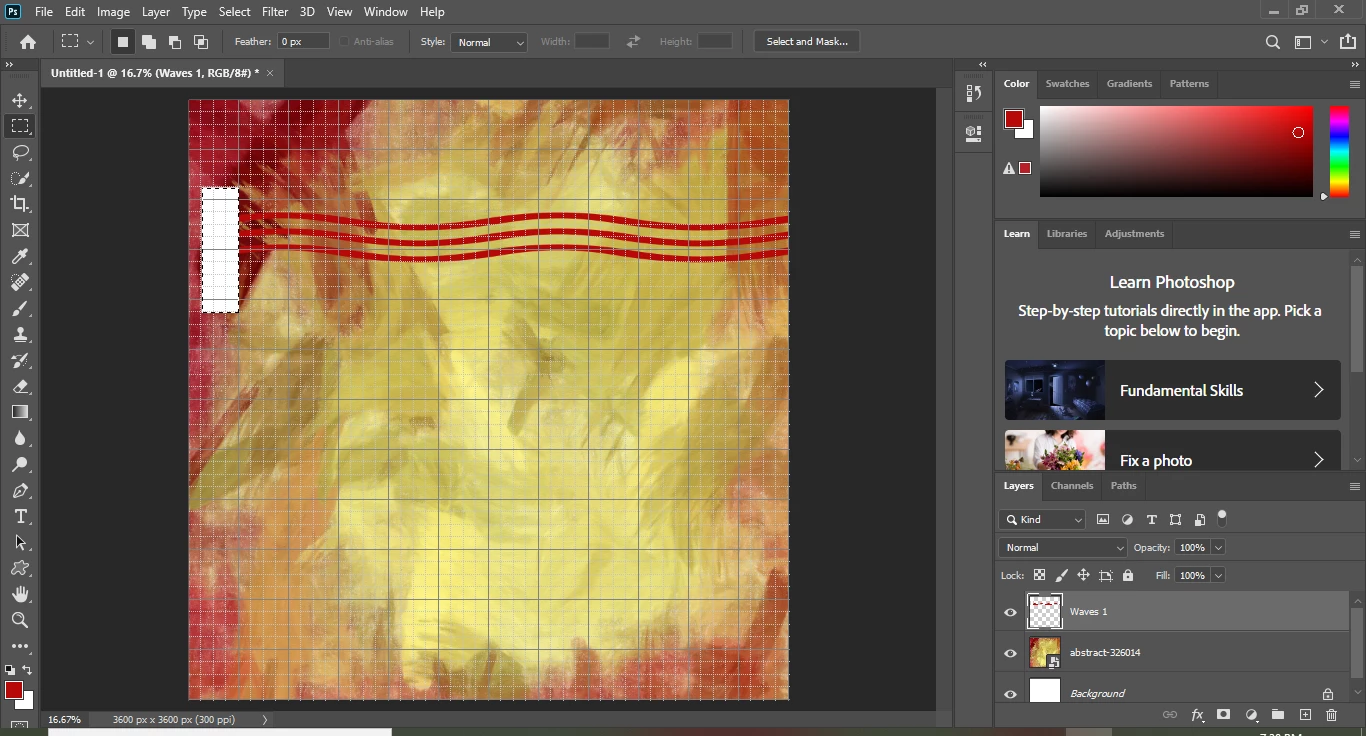
I'm following along with a tutorial on Udemy and in the video, she says to cut the edge of the shape it's cutting all the layers? How do I just cut the red lines ( my shape) and not cut all the other layers?

 Posting a picture of what I mean below:  In the video, when she cut off the edges of the red lines it didn't cut all the way thru?
이 주제는 답변이 닫혔습니다.

3 답변

Myra Ferguson
Community Expert
Community Expert
February 14, 2020

Like Michael said, it looks like you've filled the selection with white. If you hold down Control when you hit Delete, Photoshop will fill the selection with the background color.

Participating Frequently
February 15, 2020

I tried holding down control then delete but it still filled it with white ;( How can I change the settings so that it fills it with the background and not white?

Myra Ferguson
Community Expert
Community Expert
February 15, 2020

No, don't hold Control when you delete unless you want to fill it with the background color. Just make the selection and press delete.

c.pfaffenbichler
Community Expert
Community Expert
February 14, 2020

Why »cut« at all instead of using a Layer Mask? 

Participating Frequently
February 15, 2020

Not sure exactly what u mean? In the video she said to go to layer, then rasterize the shape and then cut off the edge. Is there a better way of doing it?

c.pfaffenbichler
Community Expert
Community Expert
February 16, 2020

Yes there is. 

But assuming this is a beginner’s level tutorial it might be confusing and ultimately not very helpful to go into that at current. 

If you follow a structured course you will probably get to Layer Masks eventually anyway. 

Michael Bullo
Community Expert
Community Expert
February 14, 2020

Having looked closely at the thumbnail for your "Waves 1" layer within the Layers panel I think you have filled the selection with white as opposed to deleting the pixels. What method are you using to "cut" content from a layer.

Participating Frequently
February 15, 2020

In the video, she uses the rectangular marquee tool so that's what I am doing also. She's not telling the exact steps either. All she said to do was to go to layer and rasterize shape but that's it. Then you can see her using the rectangular marquee tool and deleting the edges of the shape. After I select the area that I want to cut, I am holding control and then delete.


I'm still trying to learn photoshop tho, I'm not brand new cause I have played around with it over the years here and there but I am trying to get better at it. How do I change the settings to where it's not filled with white? Below are screenshots of the video showing what she did:


Michael Bullo
Community Expert
Community Expert
February 15, 2020

Like Myra said a little further down this page, holding down the Control key when you delete will fill your selection with the background colour. Having made a selection just press the Delete key to remove the pixels within that area.