

Participant
May 1, 2014
해결됨

How can I divide my page (in Photoshop) perfectly in to 4 or 5 sections?

  • May 1, 2014
  • 3 답변들
  • 76869 조회

How can I divide my page (in Photoshop) perfectly in to 4 or 5 sections?

I'm sure there is a better way to do it than to do maths and measure your screen..

Thank you~

이 주제는 답변이 닫혔습니다.
최고의 답변: Trevor.Dennis

Thank you, exactly what I was looking for.

I have downloaded GuideGuide and installed it on Extension Manager and enabled it, but how do I use it?


It is a wee bit non intuitive.  This will help get you started:
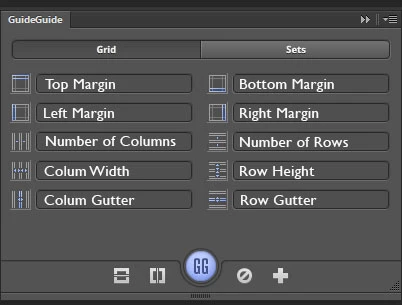
The bottom row of icons are

Center Horizontal; Center Vertical, Create Guides, Clear Guides (hold down to clear fields), create new set.

The size fields are the same as your units, so what I do is Right click a ruler and select what I want (Cms or Pixels).

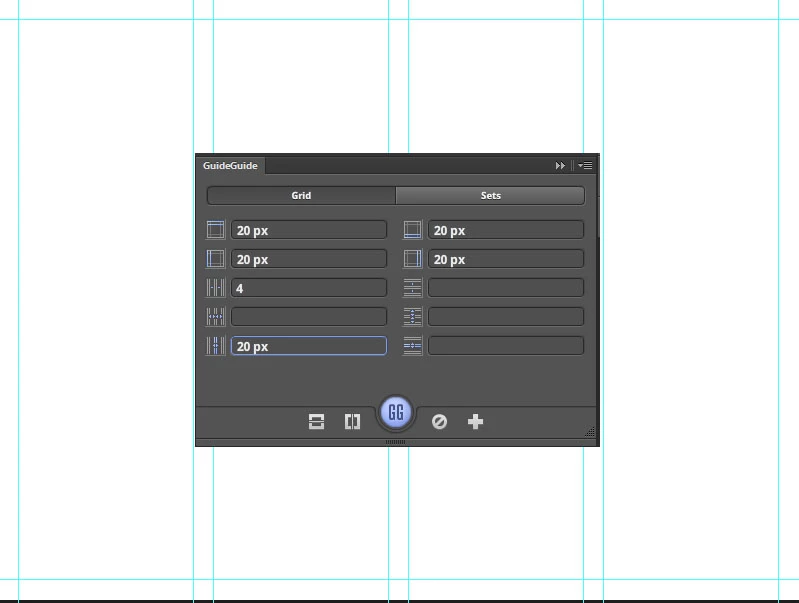
Some combinations take some working out.  This image is 800x600 pixels, so I have a 20 pixel margin all round.  Four columns, with a 20 pixel gutter between the columns.  GuideGuide just works it out and lays down the guides.  How useful is that?!
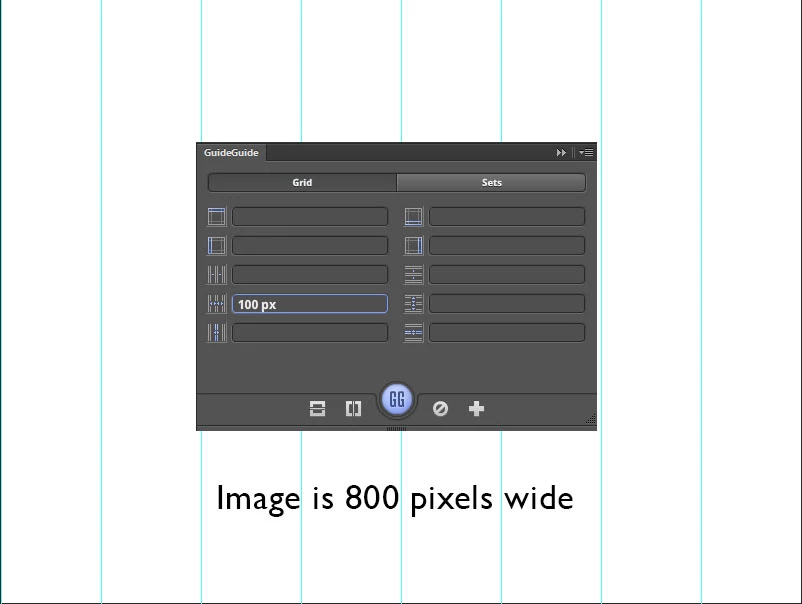
Column width can trip you up if you don't think what you are doing.  100px into an 800 pixel wide image results in eight columns.  If I had entered a value o 10, then I'd have had 80 vertical guides!.  I am sure you'll have the entire picture from here.
3 답변

War Unicorn
Community Expert
Community Expert
May 4, 2014

For those that don't want to deal with a plugin:

Go to Edit > Preferences > Guides, Grid & Slices (on Mac: Photoshop > Preferences > Guides, Grid & Slices). Under "Gridline Every," enter a number and use percentage. (e.g., If you wanted an evenly-sliced image cut into four, you'd enter 50 percent.) Enter a subdivision of 1. (Entering more subdivisions simply creates multiples of your groups of grids going across.)

(Use View > Show > Grid to show the grid, of course.)

Trevor.Dennis
Community Expert
Community Expert
May 3, 2014

Guide Guide.  It is the perfect tool for what you want to do, and completely free

GuideGuide

May 3, 2014

JJMack
Community Expert
Community Expert
May 2, 2014

What do you mean by my page.  What does your screen have to do with your  page and what do want the end results to be? Everything you wrote is vague and general.  I can think at least four way to divide a square page four way perfectly. In equal vertical rectangles four horizontal rectangle four block and four triangles.  I'm sure the are other ways as well.

JJMack
MercuryDream작성자
Participant
May 2, 2014

My apologies. By 'my page' I meant the piece of thing I'm working on.

My 'page' is 1922 pixels wide, and forget about the length. I want to divide it in to four to five perfect sections of 480.5 pixels or 384.4 pixels, I was wondering how you could do that.

Herbert2001
Inspiring
May 3, 2014

Generally you would setup a grid/division like that by adding guides. There's an excellent free plugin called "GuideGuide" that will do this automatically for you, both with rows and columns , and based on the document size or a selected area. You merely have to provide the plugin with the number of columns or rows you wish to generate.

GuideGuide

Really essential for anyone who must deal with grids in Photoshop.