

해결됨
How can I divide my page (in Photoshop) perfectly in to 4 or 5 sections?
How can I divide my page (in Photoshop) perfectly in to 4 or 5 sections?
I'm sure there is a better way to do it than to do maths and measure your screen..
Thank you~

How can I divide my page (in Photoshop) perfectly in to 4 or 5 sections?
I'm sure there is a better way to do it than to do maths and measure your screen..
Thank you~
Thank you, exactly what I was looking for.
I have downloaded GuideGuide and installed it on Extension Manager and enabled it, but how do I use it?
It is a wee bit non intuitive. This will help get you started:
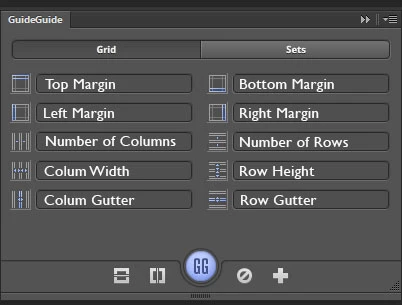
The bottom row of icons are
Center Horizontal; Center Vertical, Create Guides, Clear Guides (hold down to clear fields), create new set.
The size fields are the same as your units, so what I do is Right click a ruler and select what I want (Cms or Pixels).
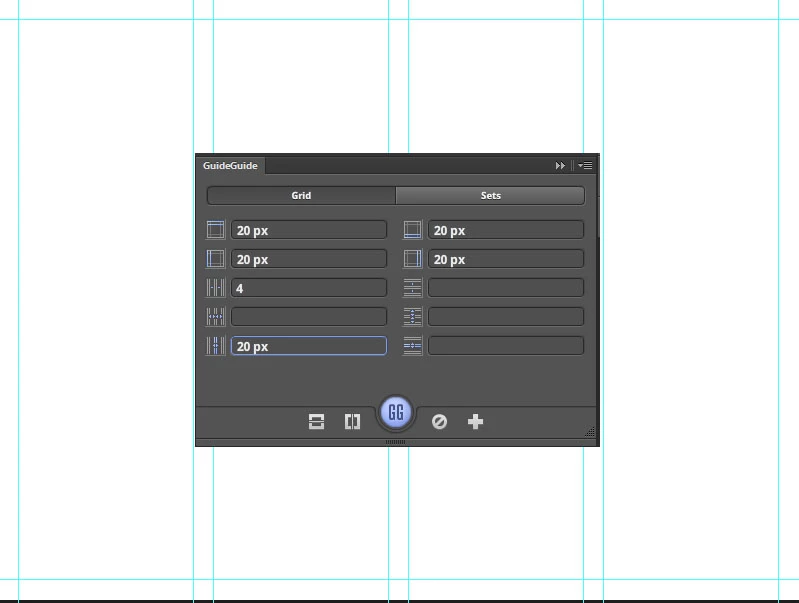
Some combinations take some working out. This image is 800x600 pixels, so I have a 20 pixel margin all round. Four columns, with a 20 pixel gutter between the columns. GuideGuide just works it out and lays down the guides. How useful is that?!
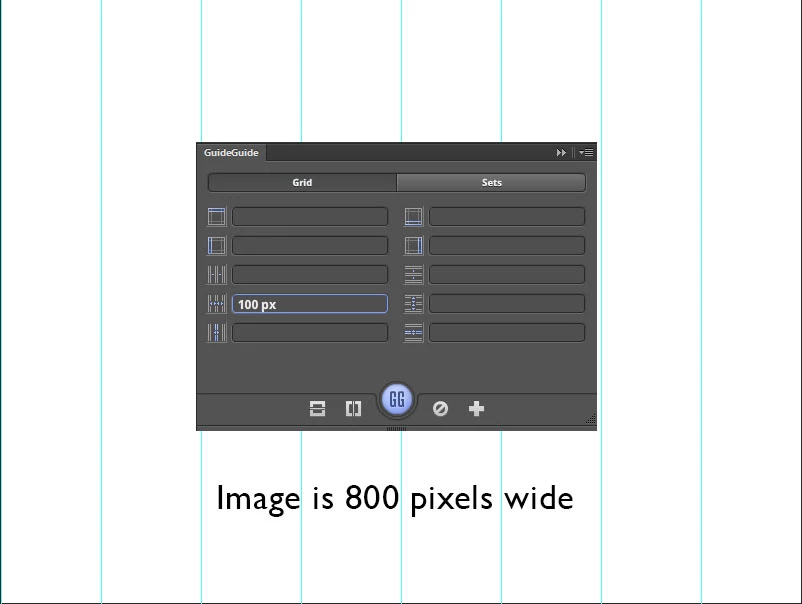
Column width can trip you up if you don't think what you are doing. 100px into an 800 pixel wide image results in eight columns. If I had entered a value o 10, then I'd have had 80 vertical guides!. I am sure you'll have the entire picture from here.
Enter your E-mail address. We'll send you an e-mail with instructions to reset your password.
 AdChoices