
Inspiring
July 24, 2023
Answered

How can I remove popups when I open a file with a script?

  • July 24, 2023
  • 3 replies
  • 1279 views

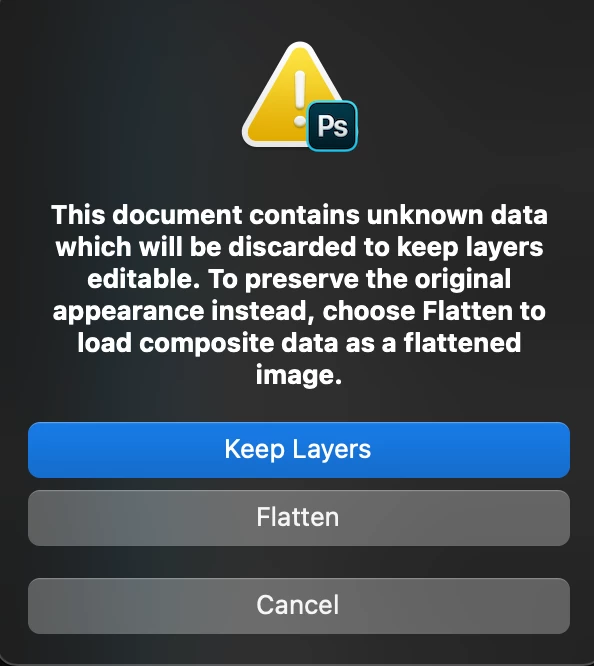
 When I open a file with the help of a script, a window like this or any other will appear. where I need to choose a variant. I know the right variant, but I still need to click the button. how can I make the variant to be chosen automatically?
This topic has been closed for replies.
Correct answer c.pfaffenbichler

Some dialogs can be suppressed, not sure about all of them. 

displayDialogs = DialogModes.NO;
app.open(File(/*insert file path here*/));
displayDialogs = DialogModes.ERROR;

3 replies

Stephen Marsh
Community Expert
July 25, 2023

Can you attach the offending PSD files? They could be 1px in size, it seems that this is more about the file/layer structure than anything.

Inspiring
July 25, 2023

when opening this file, the following request to choose an opening option is displayed


c.pfaffenbichler
Community Expert
July 25, 2023

And why don’t you mention which of the options you use? 

c.pfaffenbichler
c.pfaffenbichlerCorrect answer
Community Expert
July 24, 2023

Some dialogs can be suppressed, not sure about all of them. 

displayDialogs = DialogModes.NO;
app.open(File(/*insert file path here*/));
displayDialogs = DialogModes.ERROR;
Inspiring
July 24, 2023

I think it's a little different here. I need not just not to display the window, but to tell it what to do in this or that case.

Stephen Marsh
Community Expert
July 24, 2023
quote

I think it's a little different here. I need not just not to display the window, but to tell it what to do in this or that case.


By @Aleksei5C75


So do you get usable AM code recorded by the ScriptingListener plug-in?


If so you can set a conditional.

Inspiring
July 24, 2023

Or windows may appear in the process....