
Participant
September 3, 2021
Question

How do I disable pop up question: Rasterize the smart object?

  • September 3, 2021
  • 3 replies
  • 1471 views

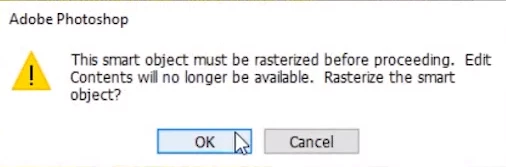
Is there an option within preferences (or somewhere else?) that I can activate that disables the following
photoshop question from popping up on my screen (requiring me to hit "ok") every time I draw over an image (that must be rasterized first)? A tool that automatically rasterizes the image or automates the required "ok" I must select that would keep this pop up from appearing every time I draw?? It would be super helpful and save the interruption and additional click.


The pop up notification is as follows:


Adobe Photoshop
This smart objet must be rasterized before proceeding. Edit
Contents will no longer be available. Rasterize the smart
object?
 

This topic has been closed for replies.

3 replies

Bojan Živković11378569
Community Expert
Community Expert
September 4, 2021

No, there isn't box to check nor option to turn on to automatically rasterize Smart Object layer when you are trying to paint on it. I do not think it will be implemented soon although you have link above to request such feature. 

jane-e
Community Expert
Community Expert
September 3, 2021

What is your workflow that you are always creating SOs that you don't want? We might be able to help with that/


~ Jane


Dave Creamer of IDEAS
Community Expert
Community Expert
September 3, 2021

If you don't need SOs at all, you can turn off the "Always Create Smart Objects when Placing" preference. 


You may want to submit a feature request: https://www.adobe.com/products/wishform.html

I would think a simple "Do not show again" checkbox would suffice. 

David Creamer: Community Expert (ACI and ACE 1995-2023)