
Inspiring
January 22, 2020
Answered

How do I disable the Save As Copy box when saving as a PDF in Photoshop 2020?

  • January 22, 2020
  • 12 replies
  • 21562 views

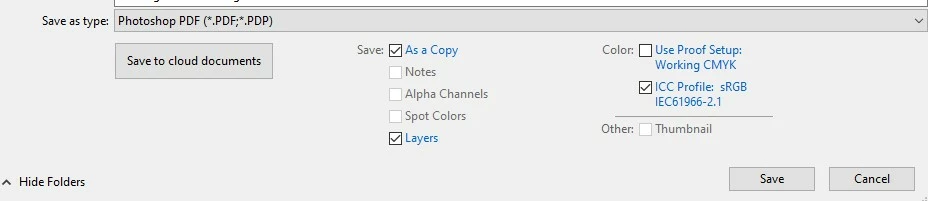
When saving a PDF from Photoshop CC 2020, the "Save a Copy" box is automatically checked off in the Save Window. Prior to CC 2020 I could save over an existing PDF file without generating a copy each time without the "Save a Copy" box being checked, how do I disable it?


{Thread renamed by moderator}
This topic has been closed for replies.
Correct answer Sahil.Chawla

Hi there,

That does not sound good, could you please let us know the operating system you're working with?
At my end I am ablt to check or uncheck the Save as a Copy box as shown below:


Have you tried resetting the preferences of Photoshop and see if that helps? 

https://helpx.adobe.com/photoshop/using/preferences.html


Note: Make sure that you back up all your custom presets, brushes & actions before restoring Photoshop's preferences. Migrate presets, actions, and settings


Regards,
Sahil


12 replies

Known Participant
September 18, 2021

Has anybody found a fix for this insanely annoying issue yet? 


When I choose to save as a .jpg or .png, the "save as copy" box get checked, and greyed out, so that I can't change it, and the file name keeps the .psd, despite being saved as an image.


The result is that a photoshop doc named Example.psd, becomes a jpg or png with the awkward file name Example copy.psd

What's worse, is that websites don't recognize it as an image file (even if I remove the .psd suffic.) I've been unable to upload these images anywhere; there is always some kind of error.

CMD42187
Participating Frequently
September 24, 2021

I'm not sure this will address your issue, but if you are in the most recent version of photoshop they have added some additional options for the "Save As" and "Save As Copy" features. If you go to Edit>Preferences>File Handling. You will see some check box options. "Do Not Append "copy" to file name when saving a copy" may be what you are looking for. I have this unchecked in my preferences.


There is also a "Enable Legacy Save As". I personally like the new "Save As" feature as it means I can save pdfs without unchecking a "Save As Copy" box. Basically you have some options in those preferences that you could experiment with and see what works best for you!

vossinc
Known Participant
February 9, 2022

Hi there. 
After selecting "Enable Legacy Save As" and the "Do not append copy to filename", I still see the "As a copy" checked and grayed out when I Save As. Just below it says "File must be saved as a copy with this selection". No matter what format I choose I get the same error unless I choose a format that my file is currently in. 
I have no idea why Adobe added this as a copy nonsense. 

CMD42187
Participating Frequently
June 22, 2021

The 22.4.2 version of photoshop has a modified Save As feature and now the "Save as Copy" box is no longer a thing when saving PDFs!

You have the option of going back to the way it has been for the last 18ish months in Edit>Preferences>Filing Handling and then checking the "Enable Legacy Save As"

If you want to save the file as anything other than a Photoshop, Large Document Format, TIFF or PDF you have to use Save As Copy instead of Save As, but you have the option to check the "Do Not append copy.." so that "copy" isn't automatically applied to the end of the file name when you are saving it in another format.

I am very happy with the changes and options Adobe has made and created. I think it gives users the ability to choose what works best for them.

Participating Frequently
March 14, 2021

If you guys are still having this issue for PNGs, try quick saving it as a png.  File > Export > Quick export as PNG. That, for me, seems to override the original file instead of making a copy of it. 


I have no idea on why Adobe changed this feature making it impossible to uncheck the copy box. 

Participating Frequently
March 14, 2021

sorry, try quick "exporting" it, not quick "saving" 

UBABTechSupport
Participating Frequently
March 12, 2021

I'm having the same issue

Naomi Graphics
Inspiring
January 28, 2021

I am seeung in preferences where to change the save mode, years back you could do that, but I am not seeing it now

Naomi Graphics
Inspiring
January 28, 2021

I mean I am NOT seeing were to go in preference

Participant
January 28, 2021

I also have this issue. I'm using macOS version 10.14.6 (18G103). Using CC Photoshop 2020. Saving as specifically from .png to .pdf the box is checked automatically. But saving from PDF to .tiff the box unchecks itself. The same goes for PDF to .psd, unchecked. I'd like it if it is ALWAYS unchecked unless I check it.

CMD42187
Participating Frequently
January 28, 2021

Still haven't found out how to always have the "Save as Copy" box unchecked. Hopefully they enable this as an option in the future!

Participant
December 3, 2020

I have the same issue! This is so frustrating and time wasting.

CMD42187
Participating Frequently
December 3, 2020

I know! No new updates that I've seen - would love to disable the auto "Save as Copy" check. Unchecking has now become part of my process, but it's an extra step that wastes time!

Participating Frequently
September 24, 2020

*EDIT you need to flatten all layers in order for this to work on .png's as one of the other commenters pointed out. Still a bit irritating though, and not a perfect solution.

I got the same issue and i am tired of the file not being overwritten.
For me it happens when i open a .png file, edit it and want to save it as a .png - i cannot choose to overwrite it, and photoshop will create a filename copy name.

scott sherrill
Participant
July 1, 2020

Also need to be sure image has flattened all layers.

thx


Naomi Graphics
Inspiring
September 8, 2020

I have the same problem, wish this could be fixed

scott sherrill
Participant
July 1, 2020

The trick is to convert the 16 bit file to 8 bit first and then it will 'save' and not 'save as'