



Participant
August 5, 2020
Answered

How do I get rid of the dotted line around my object?

  • August 5, 2020
  • 1 reply
  • 11195 views

Hi!

Every time I make a selection and move things there's a dotted moving line around the edges of my object. I tried ctrl+h but it hides ALL the selection while I still need the rectangle (it's blue I don't know why!)

Thank you in advance! 

Correct answer didiermazier

Ctrl+H hide the selection AND the envelopp…

Go to the menu :

…and uncheck (sorry for my bad italian) : contorno di selezione

The marching ants will desapear but not the blue rectangle

Et voilà

1 reply

didiermazier
Community Expert
didiermazierCommunity ExpertCorrect answer
Community Expert
August 5, 2020

Ctrl+H hide the selection AND the envelopp…

Go to the menu :
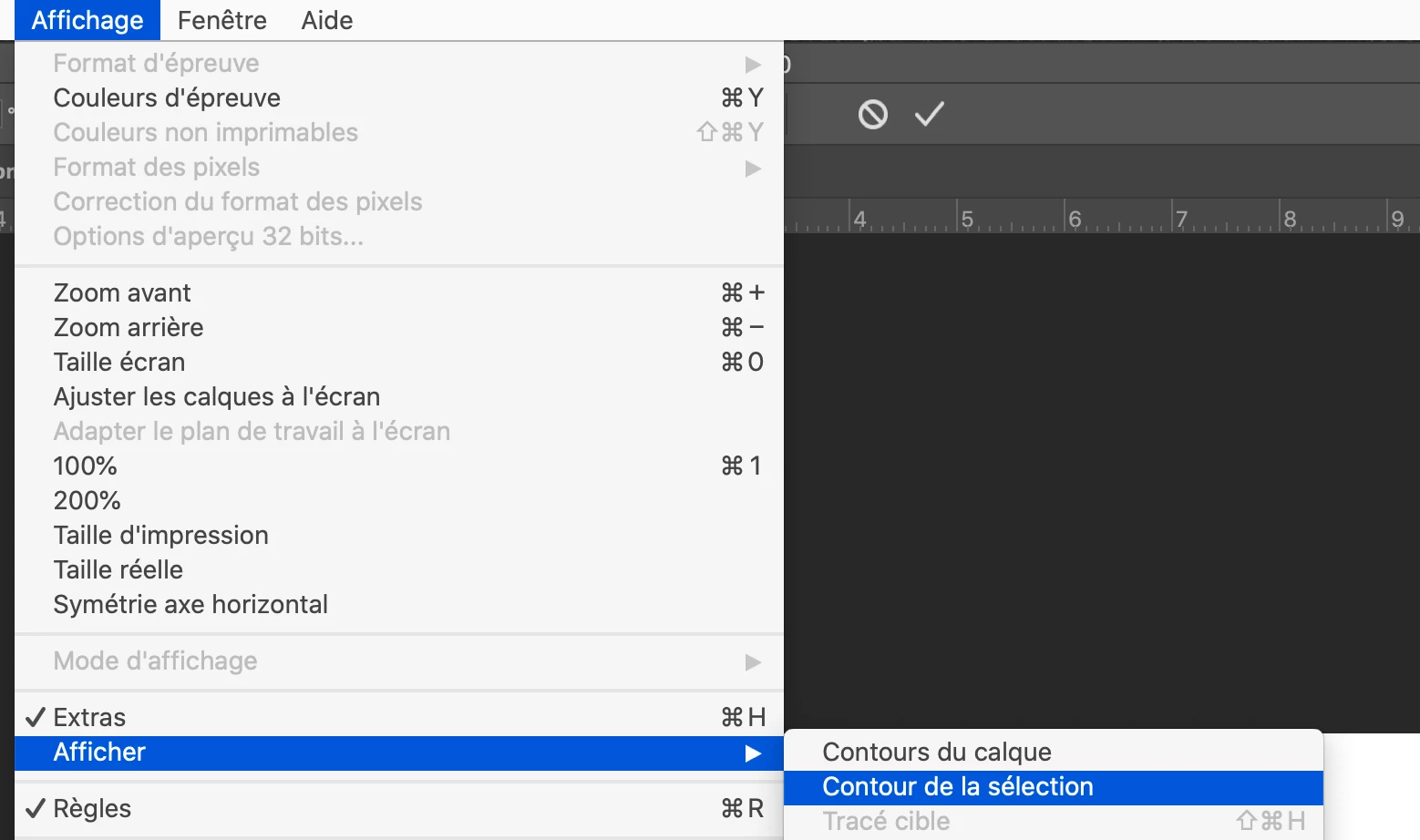
…and uncheck (sorry for my bad italian) : contorno di selezione

The marching ants will desapear but not the blue rectangle

Et voilà

Participant
August 5, 2020

Thank you so much! 🙂 Is there some sort of escamotage so that I don't have to do this all the time? 

didiermazier
Community Expert
Community Expert
August 5, 2020

Not to my knowledge.

It is important to show you what is selected…

I would suggest a custom shortcut to avoid going to the menu…

Edit > shortcuts