Known Participant
June 9, 2019
解決済み

How do I print a 5" x"7" print

  • June 9, 2019
  • 返信数 4.
  • 39309 ビュー

I give up! I can't figure out how to print a simple  5x7 image. I have a new printer and I'm trying to print a 5"x7" print on it but every time I go to the print screen dialog the paper size is set to 8.486" x 10.986", so I see my smaller 5"x7" print in the preview. But I want to print it on 5"x"7" paper. I have 5"x"7" paper and some 13"x"19" paper for later. So how do I set the paper size to be 5"x"7"?  The files's resolution is 300ppi, by the way. This seems like it should be simple but I can't find out how to do it.

I'm using Photoshop 2019 CC.

Also, I welcome any other printing tips anyone might have.

    このトピックへの返信は締め切られました。
    解決に役立った回答 gener7

    Two steps: Load the 5x7 paper and set it in the printer first. Printers have paper sizes in their setup screens. Make sure this done first.

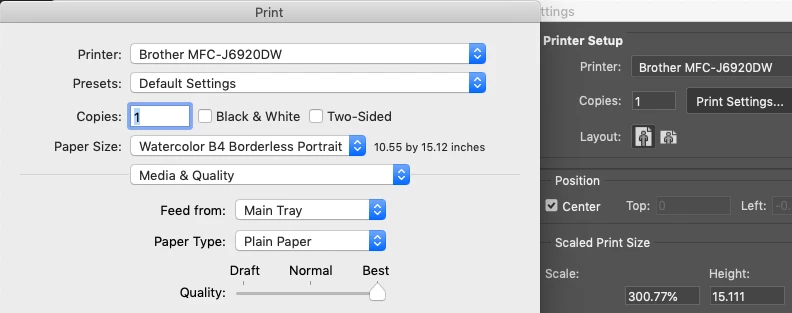
    Second Step: File > Print. Click on Advanced Settings and you will see your printer settings. Paper Size, Paper Type, border or no border, the tray that the paper is in, the Quality you want. Check to see these match.

    If the image ignores those settings, use Spacebar + Print to clear it. Troubleshoot Photoshop printing problems

    返信数 4

    Hilde Maassen
    Participating Frequently
    June 10, 2019

    The way I would do it:

    1. Go to the photoshop print menu.

    2. Go to the print settings and give in the size of the paper (it is with paper size, where to find depends on the kind of printer you use)    

      If 5x7 inch is not a standard paper size you can go to custom at the bottom and give in the correct sizes by hand.

    3. When the right paper is set you can read it above the preview of the image *5x7" = 12,7 by 17,78 cm

    Custom set the sizes.

    JJMack
    Community Expert
    Community Expert
    June 10, 2019

    Your  8.486" x 10.986" image has a wider aspect ratio then 5:7.  So you woul]d need to Crop your  images to a 5:7 apect ratio then resize the crop to print a 5" x 7" image print.

    ]]

    JJMack
    Nancy OShea
    Community Expert
    Community Expert
    June 10, 2019

    Bottom line, your printer software prints 5 x 7 prints, not Photoshop.

    Suggest you read the documentation that accompanied your printer.

    Nancy O'Shea— Product User & Community Expert
    gener7
    Community Expert
    gener7Community Expert解決!
    Community Expert
    June 10, 2019

    Two steps: Load the 5x7 paper and set it in the printer first. Printers have paper sizes in their setup screens. Make sure this done first.

    Second Step: File > Print. Click on Advanced Settings and you will see your printer settings. Paper Size, Paper Type, border or no border, the tray that the paper is in, the Quality you want. Check to see these match.

    If the image ignores those settings, use Spacebar + Print to clear it. Troubleshoot Photoshop printing problems