
scotth25528356
Participant
February 1, 2022
Question

How do I set X and Y coordinates to show the center of an image, rather than the top left?

  • February 1, 2022
  • 1 reply
  • 3995 views

For reference, I want these numbers to display where the middle of an image is, rather than the top-left corner
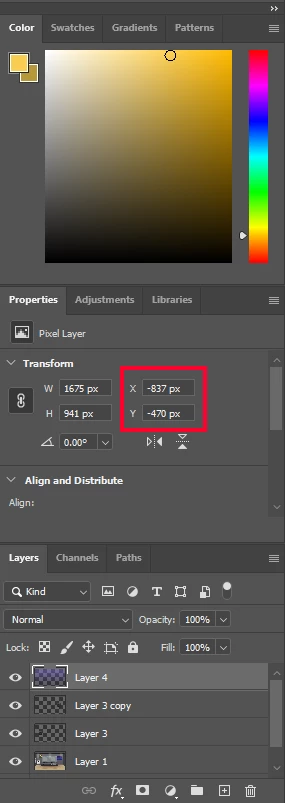
Say the middle is 0, 0 (The ruler having been set to the canvas center) I want the numbers in the red box to both be 0. How would I accomplish that? 

This topic has been closed for replies.

1 reply

Michael Bullo
Community Expert
Community Expert
February 1, 2022

Press Command/Control + R to display the rulers. Find the area where the two rulers meet in the upper left corner. Click and drag from this region to redefine the origin of your document.


scotth25528356
Participant
February 1, 2022

No I understand that (and I've done it already), but I'm not referring to the entire document, I'm talking about an individual layer. Setting the ruler to the center of the canvas is what gave me the negative values shown in the image, I want the highlighted numbers to say 0, 0. (Which is where the center of layers 1, 2, and 4 are, the top left corners are all in different places, which are irrelevant)

Stephen Marsh
Community Expert
Community Expert
February 1, 2022

It is fairly easy to do this via a script, where a dialog window will open and then you hit OK.


Similar to this, however, it would be customised for exactly what you wish to see...