Participating Frequently
June 12, 2015
Answered

How do I skip a dialog box (of an adjustment), by implementing the 'enter' function within a JavaScript (in Adobe Configurator 4)?

  • June 12, 2015
  • 2 replies
  • 2064 views

I made a custom panel with Adobe Configurator 4 with several adjustments buttons.

However, if I press for example 'Brightness/Contrast', I don´t always want to confirm the dialog box (naming the layer).

How do I skip this step? I thought about somehow implement the Enter Command in the Script, but how is that possible?

Here are several pictures to visualize what I mean:

1) nwRpQik

2) G5ORBVn

This topic has been closed for replies.
Correct answer I have gone

Ah okay, I see your situation.

I definately tried your code out, and I like the try-catch block so that no error message pops up, which is annoying aswell in my code. In my case though, it just didn´t happen anything with your version. Maybe I did something wrong on my end, since I´m completely new to script coding.

I think the main problem is that I´m not targeting the correct layer. The adjustment window pops up, but it doesn´t target the adjustment layer that I have just created.

I made some progress though, replacing one variable (desc4 in this case) with the one created (desc173) and I manage to at least change the layer mask when I have 'legacy' checked in the brightness dialog box.

This would be the code:
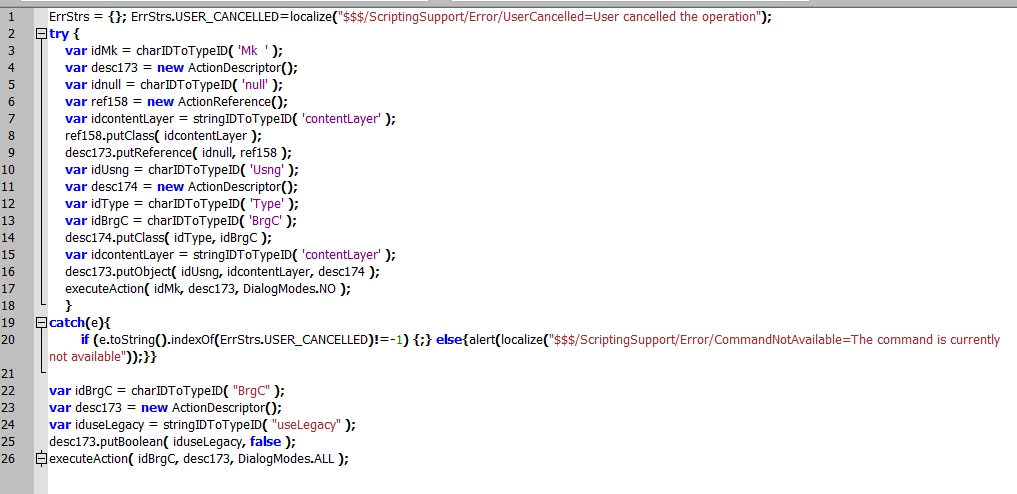
ErrStrs = {}; ErrStrs.USER_CANCELLED=localize("$$$/ScriptingSupport/Error/UserCancelled=User cancelled the operation");

try {

    var idMk = charIDToTypeID( 'Mk  ' );   

    var desc173 = new ActionDescriptor();  

    var idnull = charIDToTypeID( 'null' );       

    var ref158 = new ActionReference();       

    var idcontentLayer = stringIDToTypeID( 'contentLayer' );       

    ref158.putClass( idcontentLayer );   

    desc173.putReference( idnull, ref158 );   

    var idUsng = charIDToTypeID( 'Usng' );       

    var desc174 = new ActionDescriptor();       

    var idType = charIDToTypeID( 'Type' );       

    var idBrgC = charIDToTypeID( 'BrgC' );       

    desc174.putClass( idType, idBrgC );   

    var idcontentLayer = stringIDToTypeID( 'contentLayer' );   

    desc173.putObject( idUsng, idcontentLayer, desc174 );

    executeAction( idMk, desc173, DialogModes.NO );

    }

catch(e){

        if (e.toString().indexOf(ErrStrs.USER_CANCELLED)!=-1) {;} else{alert(localize("$$$/ScriptingSupport/Error/CommandNotAvailable=The command is currently not available"));}}


var idBrgC = charIDToTypeID( "BrgC" );

var desc173 = new ActionDescriptor();

var iduseLegacy = stringIDToTypeID( "useLegacy" );

desc173.putBoolean( iduseLegacy, false );

executeAction( idBrgC, desc173, DialogModes.ALL );

What I somehow need to achieve is to access the values dialog box that is created afterwards, only within the first try block / the first function, like it would be normally so that it doesn´t lose the 'connection'.

Any suggestions?


Try this..

newBCLayer();

selLayerRGB();

setBC();

function newBCLayer() {

var desc2 = new ActionDescriptor();

var ref1 = new ActionReference();

ref1.putClass( charIDToTypeID('AdjL') );

desc2.putReference( charIDToTypeID('null'), ref1 );

var desc3 = new ActionDescriptor();

var desc4 = new ActionDescriptor();

desc4.putBoolean( stringIDToTypeID('useLegacy'), false );

desc3.putObject( charIDToTypeID('Type'), charIDToTypeID('BrgC'), desc4 );

desc2.putObject( charIDToTypeID('Usng'), charIDToTypeID('AdjL'), desc3 );

try{

executeAction( charIDToTypeID('Mk  '), desc2, DialogModes.NO );

}catch(e){}

};

function selLayerRGB() {

var desc = new ActionDescriptor();

var ref = new ActionReference();

ref.putEnumerated( charIDToTypeID('Chnl'), charIDToTypeID('Chnl'), charIDToTypeID('RGB ') );

desc.putReference( charIDToTypeID('null'), ref );

desc.putBoolean( charIDToTypeID('MkVs'), false );

try{

executeAction( charIDToTypeID('slct'), desc, DialogModes.NO );

}catch(e){}

};

function setBC() {

var desc9 = new ActionDescriptor();

var ref5 = new ActionReference();

ref5.putEnumerated( charIDToTypeID('AdjL'), charIDToTypeID('Ordn'), charIDToTypeID('Trgt') );

desc9.putReference( charIDToTypeID('null'), ref5 );

var desc10 = new ActionDescriptor();

desc10.putInteger( charIDToTypeID('Brgh'), 0 );

desc9.putObject( charIDToTypeID('T   '), charIDToTypeID('BrgC'), desc10 );

try{

executeAction( charIDToTypeID('setd'), desc9, DialogModes.ALL );

}catch(e){}

};

2 replies

Participating Frequently
June 15, 2015

I´m finished writing the scripts for all adjustments. So far they seem working, but it would be awesome if you could correct

me if I made something wrong, don´t want to crash up the settings or something. Here´s the link to the dropbox, .rar file with ONLY textfiles in it.

Dropbox - adj scripts.rar

Inspiring
June 15, 2015

They look fine and they work for me. Good work!

Not all the scriptlistener code is produced all of the time, if it doesn't give the required code it is worth creating an action then examing the scriptlistener output as this can give extra code.

Participating Frequently
June 15, 2015

Awesome, thanks a bunch

JJMack
Brainiac
June 12, 2015

What does your script code look like? I do not use the configurators. Each version of Photoshop need a different version. CC 2014 foes not support Flash panels so panels not must be html 5 panels. I do not know how the API work between the HTML panels and Photoshop Scripts.  IMO Photoshop has more panels then it need to have why add more.

JJMack
Participating Frequently
June 12, 2015

A code example for one adjustment (in this case brightness / contrast) looks like this:

ErrStrs = {}; ErrStrs.USER_CANCELLED=localize("$$$/ScriptingSupport/Error/UserCancelled=User cancelled the operation"); try {var idMk = charIDToTypeID( 'Mk ' ); var desc173 = new ActionDescriptor(); var idnull = charIDToTypeID( 'null' ); var ref158 = new ActionReference(); var idcontentLayer = stringIDToTypeID( 'contentLayer' ); ref158.putClass( idcontentLayer ); desc173.putReference( idnull, ref158 ); var idUsng = charIDToTypeID( 'Usng' ); var desc174 = new ActionDescriptor(); var idType = charIDToTypeID( 'Type' ); var idBrgC = charIDToTypeID( 'BrgC' ); desc174.putClass( idType, idBrgC ); var idcontentLayer = stringIDToTypeID( 'contentLayer' ); desc173.putObject( idUsng, idcontentLayer, desc174 ); executeAction( idMk, desc173, DialogModes.ALL ); } catch(e){if (e.toString().indexOf(ErrStrs.USER_CANCELLED)!=-1) {;} else{alert(localize("$$$/ScriptingSupport/Error/CommandNotAvailable=The command is currently not available"));}}

I already fount out that I´m able to deactivate the DialogBoxes by setting     executeAction( idMk, desc173, DialogModes.ALL )

                                        to                                                                   executeAction( idMk, desc173, DialogModes.NO )

The problem with this solution is that this also bypasses the actual panel with the adjustment sliders, which I need to be displayed after the button being pressed. It basically just creates the adjustment layer, skipping all dialogboxes. But I only

want to skip the dialog where I have to name the layer, NOT the dialog with the adjustments themselves. See picture below (this is what is ALSO skipped).

I have goneCorrect answer
Inspiring
June 14, 2015

Ah okay, I see your situation.

I definately tried your code out, and I like the try-catch block so that no error message pops up, which is annoying aswell in my code. In my case though, it just didn´t happen anything with your version. Maybe I did something wrong on my end, since I´m completely new to script coding.

I think the main problem is that I´m not targeting the correct layer. The adjustment window pops up, but it doesn´t target the adjustment layer that I have just created.

I made some progress though, replacing one variable (desc4 in this case) with the one created (desc173) and I manage to at least change the layer mask when I have 'legacy' checked in the brightness dialog box.

This would be the code:

ErrStrs = {}; ErrStrs.USER_CANCELLED=localize("$$$/ScriptingSupport/Error/UserCancelled=User cancelled the operation");

try {

    var idMk = charIDToTypeID( 'Mk  ' );   

    var desc173 = new ActionDescriptor();  

    var idnull = charIDToTypeID( 'null' );       

    var ref158 = new ActionReference();       

    var idcontentLayer = stringIDToTypeID( 'contentLayer' );       

    ref158.putClass( idcontentLayer );   

    desc173.putReference( idnull, ref158 );   

    var idUsng = charIDToTypeID( 'Usng' );       

    var desc174 = new ActionDescriptor();       

    var idType = charIDToTypeID( 'Type' );       

    var idBrgC = charIDToTypeID( 'BrgC' );       

    desc174.putClass( idType, idBrgC );   

    var idcontentLayer = stringIDToTypeID( 'contentLayer' );   

    desc173.putObject( idUsng, idcontentLayer, desc174 );

    executeAction( idMk, desc173, DialogModes.NO );

    }

catch(e){

        if (e.toString().indexOf(ErrStrs.USER_CANCELLED)!=-1) {;} else{alert(localize("$$$/ScriptingSupport/Error/CommandNotAvailable=The command is currently not available"));}}


var idBrgC = charIDToTypeID( "BrgC" );

var desc173 = new ActionDescriptor();

var iduseLegacy = stringIDToTypeID( "useLegacy" );

desc173.putBoolean( iduseLegacy, false );

executeAction( idBrgC, desc173, DialogModes.ALL );

What I somehow need to achieve is to access the values dialog box that is created afterwards, only within the first try block / the first function, like it would be normally so that it doesn´t lose the 'connection'.

Any suggestions?


Try this..

newBCLayer();

selLayerRGB();

setBC();

function newBCLayer() {

var desc2 = new ActionDescriptor();

var ref1 = new ActionReference();

ref1.putClass( charIDToTypeID('AdjL') );

desc2.putReference( charIDToTypeID('null'), ref1 );

var desc3 = new ActionDescriptor();

var desc4 = new ActionDescriptor();

desc4.putBoolean( stringIDToTypeID('useLegacy'), false );

desc3.putObject( charIDToTypeID('Type'), charIDToTypeID('BrgC'), desc4 );

desc2.putObject( charIDToTypeID('Usng'), charIDToTypeID('AdjL'), desc3 );

try{

executeAction( charIDToTypeID('Mk  '), desc2, DialogModes.NO );

}catch(e){}

};

function selLayerRGB() {

var desc = new ActionDescriptor();

var ref = new ActionReference();

ref.putEnumerated( charIDToTypeID('Chnl'), charIDToTypeID('Chnl'), charIDToTypeID('RGB ') );

desc.putReference( charIDToTypeID('null'), ref );

desc.putBoolean( charIDToTypeID('MkVs'), false );

try{

executeAction( charIDToTypeID('slct'), desc, DialogModes.NO );

}catch(e){}

};

function setBC() {

var desc9 = new ActionDescriptor();

var ref5 = new ActionReference();

ref5.putEnumerated( charIDToTypeID('AdjL'), charIDToTypeID('Ordn'), charIDToTypeID('Trgt') );

desc9.putReference( charIDToTypeID('null'), ref5 );

var desc10 = new ActionDescriptor();

desc10.putInteger( charIDToTypeID('Brgh'), 0 );

desc9.putObject( charIDToTypeID('T   '), charIDToTypeID('BrgC'), desc10 );

try{

executeAction( charIDToTypeID('setd'), desc9, DialogModes.ALL );

}catch(e){}

};

