


- Home
- Photoshop ecosystem
- Discussions
- Re: How do I update my camera raw in Photoshop CS5...
- Re: How do I update my camera raw in Photoshop CS5...
How do I update my camera raw in Photoshop CS5 from 7.0 to 9.1 so I upload my raw images I shot with my Nikon D7200?

Copy link to clipboard
Copied
How do I update my camera raw in Photoshop CS5 from 7.0 to 9.1 so I upload my raw images I shot with my Nikon D7200?
!



Explore related tutorials & articles
 49
Replies
49
49
Replies
49


Copy link to clipboard
Copied
You must mean CS6. CS5 only went as far as 6.7
Anyway, here is the installer for 9.1.1 the latest CS6 will take.
Adobe - Adobe Camera Raw and DNG Converter : For Macintosh : Adobe DNG Converter 9.1.1
Adobe - Adobe Camera Raw and DNG Converter : For Windows : Adobe DNG Converter 9.1.1
Gene
Copy link to clipboard
Copied
Thanks Gene,
Installed the converter (you were right I meant CS6), but I can’t convert my files from Nikon D7200 raw to DNG files. Therefore I can’t use Photoshop or Lightroom
Mike
Copy link to clipboard
Copied
That should have installed Camera Raw too, what version do you have in CS6? You don't need the converter.
If you are still stuck at 7.0, go here Camera Raw installer for Adobe Photoshop CC and CS6 and get the Camera Raw installer for CS6, it should upgrade it to 9.1.1.
Gene
Copy link to clipboard
Copied
I have CS6 vs 13.0.1. 64 bits
I tried to install camera raw but failed.
I appreciate your help
Copy link to clipboard
Copied
What file did you download? When you tried to install, what was the error message?
Copy link to clipboard
Copied
I tried to open a Nikon raw file in CS6 and got a message that the file can’t be open and to go to help-plug in-camera raw. Did not get a thing. I have raw vs 7 could not update to a later vs. although all my programs are up to date.
Copy link to clipboard
Copied
Ok, but what file did you download to attempt the update? I need to find out what went wrong so you can get the update in. Include the file name and extension.
Copy link to clipboard
Copied
I could not find a file to update camera raw. I downloaded the file you suggested to convert files to DNG, but could not convert because the program did not recognize the Nikon NEF files
Copy link to clipboard
Copied
Ok, I'll get the Camera Raw installer for you. What is your OS version? Windows 7 or 10?
Copy link to clipboard
Copied
I have Windows 10
Copy link to clipboard
Copied
Here is the file. https://helpx.adobe.com/content/help/en/x-productkb/multi/camera-raw-plug-in-installer/_jcr_content/...
Unzip it, and
Right-click on the installer, choose "Run as Administrator" from the menu. It should give the installer the privileges to replace 7.0.
Copy link to clipboard
Copied
I followed your instructions, it installed it somewhere (did not indicate where and could not find it) but did not replace vs. 7
Copy link to clipboard
Copied
Ok that means a stubborn ACR plugin that won't go away.
Here's what to do:
Remove Photoshop or Photoshop Elements on Windows:
- Close all Adobe applications.
- Back up any personal files, including third-party plug-ins, you want to save from the Program Files/Adobe Photoshop [version] folder or the Program Files/Photoshop Elements [version] folder.
- Choose Start > Control Panel (or Start > Settings > Control Panel), and then do one of the following:
- Windows XP: Open Add Or Remove Programs.
- Windows Vista, Windows 7: Select Uninstall A Program from the Programs section of the Control Panel Home. Or, if you are in Classic view, open Programs And Features.
- Select your version of Photoshop or Photoshop Elements from the list of installed programs, and then click Change/Remove (Windows XP) or Uninstall (Windows Vista, Windows 7).
Note: If you have Photoshop installed as part of a suite, select your edition of Adobe Creative Suite from the list of installed programs.
- Follow the onscreen instructions to remove Photoshop or Photoshop Elements.
- In Windows Explorer, navigate to Program Files\Common Files\Adobe
- If you see a folder named Plug-Ins in the Adobe folder, delete it.
After you have removed Photoshop or Photoshop Elements, reinstall the application using your original installation media. Then run Help > Updates and it should get the latest ACR installed. Then, try to open your raw image. If you cannot open a raw image, then repeat the Instructions above.
Copy link to clipboard
Copied
This whole process is frustrating. I deleted Lightroom 6 and Photoshop CS6. Then I downloaded and reinstalled Lightroom 6. Checked and did not find any plug-ins (no Camera Raw). Then I tried to download CS6 and was unable because I am a Cloud subscriber. Called Adobe Customer Service, they told me to go to the internet to download. Went to the internet and could not find a stand-alone CS6, only “clouds”. Joined a forum and so far did not get an answer to the download link for CS6.
Since adobe introduced the “cloud” customers who do not pay monthly fee are completely neglected, they became second or third citizens.
By the way I tried to find out where Camera Raw 9.1 was installed on my computer after I unzipped it and could not find the file.
I do appreciate your help and thank you for it, but as I say it is frustrating. I have been using Photoshop for years starting with vs. 1 and now I don’t know whether I should continue using them or switch to Nikon’s programs.
Copy link to clipboard
Copied
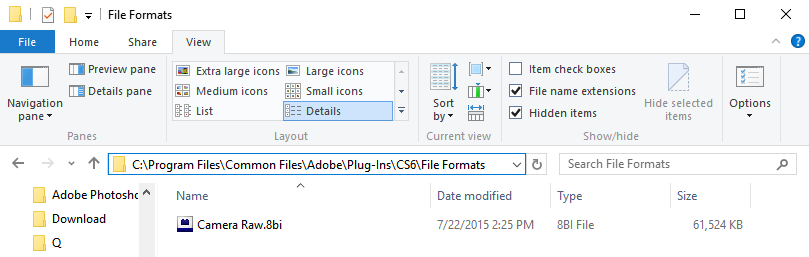
Ok. Let's do this. Manually delete or move the plugin already there. Note that I have both File name extensions and Hidden items checked under the View menu.
Then run that 9.1.1 installer that I linked you to and see if the plugin shows up in that directory.
Copy link to clipboard
Copied
I downloaded the new camera raw and saw it in the directory, but it does not show in my lightroom program. I need a link to download CS6, how do I get it. Did not receive an answer from Adobe Support.
Copy link to clipboard
Copied
This should get you to the installers. Download Creative Suite 6 applications
All you need is your serial. After you install, run Help > Updates. Hopefully 9.1.1 will make it in.
If not, check that directory again.
I don't know anything about Lightroom and Camera Raw. You do need to visit the Lr forum.
Gene
Copy link to clipboard
Copied
I really appreciate your help, but this is the most frustrated experience I had. Being an engineer and working with computers I never had a problem with installing or upgrading programs. This is a first for me. I downloaded and installed CS6, and guess what: I have Camera Raw vs. 7, that with updating the program. I am ready to give up. You were kind enough to help, but Adobe Technical Support does not care. They probably decided to cater to professional photographers and dump the amatures.
Mike
Copy link to clipboard
Copied
Well, installing CS6 put that default 7.0 plugin back, so just go back to that directory in post #16, remove that old plugin and run that Camera Raw 9.1.1
installer again (also linked in post 16, do not run anything else) and I think we may just have it this time.
It should show up in Photoshop CS6 and Bridge CS6.
Gene
Copy link to clipboard
Copied
Thanks, I’ll try it tomorrow, it is getting ate and I have to get up early.
Tanks again,
Mike
Copy link to clipboard
Copied
Ok, hope it goes well. You might want to know that except for activation problems, CS6 is not supported for anyone. So they will send you over here for tech issues and we will do our best.
Gene
Copy link to clipboard
Copied
Well Gene it did not go well. I did everything you suggested: deleted and reinstalled the program, deleted the plug in, downloaded the link to 9.1 and reinstalled the plug ins. When I opened my C: drive to see the plug in I had Camera Raw.8bi in both files – Program Files and Program Files(x86). I went to check what I had in my CS6 and I had none but my friend Camera Raw 7.
Copy link to clipboard
Copied
That's about as far as I can go.
For your raws, use the DNG converter. Here's how: Camera Raw: How to use Adobe DNG Converter - YouTube
The Nikon DNGs can be read in your current ACR.
This forum may have ideas I don't know of Adobe Camera Raw
Lightroom, update it. Help > Updates Any problems ask here: Photoshop Lightroom
The Lr update should carry the latest Camera Raw, ask if in doubt.
Hope it gets sorted out.
Copy link to clipboard
Copied
Originally I tried it, but the latest vs of camera raw is 7.1, so I can’t convert my files. I was hoping that I can do it with Lightroom but I guess I can’t do it either.
At any rate thanks for your help. I guess I may just delete the Adobe program file. If this continues the Co. will lose the phot matures, maybe that what they want.
Thanks again and have a Happy and Healthy New Year.
Mike

-
- 1
- 2

Get ready! An upgraded Adobe Community experience is coming in January.
Learn more
 AdChoices