
gregd
Known Participant
September 30, 2025
Question

How does contiguous work?

  • September 30, 2025
  • 2 replies
  • 387 views

For many years now, I've ran into strange edge case behavior with Magic Wand selecting contiguous. Here's an example where I want to intersect select, resulting in the top and bottom intersections being selected:
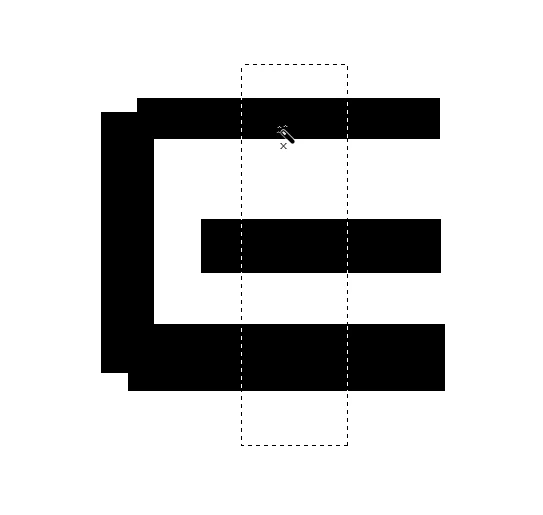
With contiguous disabled, all three intersections are selected, as you would expect. With contiguous enabled, only the top intersection is selected for some reason. Changing tolerance doesn't effect anything, and all of the black segments are the exact same color.

If I try to click just outside the current selection, it results in no selection:
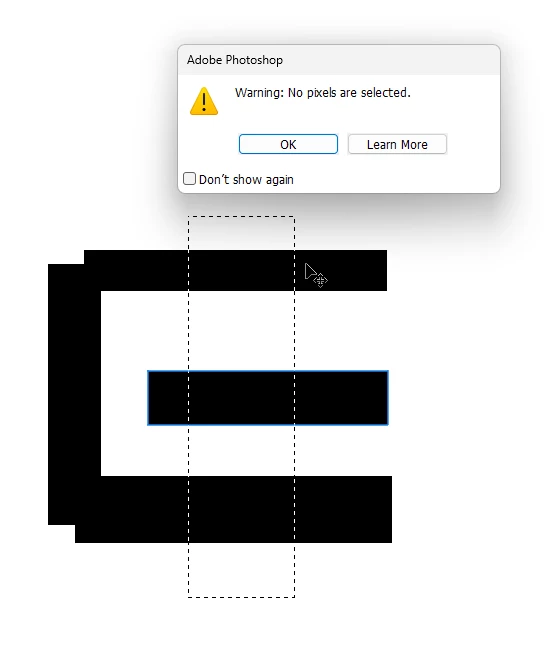
 Why does this happen?

2 replies

mglush
Community Expert
Community Expert
September 30, 2025

Hi!

The definition of Contiguous actually means sharing a common border, or touching. So, Contiguoulsin this case means that everything that is the same color—and is touching the area you have selected will be added to the selection. When Contiguous is checked it selects only the areas that are similar and touching, and when it is not checked, it selects all areas that are similar to the area you clicked but are not touching.


I hope that helps!

Michelle

Brad @ Roaring Mouse
Community Expert
Community Expert
September 30, 2025

Contiguous means it will select all matching pixels that are touching/connected. Non-Contiguous would select any matching pixel, touching or not. So when you select the area you did with Contiguous selected, there is no connection of black pixels within that selection, so, yes it would only select the top bar.

gregd
gregdAuthor
Known Participant
September 30, 2025

I'm sorry, I don't understand. If contiguous only selects "touching/connected" pixels, then why does this intersect select result in a disconnected selection?

mglush
Community Expert
Community Expert
October 1, 2025

Aren't the two selected regions in the second image in the comment that you replied to not "touching or sharing a common border"?


Hi! What option for the Selection tool is checked in the Options Bar? Can you show us a screenshot of your window with the panels and layers visible, and not just the image? That would help immensely.


It looks like you might have the Intersect option checked in the options bar, but I cannot tell unless we can see the Options bar and what layer you have selected. 

What are you trying to select?

Michelle