Copy link to clipboard
Copied
Hi, All!
I'm trying to load 'Adobe PDF Presets' from file 'Book_Preset.joboptions' automatically when Photoshop start up.
I put the preset file into '/Users/myUserName/settingfiles/' folder.
And start up script file(javascript) put into 'C:\Program Files (x86)\Common Files\Adobe\Startup Scripts CS6\Adobe Photoshop' folder.
My source:
if (BridgeTalk.appName == "photoshop") {
//Invoke function
loadPDFPresetFile();
function loadPDFPresetFile() {
var desc = new ActionDescriptor();
var ref = new ActionReference();
ref.putProperty( charIDToTypeID( "Prpr" ), stringIDToTypeID( "pdfPresetFilename" ) );
desc.putReference( charIDToTypeID( "null" ), ref );
var pdfPresetFileDesc = new ActionDescriptor();
pdfPresetFileDesc.putPath( charIDToTypeID( "Usng" ), new File( "/Users/myUserName/settingfiles/Book_Preset.joboptions" ) );
desc.putObject( charIDToTypeID( "T " ), stringIDToTypeID( "pdfPresetFilename" ), pdfPresetFileDesc );
executeAction( charIDToTypeID( "setd" ), desc, DialogModes.NO );
}
}
But it not work.
How does load 'Adobe PDF Presets' file 'Book_Preset.joboptions' in start up script.
Thanks.
Copy link to clipboard
Copied
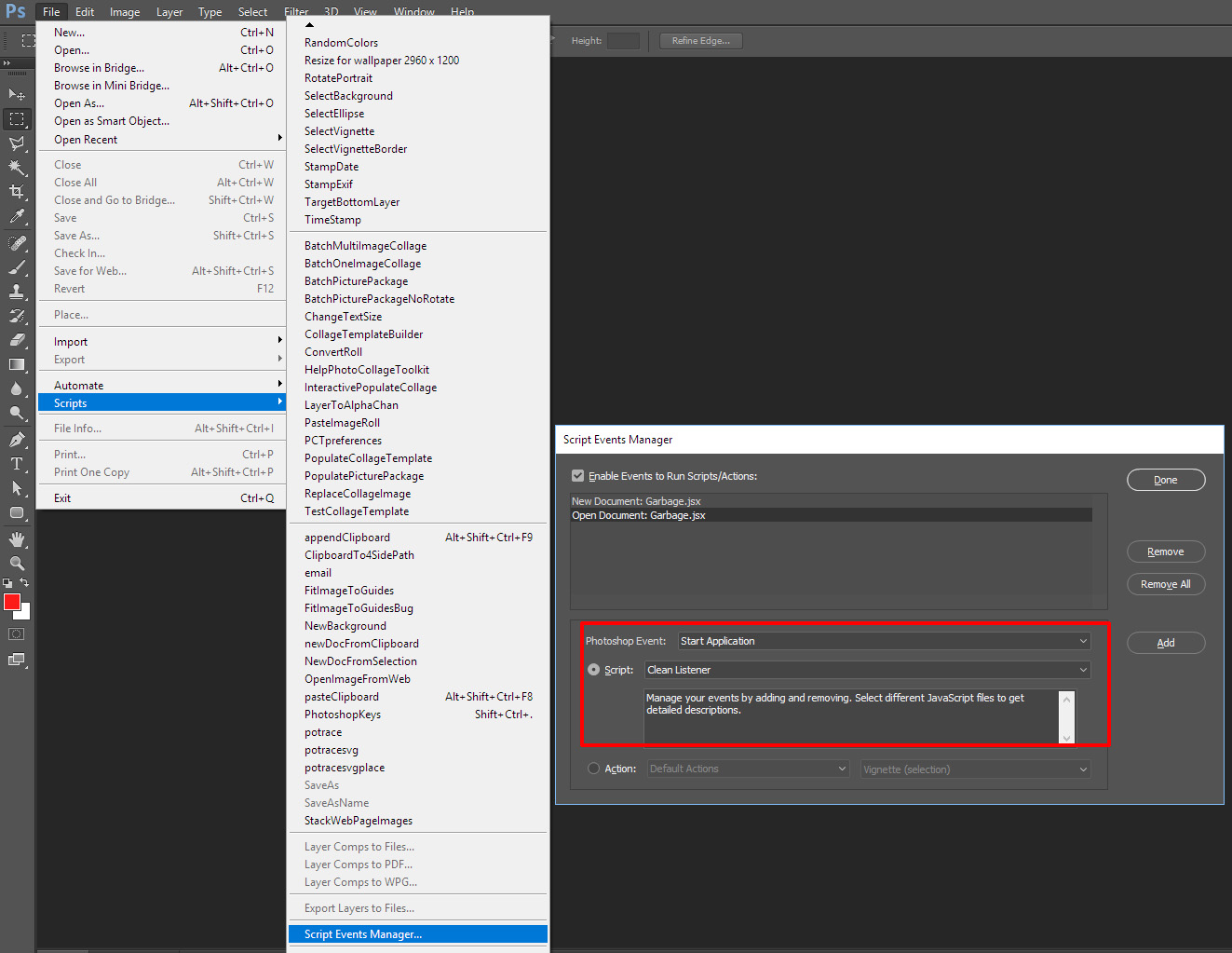
If you want to load some preset when Photoshop starts you should create a Script event handler to do that not try to use a Bridge startup scrip. I hardly ever start the bridge I use Photoshop all the time. The script should most likely first test to see it the preset is already loaded and if not load it. Presets can also delete by scripts. I do not even know what a PDF preset is are you trying to make some custom script option? In any case check out Photoshop Script Event Manager. A start Application event may be what you need to set up.

Copy link to clipboard
Copied
First of all, thank you for your answer.
In fact, I want to turn some manual setting works into automatic processing.
Before that, We have been manually loading the color settings(load xxx.csf file by menu 'Edit > Color Settings') and Adobe PDF Presets(load yyy.joboptions file by menu 'Edit > Adobe PDF Presets') in Photoshop.
Because the .CSF files and the .joboptions file are more, manual operation often selects the wrong file.
In order to prevent those wrong, I would like to use a program to load setting files automatically.
I will write some code that selects the color setting(.csf file) and the Adobe PDF preset(.joboptions file) that I need based on the information I have obtained, and then dynamically generate the start up script so that Photoshop can load the correct settings when it starts.
The start up script for the color settings is OK, and I try to modify the script for load Adobe PDF Presets(.joboptons file),just like the code above.
From the start up script for the color settings, I just change
Stringidtotypeid ("Colorsettings")
into
Stringidtotypeid ("Pdfpresetfilename")
and replacing the file full path that need to be loaded.
But it doesn't work.
If it must be a start application event, how do I write a program instead of a manual setting?
Thank you very much!

Copy link to clipboard
Copied
First users use the Photoshop features the need to do what the have to. I do not create PDF Files With Photoshop or Acrobat I may have at one time created a PDF presentation with Photoshop to see If the would be helpful. I rarely use the Bridge but I do use Photoshop. read you want to load a preset when Photoshop loads. I did not notice the there was a menu item Edit>Adobe PDF Presets... or the that was a file type .joboptions that can be loaded. If that can be scripted that script can be triggered when Photoshop starts by setting up an application start event handler. I would think the script should first make sure the the preset is not loaded already. I did not see you obtaining anything in the script you posted. If that can be scriped it can be made part of the script or included in the script. Photoshop would be running but the script would be run before the user could use Photoshop UI. What you posted looked like Photoshop Action Manager code. I have never scripted the bridge or user bridge talk so I do not know is action manger code is supported in the bridge in bridge startup script. It would most like be if it adds a tool menu item that would pass work to Photoshop from the bridge and the would be done every time the menu item was used not just at Photoshop startup..
"I will write some code that selects the color setting(.csf file) and the Adobe PDF preset(.joboptions file) that I need based on the information I have obtained, and then dynamically generate the start up script so that Photoshop can load the correct settings when it starts."
Copy link to clipboard
Copied
Ther are other script events you can set up even handlers for. You might have notice I have set up two in CC 2017 I also do this for CC 2015.5. Adobe design in a intentional bug in CC 2015.5 scripting. I set up an Open Document and a new document event handlers to add garbage into a documents info filed if it is not there to get around Adobe intentional bug in CC 2015.5 and CC 2017 scripting.
Get ready! An upgraded Adobe Community experience is coming in January.
Learn more