EDIT: 2.7 Update, 5th September 2026: Added a confirm dialog on launch (for CMYK mode documents only) offering to temporarily switch the color settings rendering intent to Absolute Colorimetric. The original rendering intent is automatically restored when the dialog is closed.
/* Calculates the CIE colour difference (dE76/dE94/dE2000) between either:
- the Foreground and Background colors or - Color Sampler 1 and Color Sampler 2 on the active document or - Manual float entry to two decimal places (Photoshop Lab mode natively supports integers)
Stephen Marsh https://github.com/MarshySwamp/CIE_Color_Difference_Calculator https://community.adobe.com/t5/photoshop-ecosystem-discussions/how-does-photoshop-calculate-lab-values/m-p/15028840
Changelog: v1.0 - 10th December 2024: Private testing. v1.1 - 10th December 2024: Initial public release, no GUI. v1.2 - 31st May 2026: Added (LCh) Lightness, Chroma & hue readings. v1.3 - 1st June 2026: Replaced the native alert with a ScriptUI dialog with copy to clipboard button. v1.4 - 9th June 2026: Added Delta L, a, b, C, h component breakdown & dE traffic light colouring. v1.5 - 17th June 2026: Added editable L, a, b floating value input fields for foreground and background, removed the traffic light colouring due to legibility issues. v1.6 - 1st July 2026: Combined the separate dE76/dE94/dE00 scripts into a single script with radio buttons to switch between the three formulas. v1.7 - 1st July 2026: Changed the colour source from the foreground/background swatches to Color Sampler 1 and Color Sampler 2 on the active document. v1.8 - 1st July 2026: Combined v1.6 and v1.7 into a single script. Added a checkbox to toggle between Foreground/Background and Color Sampler 1 and 2 as the colour source. v1.9 - 3rd July 2026: Minor GUI change, moved the "Enable manual entry" checkbox under the "Use Color Samplers" checkbox. v1.10 - 5th July 2026: Replaced the two source checkboxes with three radio buttons (Foreground/Background, Color Samplers and Manual Entry). The initial Foreground/Background Lab values are stored once and used to restore when switching back from samplers or manual entry. v1.11 - 11th July 2026: Minor GUI change, moved the Manual Entry input panel into the Color Source panel. v2.0 - 12th July 2026: Added range validation/clamping to the Manual Entry fields. v2.1 - 13th July 2026: Fixed a rounding display error in the results panel. Minor GUI changes. v2.2 - 27th July 2026: Swapped Delta L, a, b, C, h subtraction calculation order from reference/sample to sample/reference. v2.3 - 31st July 2026: Added a "Round values" checkbox (to 2 decimal places), when off the results are now truncated to 6 decimal places. Checking the box restores the previous rounding behaviour. Minor GUI changes. v2.4 - 31st July 2026: Fixed a bug where a failed switch to Color Samplers (no document/not enough samplers) always reverted the radio button selection to Foreground/Background. It now restores the source that was previously active. v2.5 - 31st July 2026: Once the Manual Entry fields have been edited to no longer match the Foreground/Background values, those custom entries are now remembered and restored if the user switches back to Manual Entry, instead of being silently overwritten and lost. Minor GUI changes. v2.6 - 26th August 2026: As scripting can't access the eyedropper sample size (point sample vs. 3 x 3 etc.), I have added a checkbox to average out noise or small variations from the results of the color samplers. v2.7 - 5th September 2026: Added a confirm dialog on launch offering to temporarily switch the color settings rendering intent to Absolute Colorimetric. The original rendering intent is automatically restored when the dialog is closed. */
#target photoshop
// ------------------------------------------------------------------------ // v2.7 // ActionManager helpers for getting and setting the application's colour // settings rendering intent. // ------------------------------------------------------------------------ var c2t = function(s) { return app.charIDToTypeID(s); }; var s2t = function(s) { return app.stringIDToTypeID(s); }; var t2s = function(t) { return app.typeIDToStringID(t); };
function main(restoreRenderingIntent) {
// ------------------------------------------------------------------------ // Start with the Foreground / Background colors - always available, no doc // or color samplers required. // ------------------------------------------------------------------------ var fgColor = app.foregroundColor.lab; var bgColor = app.backgroundColor.lab;
// ------------------------------------------------------------------------ // Initial Foreground/Background Lab values. These are kept for the lifetime of the // dialog so that the Foreground/Background source can always be restored exactly, // even after the user has switched to the Color Sampler or Manual Entry sources. // ------------------------------------------------------------------------ var initialFgLab = [Math.round(fgColor.l), Math.round(fgColor.a), Math.round(fgColor.b)]; var initialBgLab = [Math.round(bgColor.l), Math.round(bgColor.a), Math.round(bgColor.b)];
// Tracks which colour source is currently active: "fgbg", "sampler", or "manual" var colorSourceMode = "fgbg";
// ------------------------------------------------------------------------ // v2.5 // Remembers the most recent Manual Entry field values. Custom entries can // be restored later even after the shared fields have been overwritten. // ------------------------------------------------------------------------ var savedManualLab1 = initialFgLab.slice(); var savedManualLab2 = initialBgLab.slice();
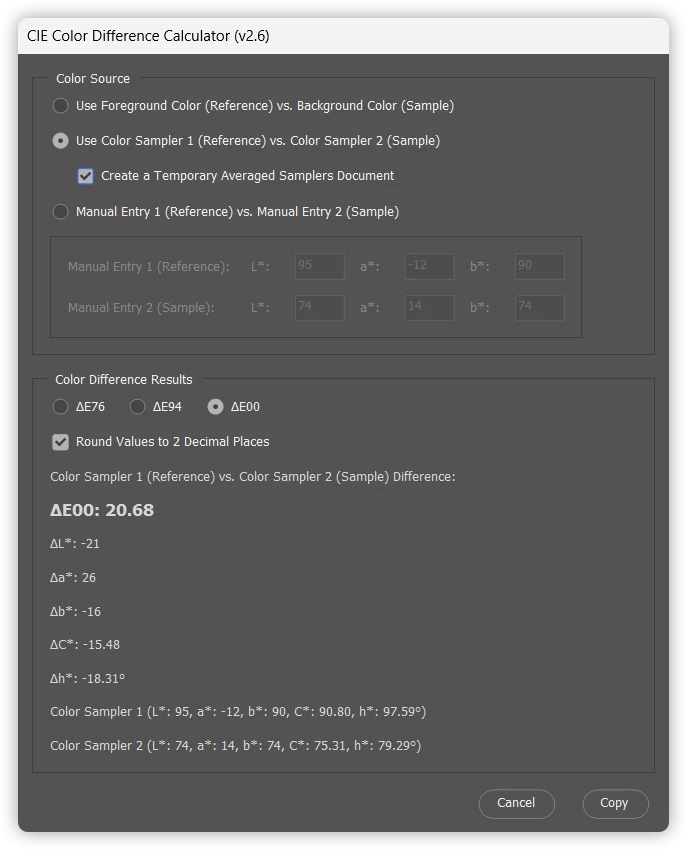
// ------------------------------------------------------------------------ // ScriptUI Dialog // ------------------------------------------------------------------------ var win = new Window("dialog", "CIE Color Difference Calculator (v2.7)"); win.alignChildren = "fill"; win.spacing = 12; win.margins = 12; //win.preferredSize.width = 655;
var rbFgBg = sourceGroup.add("radiobutton", undefined, "Use Foreground Color (Reference) vs. Background Color (Sample)"); var rbSampler = sourceGroup.add("radiobutton", undefined, "Use Color Sampler 1 (Reference) vs. Color Sampler 2 (Sample)");
// ------------------------------------------------------------------------ // v2.6 // Checkbox: builds or closes a temporary averaged document for the Color // Sampler source. It has no effect on Foreground/Background or Manual Entry. // ------------------------------------------------------------------------ var samplerOptionsGroup = sourceGroup.add("group"); samplerOptionsGroup.orientation = "row"; samplerOptionsGroup.alignChildren = "left"; samplerOptionsGroup.margins = [20, 0, 0, 0];
var cbCreateAvgLayer = samplerOptionsGroup.add("checkbox", undefined, "Create a Temporary Averaged Samplers Document"); cbCreateAvgLayer.enabled = false; // only usable while Color Sampler source is active cbCreateAvgLayer.helpTip = "Duplicates the active document as a merged copy, then averages out small variations or noise.";
// Tracks the original document (with color samplers) and any temporary // averaged document created while the checkbox is on. var originalDocForAvg = null; var tempAvgDoc = null;
var rbManual = sourceGroup.add("radiobutton", undefined, "Manual Entry 1 (Reference) vs. Manual Entry 2 (Sample)"); rbFgBg.value = true; // default: Foreground/Background
// ------------------------------------------------------------------------ // Radio buttons: dE mode selector (upper left of the results panel) // ------------------------------------------------------------------------ var modeGroup = panel.add("group"); modeGroup.orientation = "row"; modeGroup.alignChildren = "left"; modeGroup.alignment = "left"; modeGroup.spacing = 12;
var rbdE76 = modeGroup.add("radiobutton", undefined, "\u0394E76"); var rbdE94 = modeGroup.add("radiobutton", undefined, "\u0394E94"); var rbdE00 = modeGroup.add("radiobutton", undefined, "\u0394E00"); rbdE00.value = true; // default: dE00
// ------------------------------------------------------------------------ // Checkbox: toggles whether the 2-decimal-place results below are // rounded (2 decimal places) or truncated (6 decimal places) // ------------------------------------------------------------------------ var cbRoundValues = panel.add("checkbox", undefined, "Round Values to 2 Decimal Places"); cbRoundValues.value = true; // default value //cbRoundValues.helpTip = "When checked, results are rounded to 2 decimal places.\nWhen unchecked, results are displayed at 6 decimal places.";
// ------------------------------------------------------------------------ // Truncates val to the given number of decimal places (toward zero), // guarding against floating-point representation noise (e.g. treating // 2.9999999999996 as 3, not 2.99) by cleaning up the value at a much // finer precision before truncating. // ------------------------------------------------------------------------ function truncateToFixed(val, decimals) { var factor = Math.pow(10, decimals); var scaled = val * factor; var cleanedScaled = Math.round(scaled * 1e6) / 1e6; var truncatedScaled = (cleanedScaled < 0) ? Math.ceil(cleanedScaled) : Math.floor(cleanedScaled); return (truncatedScaled / factor).toFixed(decimals); }
// ------------------------------------------------------------------------ // Formats val, rounding to 2 decimal places or truncating to 6 decimal // places depending on the "Round values" checkbox state. // ------------------------------------------------------------------------ function formatDecimal(val) { if (cbRoundValues.value) { return val.toFixed(2); } return truncateToFixed(val, 6); }
var headingText = panel.add("statictext", undefined, "Foreground vs. Background Color Picker Difference:"); headingText.preferredSize.width = 470;
var cancelBtn = btnGroup.add("button", undefined, "Cancel", { name: "cancel" }); var copyBtn = btnGroup.add("button", undefined, "Copy");
// ------------------------------------------------------------------------ // Helper: returns the currently selected dE mode as a string // ------------------------------------------------------------------------ function getSelectedMode() { if (rbdE76.value) return "dE76"; if (rbdE94.value) return "dE94"; return "dE00"; }
// ------------------------------------------------------------------------ // Helper: updates all static text (heading, panel titles, help tips, // summary label prefixes) to match the active colour source // ------------------------------------------------------------------------ function updateLabelsForMode() { if (colorSourceMode === "sampler") { headingText.text = "Color Sampler 1 (Reference) vs. Color Sampler 2 (Sample) Difference:"; } else if (colorSourceMode === "manual") { headingText.text = "Manual Entry 1 (Reference) vs. Manual Entry 2 (Sample) Difference:"; } else { headingText.text = "Foreground (Reference ) vs. Background (Sample) Color Picker Difference:"; } }
// ------------------------------------------------------------------------ // Central recalculate-and-refresh function // ------------------------------------------------------------------------ function recalculate() {
var fL = manOneL.value; var fA = manOneA.value; var fB = manOneB.value; if (isNaN(fL)) { fL = 0; } if (isNaN(fA)) { fA = 0; } if (isNaN(fB)) { fB = 0; }
var bL = manTwoL.value; var bA = manTwoA.value; var bB = manTwoB.value; if (isNaN(bL)) { bL = 0; } if (isNaN(bA)) { bA = 0; } if (isNaN(bB)) { bB = 0; }
var currentFgLab = [fL, fA, fB]; var currentBgLab = [bL, bA, bB];
var currentFgLCH = labToLCH(currentFgLab); var currentBgLCH = labToLCH(currentBgLab);
var mode = getSelectedMode(); var dE, label;
if (mode === "dE76") { dE = calculateCIEdE76(currentFgLab, currentBgLab); label = "\u0394E76"; } else if (mode === "dE94") { dE = calculateCIEdE94(currentFgLab, currentBgLab); label = "\u0394E94"; } else { dE = calculateCIEdE00(currentFgLab, currentBgLab); label = "\u0394E00"; }
// ------------------------------------------------------------------------ // v2.1 - Result value formatting. // fmtComponent: for raw L*/a*/b* values and their direct deltas // (deltaL/deltaA/deltaB are plain differences, so they stay integer // whenever the inputs are integer). FG/BG and Color Sampler inputs // are always whole numbers in Photoshop, so those modes display as // integers; Manual Entry keeps 2 decimal places. // fmt: for derived values (C*, h*, dE, deltaC, deltaH) which involve // sqrt/trig and are not guaranteed to be whole numbers even when the // L*/a*/b* inputs are integers - always shown to 2 decimal places. // // v2.2 - Swapped the calculation order of the ref/sample to sample/ref: // ΔL* = Sample (2) - Standard/Reference (1) // Δa* = Sample (2) - Standard/Reference (1) // Δb* = Sample (2) - Standard/Reference (1) // ΔC* = Sample (2) - Standard/Reference (1) // Δh* = Sample (2) - Standard/Reference (1) // ------------------------------------------------------------------------ function fmtComponent(val) { if (colorSourceMode === "manual") { return formatDecimal(val); } return Math.round(val).toString(); }
function fmt(val) { return formatDecimal(val); }
var deltaL = bL - fL; var deltaA = bA - fA; var deltaB = bB - fB; var deltaC = currentBgLCH.C - currentFgLCH.C;
// ------------------------------------------------------------------------ // Hue angle difference, normalised to [-180, +180] // ------------------------------------------------------------------------ var deltaH = currentBgLCH.H - currentFgLCH.H; if (deltaH > 180) { deltaH -= 360; } if (deltaH < -180) { deltaH += 360; }
// ------------------------------------------------------------------------ // Update dE label text // ------------------------------------------------------------------------ deText.text = label + ": " + fmt(dE);
// ------------------------------------------------------------------------ // Update footer summary labels using the current color source's prefixes // ------------------------------------------------------------------------ var prefixes = getSummaryPrefixes();
// ------------------------------------------------------------------------ // Radio buttons: switch dE formula and recalculate live // ------------------------------------------------------------------------ rbdE76.onClick = recalculate; rbdE94.onClick = recalculate; rbdE00.onClick = recalculate; cbRoundValues.onClick = recalculate;
// ------------------------------------------------------------------------ // Radio buttons: switch between Foreground/Background, Color Sampler 1 & 2, // and Manual Entry as the colour source. Only one can be active at a time. // ------------------------------------------------------------------------
// Start disabled - only Manual Entry allows direct editing of the fields manOneInputPanel.enabled = false; manTwoInputPanel.enabled = false;
// Foreground / Background - restores the Lab values captured at script // start, so the original swatches are always recoverable. rbFgBg.onClick = function() { manOneL.value = initialFgLab[0]; manOneA.value = initialFgLab[1]; manOneB.value = initialFgLab[2]; manTwoL.value = initialBgLab[0]; manTwoA.value = initialBgLab[1]; manTwoB.value = initialBgLab[2];
// ------------------------------------------------------------------------ // Helper: re-checks whichever radio button was active before a failed // attempt to switch to the Color Sampler source. colorSourceMode still // holds the pre-click mode at this point (it's only reassigned once // validation succeeds), and nothing else was touched by the failed // attempt, so this simply restores the radio button UI to match reality - // without resetting the manual entry fields or panel enabled state. // ------------------------------------------------------------------------ function restorePreviousSourceRadio() { if (colorSourceMode === "manual") { rbManual.value = true; } else { rbFgBg.value = true; } }
// ------------------------------------------------------------------------ // v2.6 // Helper: re-reads the current Lab values from Color Sampler 1 and 2 and // pushes them into the fields that back the sampler display/calculation. // ------------------------------------------------------------------------ function refreshSamplerReadings() { if (!app.documents.length) { return false; }
// ------------------------------------------------------------------------ // Color Samplers - validates that a document with at least 2 color // samplers is available before committing to this mode. // ------------------------------------------------------------------------ rbSampler.onClick = function() {
if (!app.documents.length) { alert("No document open.\n\nOpen a document and place at least 2 color samplers before using this mode."); restorePreviousSourceRadio(); return; }
var activeDoc = app.activeDocument;
if (activeDoc.colorSamplers.length < 2) { alert("At least 2 color samplers are required.\n\n" + "Currently found: " + activeDoc.colorSamplers.length + "\n\n" + "Add color samplers with the Color Sampler tool (I) and try again.\n" + "This mode compares Color Sampler 1 vs. Color Sampler 2."); restorePreviousSourceRadio(); return; }
// ------------------------------------------------------------------------ // Validation passed - remember the source document and pull Lab values // ------------------------------------------------------------------------ originalDocForAvg = activeDoc; refreshSamplerReadings();
// ------------------------------------------------------------------------ // v2.6: // Closes the temporary averaged document without saving, if it exists, // and restores the original document as active when needed. // ------------------------------------------------------------------------ function closeTempAvgDoc() { if (!tempAvgDoc) { return; } try { // Prefer restoring the remembered original; fall back to any other open doc. var restoreDoc = null; if (originalDocForAvg) { try { // Touch a property to verify the document is still open var _ = originalDocForAvg.name; restoreDoc = originalDocForAvg; } catch (e) { restoreDoc = null; } } if (!restoreDoc && app.documents.length > 1) { for (var i = 0; i < app.documents.length; i++) { if (app.documents[i] !== tempAvgDoc) { restoreDoc = app.documents[i]; break; } } } if (app.activeDocument === tempAvgDoc && restoreDoc) { app.activeDocument = restoreDoc; } tempAvgDoc.close(SaveOptions.DONOTSAVECHANGES); } catch (e) { // Document may already have been closed - nothing more to do. } tempAvgDoc = null; }
// ------------------------------------------------------------------------ // v2.6 // Checkbox handler: creates a duplicated merged document and resizes it // when checked; closes it without saving when unchecked. Any existing temp // document is cleared first so repeated toggles close the temp document. // ------------------------------------------------------------------------ cbCreateAvgLayer.onClick = function() { if (cbCreateAvgLayer.value) { closeTempAvgDoc();
try { if (!originalDocForAvg) { originalDocForAvg = app.activeDocument; } // Ensure we are working from the original document that holds the samplers app.activeDocument = originalDocForAvg;
// Re-read the two color samplers so the displayed/calculated values // reflect whichever composite (averaged or original) is now under // Color Sampler 1 and 2, then refresh the results panel. if (colorSourceMode === "sampler") { refreshSamplerReadings(); recalculate(); } };
// ------------------------------------------------------------------------ // v2.5 // True once the Manual Entry fields have actually been edited to differ from // the Foreground/Background values captured at script start. Used to decide // when re-entering Manual Entry mode, whether to restore those custom values // or just leave whatever the most recently active source (FG/BG or Color Samplers) // is currently showing. // ------------------------------------------------------------------------ function manualValuesAreCustomized() { return savedManualLab1[0] !== initialFgLab[0] || savedManualLab1[1] !== initialFgLab[1] || savedManualLab1[2] !== initialFgLab[2] || savedManualLab2[0] !== initialBgLab[0] || savedManualLab2[1] !== initialBgLab[1] || savedManualLab2[2] !== initialBgLab[2]; }
// ------------------------------------------------------------------------ // Manual Entry - unlocks both input panels for free editing. // If the fields have previously been customized (edited to no longer // match the Foreground/Background values), those custom entries are // restored so they aren't lost after switching away to FG/BG or Color // Samplers and back. // ------------------------------------------------------------------------ rbManual.onClick = function() { colorSourceMode = "manual"; manOneInputPanel.enabled = true; manTwoInputPanel.enabled = true; cbCreateAvgLayer.enabled = false; cbCreateAvgLayer.value = false; closeTempAvgDoc();
// ------------------------------------------------------------------------ // Manual entry field validation - clamps each field to its valid Lab range and // rounds to 2 decimal places, then triggers a live recalculate. L*: 0.00 to 100.00 // a*/b*: -128.00 to 127.00 as editable floating point valuess. // ------------------------------------------------------------------------ function roundTo2(val) { return Math.round(val * 100) / 100; }
function makeManualFieldValidator(field, min, max) { return function() { var v = field.value; if (isNaN(v)) { v = 0; } v = roundTo2(v); if (v < min) { v = min; } if (v > max) { v = max; } field.value = v;
// Keep the saved custom values in sync with live edits so they // can be restored later if the user switches away and back. if (colorSourceMode === "manual") { savedManualLab1 = [manOneL.value, manOneA.value, manOneB.value]; savedManualLab2 = [manTwoL.value, manTwoA.value, manTwoB.value]; }
recalculate(); }; }
// ------------------------------------------------------------------------ // Set onChange on each editnumber field to validate/clamp and then trigger // a live recalculate // ------------------------------------------------------------------------ manOneL.onChange = makeManualFieldValidator(manOneL, 0, 100); manOneA.onChange = makeManualFieldValidator(manOneA, -128, 127); manOneB.onChange = makeManualFieldValidator(manOneB, -128, 127); manTwoL.onChange = makeManualFieldValidator(manTwoL, 0, 100); manTwoA.onChange = makeManualFieldValidator(manTwoA, -128, 127); manTwoB.onChange = makeManualFieldValidator(manTwoB, -128, 127);
copyBtn.onClick = function() { closeTempAvgDoc(); var d = new ActionDescriptor(); d.putString(stringIDToTypeID("textData"), win._alertText || ""); executeAction(stringIDToTypeID("textToClipboard"), d, DialogModes.NO); restoreRenderingIntent(); win.close(); };
// ------------------------------------------------------------------------ // v2.7 // The original rendering intent should be restored when the dialog is closed. // ------------------------------------------------------------------------ win.onClose = function() { restoreRenderingIntent(); };
// ------------------------------------------------------------------------ // Populate all display fields with the initial Photoshop values // ------------------------------------------------------------------------ updateLabelsForMode(); recalculate();
win.show(); }
// ------------------------------------------------------------------------ // v2.6 // createAveragedTempDoc - duplicates the source document as a merged copy // ------------------------------------------------------------------------ function createAveragedTempDoc(sourceDoc) { var tempDoc = sourceDoc.duplicate("Temporary Average Samplers", true); try { // Capture original dimensions before resizing var originalWidth = tempDoc.width; var originalHeight = tempDoc.height;
// Step 1: Reduce to 75% tempDoc.resizeImage( new UnitValue(originalWidth.value * 0.75, "px"), new UnitValue(originalHeight.value * 0.75, "px"), null, ResampleMethod.BILINEAR ); // Step 2: Return to the original pixel dimensions tempDoc.resizeImage( new UnitValue(originalWidth.value, "px"), new UnitValue(originalHeight.value, "px"), null, ResampleMethod.BILINEAR ); } catch (e) { try { tempDoc.close(SaveOptions.DONOTSAVECHANGES); } catch (cleanupError) {} throw e; } return tempDoc; }
// ------------------------------------------------------------------------ // LCh - converts a LAB array [L, a, b] to an LCh object { L, C, H } // ------------------------------------------------------------------------ function labToLCH(lab) { var L = lab[0]; var C = Math.sqrt(lab[1] * lab[1] + lab[2] * lab[2]); var H = (Math.atan2(lab[2], lab[1]) * 180) / Math.PI; if (H < 0) { H += 360; } return { L: L, C: C, H: H }; }
// ------------------------------------------------------------------------ // I'm unsure of the source for the dE formula's, however, I'm guessing // that credit should probably go to Bruce Lindbloom: // http://www.brucelindbloom.com/Eqn_DeltaE_CIE76.html // http://www.brucelindbloom.com/Eqn_DeltaE_CIE94.html // http://www.brucelindbloom.com/Eqn_DeltaE_CIE2000.html // http://www.brucelindbloom.com/ColorDifferenceCalc.html // ------------------------------------------------------------------------
// ------------------------------------------------------------------------ // dE76 (CIE76 / dEab) - simple Euclidean distance in Lab space // ------------------------------------------------------------------------ function calculateCIEdE76(lab1, lab2) { var deltaL = lab1[0] - lab2[0]; var deltaA = lab1[1] - lab2[1]; var deltaB = lab1[2] - lab2[2]; return Math.sqrt(deltaL * deltaL + deltaA * deltaA + deltaB * deltaB); }
// ------------------------------------------------------------------------ // dE94 (CIE94) - Formula improved for perceptual uniformity // ------------------------------------------------------------------------ function calculateCIEdE94(lab1, lab2) { var kL = 1, kC = 1, kH = 1; var K1 = 0.045, K2 = 0.015;
var deltaL = lab1[0] - lab2[0]; var deltaA = lab1[1] - lab2[1]; var deltaB = lab1[2] - lab2[2];
// Gets the current rendering intent as a stringID (e.g. "absColorimetric", "colorimetric", "image", "graphics") function getRenderingIntent() { var reference = new ActionReference(); reference.putProperty(s2t("property"), s2t("colorSettings")); reference.putEnumerated(s2t("application"), s2t("ordinal"), s2t("targetEnum")); var desc = executeActionGet(reference); var colorSettingsDesc = desc.getObjectValue(s2t("colorSettings")); var intentID = colorSettingsDesc.getEnumerationValue(s2t("intent")); return t2s(intentID); } // Sets the rendering intent, given a stringID (e.g. "absColorimetric", "colorimetric", "image", "graphics") function setRenderingIntent(intentString) { var descriptor = new ActionDescriptor(); var descriptor2 = new ActionDescriptor(); var reference = new ActionReference(); reference.putProperty(s2t("property"), s2t("colorSettings")); reference.putEnumerated(s2t("application"), s2t("ordinal"), s2t("targetEnum")); descriptor.putReference(c2t("null"), reference); descriptor2.putEnumerated(s2t("intent"), s2t("intent"), s2t(intentString)); descriptor.putObject(s2t("to"), s2t("colorSettings"), descriptor2); executeAction(s2t("set"), descriptor, DialogModes.NO); }
// Friendly display names for the rendering intent stringIDs, used only in // the confirm dialog text below. var renderingIntentLabels = { "perceptual": "Perceptual", "saturation": "Saturation", "colorimetric": "Relative Colorimetric", "absColorimetric": "Absolute Colorimetric" };
function renderingIntentLabel(intentString) { return renderingIntentLabels[intentString] || intentString; }
changeRenderingIntent();
// ------------------------------------------------------------------------ // v2.7 // The changeRenderingIntent function captures the rendering intent that was // active before the script ran, then asks whether to temporarily switch it to // Absolute Colorimetric readings while the main() dialog is open. The original // rendering intent is restored when the main() dialog is exited. // ------------------------------------------------------------------------ function changeRenderingIntent() {
var originalIntent = null; var intentChanged = false;
try { originalIntent = getRenderingIntent(); } catch (e) { // Could not read the current rendering intent - skip the prompt // below and run the calculator without touching color settings. originalIntent = null; }
if (originalIntent !== null && originalIntent !== "absColorimetric" && app.documents.length > 0 && app.activeDocument.mode === DocumentMode.CMYK) { var useAbsColorimetric = confirm( "This script can temporarily set the rendering intent to Absolute Colorimetric while it runs.\n\n" + "Current rendering intent: " + renderingIntentLabel(originalIntent) + "\n\n" + "Your original rendering intent will be restored automatically when the script is exited.\n\n" + "Set rendering intent to Absolute Colorimetric now?" ); }
// ------------------------------------------------------------------------ // Restores the rendering intent captured above, but only if it was // actually changed. Safe to call more than once (e.g. from both a button // handler and a window close handler). // ------------------------------------------------------------------------ function restoreRenderingIntent() { if (!intentChanged) { return; } try { setRenderingIntent(originalIntent); } catch (e) { // Nothing more we can do if this fails. } intentChanged = false; }
try { main(restoreRenderingIntent); } catch (e) { // Make sure the original rendering intent is restored even if // main() throws unexpectedly. restoreRenderingIntent(); throw e; } }
It might help to understand the quote below from the book “Real World Photoshop CS3” which was published in 2008. It also appeared in the book’s earlier editions by the late Bruce Fraser, as well as his book “Real World Color Management” published in 2003. Bruce didn’t just say that out of thin air. He worked closely with the Photoshop team.
The second quote, below, is from page 33 of “The Digital Print” (2014) by Jeff Schewe, who also works closely with the Photoshop, Camera Raw, and Lightroom teams.
Anyone who studies how Photoshop color works eventually understands that:
Lab is its reference color space for color conversions.
Any color conversions must be corrected for the specific color space of the current color mode (such as sRGB vs Adobe RGB, or FOGRA CMYK vs US SWOP CMYK).
If you show an Excel spreadsheet or color conversion table that doesn’t account for color space, or doesn’t use Lab as a reference color space, that conversion table is not useful or reliable when discussing Photoshop.
'If you show an Excel spreadsheet or color conversion table that doesn’t account for color space, or doesn’t use Lab as a reference color space, that conversion table is not useful or reliable' when discussing Photoshop.
Make 2 separate RGB files, one sRGB, the other ProPhoto RGB. Type in the same set of RGB values and compare the Lab readings. Type in the same Lab values and compare the RGB readings.
I appreciate the time you invested to respond to my question. However, you answered a question I didn't ask. I asked how does Photoshop calculate the numbers that appear in the color picker when a user enters RGB values. I've found formulas online that purport to do it, but they're written in code or use calculus. I took calculus around 40 years ago and have never needed to use it until now. I need to calculate the Delta-E between multiple colors, and plugging them into a website form one by one takes too much time. I'm too old to waste it on that kind of stuff, know what I mean?
It’s not clear why you see that as a counter-argument, because as D Fosse is explaining, Lab is the device-independent reference for all Photoshop colors in any color mode.
In other words, of course Adobe has “no problem spitting out Lab numbers if you input RGB into their color picker” because that’s what it does every time anyway, for any color. It will always run the color values through Lab to get to any other color space. (The only exception might be a Device Link profile conversion, but I don’t have enough experience with those.)



 AdChoices