Participant
April 17, 2016
Answered

how to add a tail on the end of a text in photoshop?

  • April 17, 2016
  • 3 replies
  • 22989 views

how to add a tail on the end of a text in photoshop?

    This topic has been closed for replies.
    Correct answer

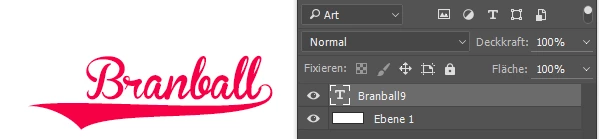
    I used the font required and pressed the number 9 to add the tail on at the end but when I click off of the image the tail disappears


    I tested the font (from dafont.com) in the actual Photoshop on a Windows 7/32 Bit computer.

    It's all ok.

    Fenja

    3 replies

    Chuck Uebele
    Community Expert
    Community Expert
    April 17, 2016

    Do you have an example of what you're looking to do? I'm assuming you wither want the last letter of some line with a longer "tail", or do you want a big fancy swirl under the line starting from the last letter? Either way, you most likely should use the pen tool to draw the shape that you want. If you want an adjustable width stroke, like some calligraphy, Illustrator would be a better choice, as you can do variable width strokes with it.

    Participant
    April 17, 2016

    Yes that's exactly what I want to do. Have the last letter with the long tail at the end. I figured out how to do it but when I do it and click off of the image in Photoshop it disappears. How can I get it to stay ??

    Chuck Uebele
    Community Expert
    Community Expert
    April 17, 2016

    What did you do to create it? If you drew it with the pen tool, you might have had the pen tool set to path, so it's still there, you just can't see it. You need to go to your paths panel, select it again and turn it into a shape.

    postrophe
    Inspiring
    April 17, 2016

    Hi

    Can you elaborate more your question. Are you trying to add a swash to the last letter of a word or something else.

    If so, you could check if your font have that glyphs. Type > Panels > Glyphs Panel (select your font)

    Pierre

    Brad Lawryk
    Legend
    April 17, 2016