
wallaceh3639989
Known Participant
July 5, 2018
Answered

How to change the starting point on a path when using a brush to stroke?

  • July 5, 2018
  • 1 reply
  • 1052 views

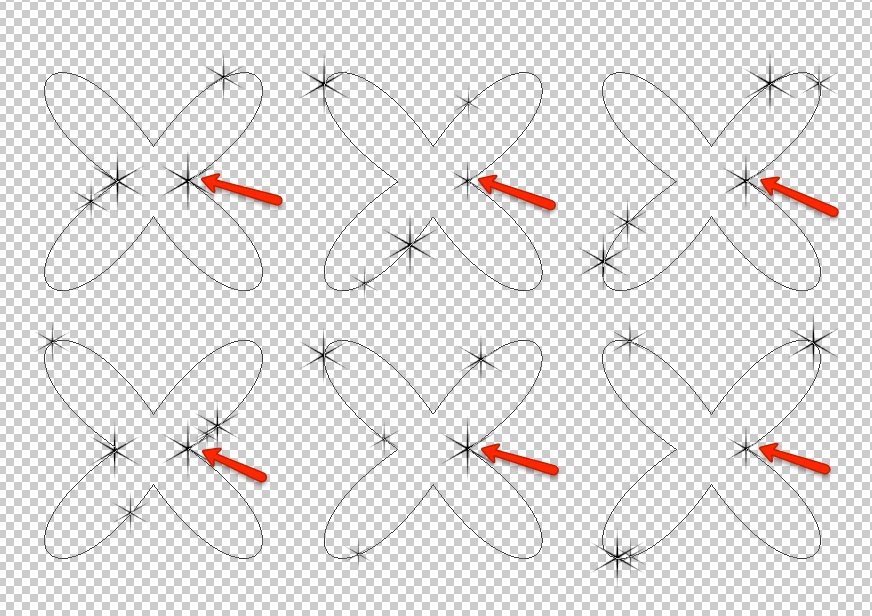
I'm using a brush to stroke a path in different frames and layers to get a sparkle animation. The special brush settings are 1000% spacing and 50% size jitter.

The problem is that the brush always starts at the same place/point, so there is a brush object that remains intact in the animation (pointed with the red arrows at the image below).

Is there a way to solve this? Changing some brush parameters or something else. This image is an example with a simple path, in the real illustration the path is an irregular shape, so flipping the path is not an option.
This topic has been closed for replies.
Correct answer JJMack

wallaceh3639989  wrote

The problem is that this animation is a small part of an action, I would prefer a solution inside Photoshop rather than an external script.

A Photoshop Script is not much different than a Photoshop Action.  They  are Photoshop automations.  Photoshop Action can use Photoshop  Scripts and Photoshop scripts can use Photoshop actions.  They work in Photoshop so I do not understand what you mean by an external Photoshop Scripts. Photoshop Scripts and Actions only work within Photoshop.

1 reply

JJMack
Community Expert
Community Expert
July 5, 2018
wallaceh3639989
Known Participant
July 5, 2018

Thanks for your suggestion, I have read many answers. The problem is that this animation is a small part of an action, I would prefer a solution inside Photoshop rather than an external script.

JJMack
Community Expert
JJMackCommunity ExpertCorrect answer
Community Expert
July 5, 2018

wallaceh3639989  wrote

The problem is that this animation is a small part of an action, I would prefer a solution inside Photoshop rather than an external script.

A Photoshop Script is not much different than a Photoshop Action.  They  are Photoshop automations.  Photoshop Action can use Photoshop  Scripts and Photoshop scripts can use Photoshop actions.  They work in Photoshop so I do not understand what you mean by an external Photoshop Scripts. Photoshop Scripts and Actions only work within Photoshop.

JJMack