
Known Participant
January 10, 2022
Question

How to Create a Gradient along a Path?

  • January 10, 2022
  • 3 replies
  • 2627 views

Hi! I would like to find the simplest way to create a gradient along a "path" (of course, if there is any easier method than actually using a "path", I am all ears!) See the attached images for an example. Instead of having a spiral where the colors are clearly separated (picture 1), I would like there to be a smooth gradient. (picture 2)


Thank you! 🙂

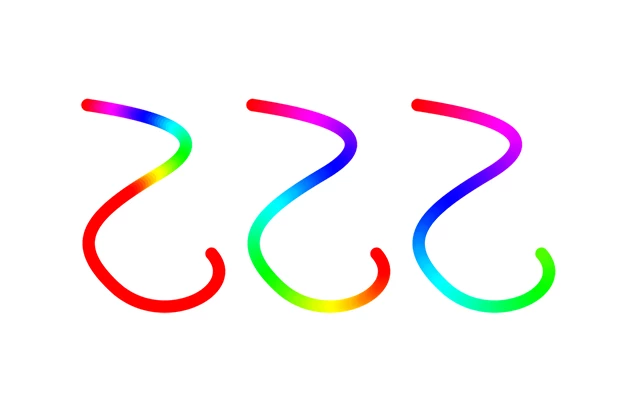
This topic has been closed for replies.

3 replies

Jeff Arola
Adobe Expert
January 10, 2022

Make your path as a Shape, use Gradient set to Radial as the Stroke.


Brainiac
January 10, 2022

You can also possibly get there with Liquify. Create a gradient layer, mask it to the approximate width, merge to a new layer, and use a large Liquify brush to make it the shape and size you want.

melissapiccone
Adobe Expert
January 10, 2022

The gradient won't follow the path. You can try a brush with color jitter. You can use a gradient on a path in Illustrator. In PS, if it's just one path, you can just airbrush it. You can also try a series of gradients that go from color to transparent on top of each other. 

Melissa Piccone | Adobe Trainer | Online Courses Author | Fine Artist