


This topic is closed to new replies. Start a new post to keep the conversation going.

13 replies

Stephen Marsh
Community Expert
Community Expert
December 5, 2021

Is this a commercial script? You have redacted the full name/title of the script screenshot, which leads me to believe that this is a working script and not just an interface mockup. There are too many unknowns. Do you know how to script?

Translate
zia5E08
zia5E08Author
Known Participant
December 14, 2021

i want to create script like this butt i dont no  how to do?

Translate
JJMack
Community Expert
Community Expert
December 5, 2021

If you want it to be cross platform you use Photoshop Javascript and ScriptUI for the dialog.

Translate
JJMack
c.pfaffenbichler
Community Expert
Community Expert
December 5, 2021

I guess one could even fancy it up and create a proper UXP Panel … 

Translate
JJMack
Community Expert
Community Expert
December 5, 2021

Do you really think Photoshop need more panels how many displays are you using?

Translate
JJMack
c.pfaffenbichler
Community Expert
Community Expert
December 5, 2021

What exactly is the Script supposed to produce? 

Shape Layers, plain pixel Layers, …? 

Is it supposed to work based on a Selection, a Layer, a Layer’s Bound Box, …? 


How experienced are you with JavaScript and Photoshop’s DOM and AM-code? 

Translate
Stephen Marsh
Community Expert
Community Expert
December 5, 2021

@zia5E08 wrote:

how to crate auto frames createrscripts like this 
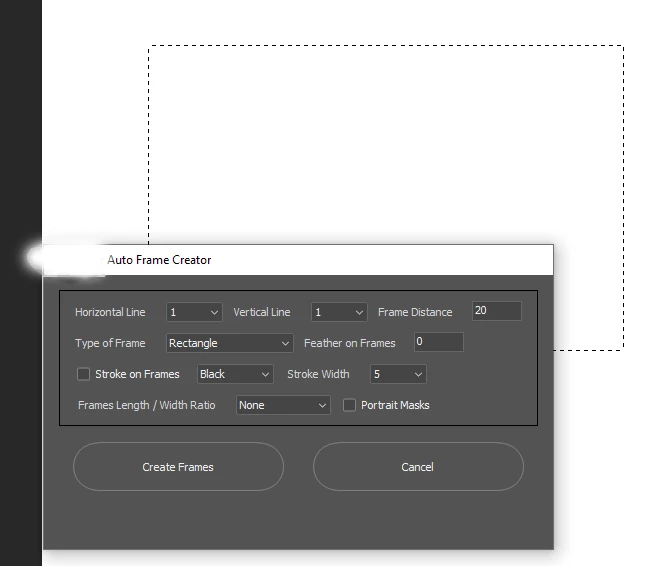


With the appropriate code!

Translate
