edwins30630614
Participant
February 8, 2016
해결됨

How to enable Paint Bucket instead of Material Drop Tool on Photoshop CC 2015?

  • February 8, 2016
  • 4 답변들
  • 56512 조회

wn votefavor

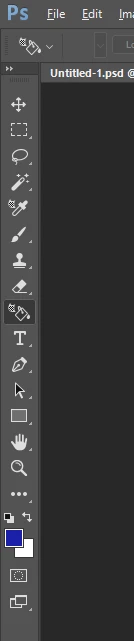
I'm using photoshop CC 2015 and I can't select Paint bucket anymore, only this annoying Material Drop Tool is shown instead of bucket in the Tools.

any ideas?

이 주제는 답변이 닫혔습니다.
최고의 답변: Trevor.Dennis

We seem to have a few posts like yours since CC2015.1.2.  The problem is, we can't tell if it is user error, and the posters are not using the fly-out tools, or if it is a fault.  I'm leaning towards the latter because I don't remember this happening before the last update.

So I Mohit's suggestion has not helpped,

Select and reset the Essentials Workspace

Click on the three dots at the bottom of the Toolbar

Click on Edit Toolbar and then on Restore defaults

If you are still in trouble, come back and we'll take it from there.

4 답변

Participant
May 16, 2021

Click this button here and select essentials. Your on 3d thats why u only have the 3d paint bucket thing

Participant
February 17, 2016
Trevor.Dennis
Community Expert
Community Expert
February 8, 2016

We seem to have a few posts like yours since CC2015.1.2.  The problem is, we can't tell if it is user error, and the posters are not using the fly-out tools, or if it is a fault.  I'm leaning towards the latter because I don't remember this happening before the last update.

So I Mohit's suggestion has not helpped,

Select and reset the Essentials Workspace

Click on the three dots at the bottom of the Toolbar

Click on Edit Toolbar and then on Restore defaults

If you are still in trouble, come back and we'll take it from there.

Mohit Goyal
Community Manager
Community Manager
February 8, 2016

Hi edwins,

Right/Ctrl+Click on the tool and change to Paint Bucket Or Change the Workspace to essential.

Let us know if that helps.

Regards,

Mohit