
nicolasp63994568
Participant
January 8, 2016
Answered

how to export my "action" in photoshop cc2015 to a other computer (PC) with the same version of photoshop ?

  • January 8, 2016
  • 2 replies
  • 65968 views

hello

I have a prob with my pc on w10, I want to reset it and I ask how to export my "action" in photoshop cc 2015 to my new installation of w10

Perhaps My preset are saved to the cloud but I'm not sure...

could you please answer me before I format my disk C:/ and i porecess to the new install.

thank you
This topic has been closed for replies.
Correct answer Chetna Srivastava

Hi nicolasp,

Follow below steps to save your actions :

  • open Photoshop and go to actions window
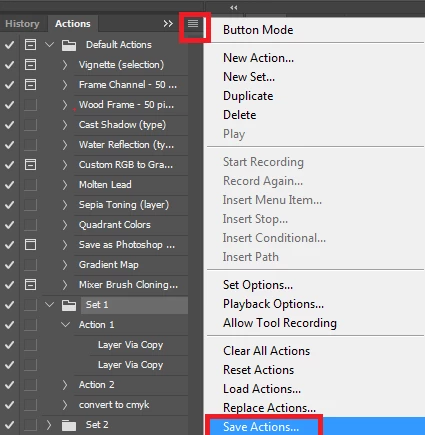
  • Select an action and click on the fly-out menu on top right and choose Save Action > select the location to be saved
  • You need to perform the same step for all actions that you have

If your actions are purchased ones, then they should be saved at the below location. You should check at this location :

C:\Program Files\ADOBE\Adobe Photoshop CC 2015\Presets\Actions

Regards,

Chetna

2 replies

nicolasp63994568
Participant
January 8, 2016

Hi Chetna thank for your answer


1°) the fonction "save action" is not actived (is in grey and not in black)

.

2°) I search on the web answers before i ask here on this forum

I allready read the same information as your answer.


I make some researchs in w10 explorer  like *.atn or forder with name "actions"

I found some folders but only with the default files (not with my files...)

I don't know were are my files..


thank you

Nicolas

nicolasp63994568
Participant
January 8, 2016

I undertand what was the problem

I click on each action but i have to click on the folder of actions...

It's allryght

thank you

Nicolas

Chetna SrivastavaCorrect answer
Participating Frequently
January 8, 2016

Hi nicolasp,

Follow below steps to save your actions :

  • open Photoshop and go to actions window
  • Select an action and click on the fly-out menu on top right and choose Save Action > select the location to be saved
  • You need to perform the same step for all actions that you have

If your actions are purchased ones, then they should be saved at the below location. You should check at this location :

C:\Program Files\ADOBE\Adobe Photoshop CC 2015\Presets\Actions

Regards,

Chetna