Mohamed Hameed21513110
Inspiring
November 24, 2021
해결됨

how to get all open documnet dimensions with one alert

  • November 24, 2021
  • 1 답변
  • 1892 조회

hi

I have a number of open files of different sizes and dimensions
I want a script code that brings me the dimensions and sizes of the open files and the color mode in just one alert
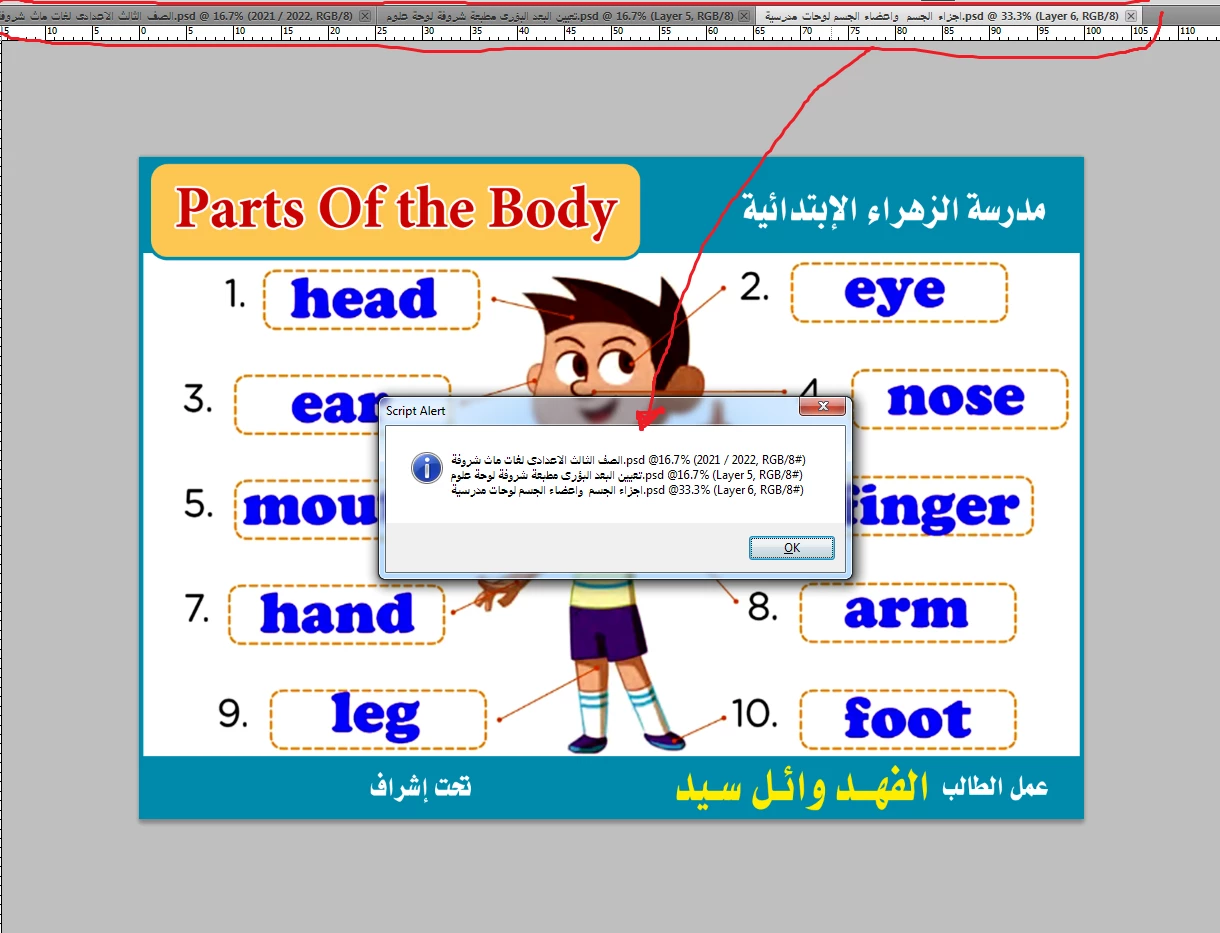
In the attached picture are the names of the files.. I want the sizes and color mode for these files


이 주제는 답변이 닫혔습니다.
최고의 답변: jazz-y

And I have another question
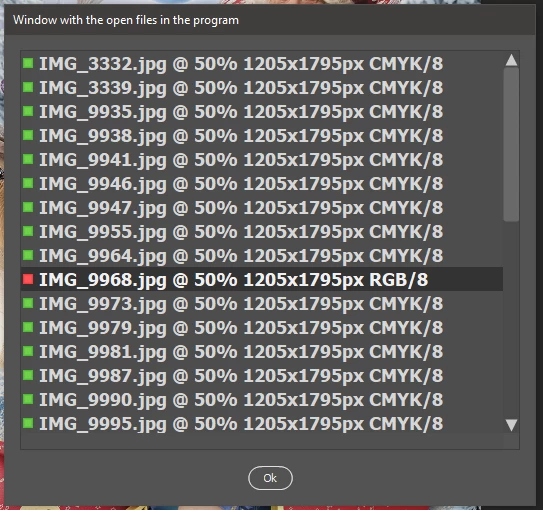
Is it possible to color a specific line inside the list box?
I am working on CMYK color files
I want to check all the list and if there is no color matching CMYK
It appears to me in a red color, for example, as a warning of an error

and Thank you very much for your interest

quote

Is it possible to color a specific line inside the list box?


l = w.add("listbox{preferredSize: [500, 400]}")


preferredSize: [WIDTH, HEIGHT]


#target photoshop

var s2t = stringIDToTypeID,
    t2s = typeIDToStringID,
    w = new Window("dialog {text: 'Window with the open files in the program'}"),
    l = w.add("listbox{preferredSize: [500, 400]}"),
    b = w.add("button {text:'Ok'}", undefined, undefined, { name: "ok" }),
    icoRed = "\u0089PNG\r\n\x1A\n\x00\x00\x00\rIHDR\x00\x00\x00\n\x00\x00\x00\n\b\x06\x00\x00\x00\u008D2\u00CF\u00BD\x00\x00\x00;IDAT\x18\u0095c\u00FCci\u00F3\u009F\u0081\b\u00C0\x02R\u00C2((\u0084W\u00E5\u00FF\u00F7\u00EF \n\u00C1\u0080\u0087\x17\u00BB\u00AA/\u009F\u00C1\x14\x131\u00D6\x0E\x15\u0085\b_C}\u0087W!(\u009C\u00F0\x02\x06\x06\x06\x00\x18\u00EF\fO\u0083\b\u00CC\u00FD\x00\x00\x00\x00IEND\u00AEB`\u0082",
    icoGreen = "\u0089PNG\r\n\x1A\n\x00\x00\x00\rIHDR\x00\x00\x00\n\x00\x00\x00\n\b\x06\x00\x00\x00\u008D2\u00CF\u00BD\x00\x00\x00=IDAT\x18\u0095c\u00F4\u00DEo\u00F8\u009F\u0081\b\u00C0\x02R\"\u00C6\u00C9\u008FW\u00E5\u00AB\u00EF\x1F!\nA@\u0090\u009D\x1B\u00AB\u00A2\u00F7?\u00BF\u0082i&b\u00AC\x1D*\n\u00E1\u00BE\u0086\u00F9\x0E\u00AFBP8\u00E1\x05\f\f\f\x000\x1F\x0E\x05z4V\u0094\x00\x00\x00\x00IEND\u00AEB`\u0082";


l.onClick = function () {
    if (l.items.length) {
        (r = new ActionReference()).putIndex(s2t('document'), l.selection + 1);
        (d = new ActionDescriptor()).putReference(s2t('null'), r);
        executeAction(s2t('select'), d, DialogModes.NO)
    }
}

l.onDoubleClick = function () { w.close() }

w.onShow = function () {
    l.graphics.font = "Tahoma-Bold:18";
    var len = getPropertyDesc('application', p = 'numberOfDocuments').getInteger(s2t(p));
    if (len) {
        for (var i = 1; i <= len; i++) {
            var res = getPropertyDesc('document', p = 'resolution', i).getDouble(s2t(p))
            l.add('item',
                ' ' + getPropertyDesc('document', p = 'title', i).getString(s2t(p)) +
                ' @ ' + Math.round(getPropertyDesc('document', p = 'zoom', i).getDouble(s2t(p)) * 100, 2) + '% ' +
                getPropertyDesc('document', p = 'width', i).getDouble(s2t(p)) * res / 72 + 'x' +
                getPropertyDesc('document', p = 'height', i).getDouble(s2t(p)) * res / 72 + 'px ' +
                (mode = t2s(getPropertyDesc('document', p = 'mode', i).getEnumerationValue(s2t(p))).replace(new RegExp('Color(Enum)?'), '')) + '/' +
                getPropertyDesc('document', p = 'depth', i).getInteger(s2t(p))
            )
            l.items[i - 1].image = mode == 'CMYK' ? icoGreen : icoRed
        }


        l.selection = getPropertyDesc('document', p = 'itemIndex').getInteger(s2t(p)) - 1
    }
}
w.show();

function getPropertyDesc(target, property, idx) {
    target = s2t(target);
    (r = new ActionReference()).putProperty(s2t('property'), s2t(property));
    idx ? r.putIndex(target, idx) : r.putEnumerated(target, s2t('ordinal'), s2t('targetEnum'));
    return executeActionGet(r);
}


It would be much better if all the requirements were originally specified in the first post. We're getting further and further away from the topic title.


1 답변

Legend
November 24, 2021


#target photoshop

s2t = stringIDToTypeID;
t2s = typeIDToStringID;

var len = getPropertyDesc('application', p = 'numberOfDocuments').getInteger(s2t(p)),
    result = [];

for (var i = 1; i <= len; i++) {
        var res = getPropertyDesc('document', p = 'resolution', i).getDouble(s2t(p))
    result.push(
        getPropertyDesc('document', p = 'title', i).getString(s2t(p)) +
        ' @ ' + Math.round(getPropertyDesc('document', p = 'zoom', i).getDouble(s2t(p)) * 100, 2) + '% ' +
        getPropertyDesc('document', p = 'width', i).getDouble(s2t(p)) * res / 72 + 'x' +
        getPropertyDesc('document', p = 'height', i).getDouble(s2t(p)) * res / 72 + 'px ' +
        t2s(getPropertyDesc('document', p = 'mode', i).getEnumerationValue(s2t(p))).replace(new RegExp('Color(Enum)?'), '') + '/' +
        getPropertyDesc('document', p = 'depth', i).getInteger(s2t(p))
    )
}
alert(result.join('\n'))

function getPropertyDesc(target, property, idx) {
    target = s2t(target);
    (r = new ActionReference()).putProperty(s2t('property'), s2t(property));
    idx ? r.putIndex(target, idx) : r.putEnumerated(target, s2t('ordinal'), s2t('targetEnum'));
    return executeActionGet(r);
}


Mohamed Hameed21513110
Inspiring
November 24, 2021

thnak you mr.jazz-y

Is it possible to have a window or screen with the open files in the program and a checkbox next to it?
When choosing a file, it will go directly to it
Because I work on too many files

Legend
November 24, 2021


#target photoshop

var s2t = stringIDToTypeID,
    t2s = typeIDToStringID,
    w = new Window("dialog {text: 'Window with the open files in the program'}"),
    l = w.add("listbox{preferredSize: [500, 400]}"),
    b = w.add("button {text:'Ok'}", undefined, undefined, { name: "ok" });

l.onClick = function () {
    if (l.items.length) {
        (r = new ActionReference()).putIndex(s2t('document'), l.selection + 1);
        (d = new ActionDescriptor()).putReference(s2t('null'), r);
        executeAction(s2t('select'), d, DialogModes.NO)
    }
}

l.onDoubleClick = function () { w.close() }

w.onShow = function () {
    var len = getPropertyDesc('application', p = 'numberOfDocuments').getInteger(s2t(p));
    if (len) {
        for (var i = 1; i <= len; i++) {
            var res = getPropertyDesc('document', p = 'resolution', i).getDouble(s2t(p))
            l.add('item',
                getPropertyDesc('document', p = 'title', i).getString(s2t(p)) +
                ' @ ' + Math.round(getPropertyDesc('document', p = 'zoom', i).getDouble(s2t(p)) * 100, 2) + '% ' +
                getPropertyDesc('document', p = 'width', i).getDouble(s2t(p)) * res / 72 + 'x' +
                getPropertyDesc('document', p = 'height', i).getDouble(s2t(p)) * res / 72 + 'px ' +
                t2s(getPropertyDesc('document', p = 'mode', i).getEnumerationValue(s2t(p))).replace(new RegExp('Color(Enum)?'), '') + '/' +
                getPropertyDesc('document', p = 'depth', i).getInteger(s2t(p))
            )
        }
        l.selection = getPropertyDesc('document', p = 'itemIndex').getInteger(s2t(p)) - 1
    }
}
w.show();

function getPropertyDesc(target, property, idx) {
    target = s2t(target);
    (r = new ActionReference()).putProperty(s2t('property'), s2t(property));
    idx ? r.putIndex(target, idx) : r.putEnumerated(target, s2t('ordinal'), s2t('targetEnum'));
    return executeActionGet(r);
}