
Participant
May 1, 2017
Answered

how to get photo shop to display tool names when mouse hovers over them

  • May 1, 2017
  • 1 reply
  • 4433 views

I know that all adobe softwares have this feature. It's like a preference that you turn on, so that when your mouse hovers over a tool, or option, a small tip will be hanging off the mouse displaying the tool's name or the quick key or something like a tip. Please tell me how to turn this feature on in photoshop. Thanks
    This topic has been closed for replies.
    Correct answer Akash Sharma

    Hi jzhen84,

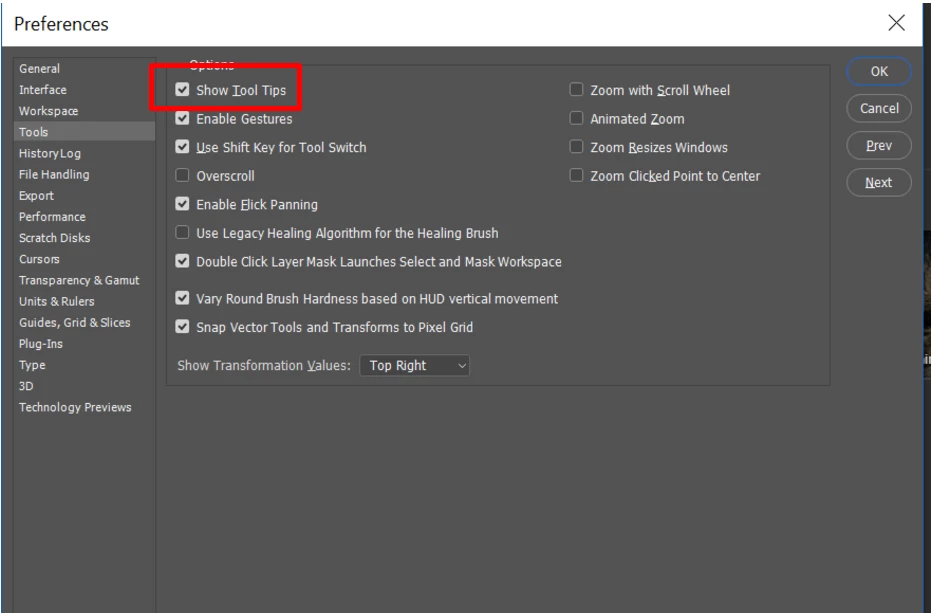
    Please ensure that the option to show Tooltips in Photoshop preferences is enabled.

    You can view information about any tool by positioning the pointer over it. The name of the tool appears in a tool tip below the pointer.

    Hope that helps.

    Thanks,

    Akash

    1 reply

    Akash Sharma
    Akash SharmaCorrect answer
    Legend
    May 1, 2017

    Hi jzhen84,

    Please ensure that the option to show Tooltips in Photoshop preferences is enabled.

    You can view information about any tool by positioning the pointer over it. The name of the tool appears in a tool tip below the pointer.

    Hope that helps.

    Thanks,

    Akash

    jzhen84Author
    Participant
    May 1, 2017

    how come my preferences don't have tools ?

    jzhen84Author
    Participant
    May 3, 2017

    Look under Photoshop>Preferences>Interface>Show Tool Tips

    You probably don't have the latest photoshop version 2017.1

    In your photoshop look under Help>System Info and the top line says the version.

    What version of mac os x are you using?


    actually, i got it, it just needed to be reactivated. thanks a lot man