
Known Participant
August 8, 2024
Question

how to get the placed layer details

  • August 8, 2024
  • 5 replies
  • 1017 views

i have psd file in that one of the layer i have attached placed which is .png file
how to get those details
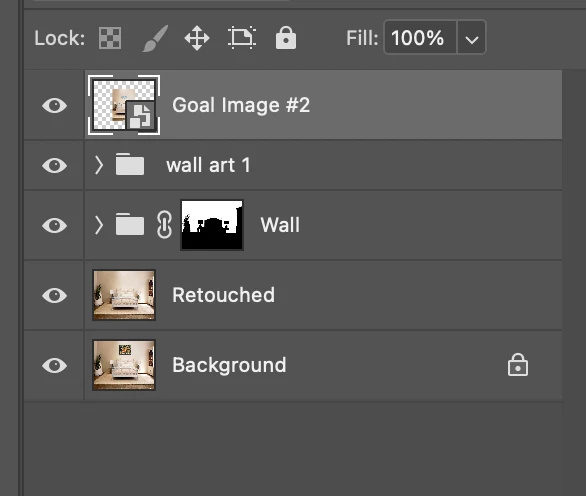
 here in the above screenshot first layer contains the placed layer , when i double click one png file will open.
so how get that png file details, like width,height,name and image data.
and that placed layer details where they will save meaning in which block they will save the placed layer data.
thank you

This topic has been closed for replies.

5 replies

c.pfaffenbichler
Community Expert
Community Expert
August 9, 2024

As for the name: 

// based on code by michael l hale;
// 2024, use it at your own risk;
#target photoshop
if (app.documents.length > 0) {
var ref = new ActionReference();
ref.putEnumerated( charIDToTypeID("Lyr "), charIDToTypeID("Ordn"), charIDToTypeID("Trgt") ); 
var layerDesc = executeActionGet(ref);
var soDesc = layerDesc.getObjectValue(stringIDToTypeID('smartObject'));
alert (soDesc.getString(stringIDToTypeID('fileReference')));
};
Mahesh12Author
Known Participant
August 10, 2024

@c.pfaffenbichler  thanks i'll  check this.

in the above screenshot  the placed layer details where it is saved.


for example in th second screenshot i have provided .  when i double click one jpeg file will open.and that jpeg file contains path.

the  third image is the path that jpeg file contains.
how to retrieve this path point and in the photoshop file format structure where that placed layer path point details are stored.


c.pfaffenbichler
Community Expert
Community Expert
August 10, 2024

I doubt that this is possible with ESTK Scripting without opening the Smart Object. 

c.pfaffenbichler
Community Expert
Community Expert
August 9, 2024

»here in the above screenshot first layer contains the placed layer , when i double click one png file will open.
so how get that png file details, like width,height,name and image data.«

What do you mean by »image data«? 


// based on code by michael l hale;
// 2024, use it at your own risk;
#target photoshop
if (app.documents.length > 0) {
var ref = new ActionReference();
ref.putEnumerated( charIDToTypeID("Lyr "), charIDToTypeID("Ordn"), charIDToTypeID("Trgt") ); 
var layerDesc = executeActionGet(ref);
var soDesc = layerDesc.getObjectValue(stringIDToTypeID('smartObject'));
var soMoreDesc = layerDesc.getObjectValue(stringIDToTypeID('smartObjectMore'));
checkDesc2 (soMoreDesc.getObjectValue(stringIDToTypeID("size")));
};
////// based on code by michael l hale //////
function checkDesc2 (theDesc) {
var c = theDesc.count;
var str = '';
for(var i=0;i<c;i++){ //enumerate descriptor's keys
	str = str + 'Key '+i+' = '+typeIDToStringID(theDesc.getKey(i))+': '+theDesc.getType(theDesc.getKey(i))+'\n'+getValues (theDesc, i)+'\n';
	};
alert("desc\n\n"+str);
};
////// check //////
function getValues (theDesc, theNumber) {
switch (theDesc.getType(theDesc.getKey(theNumber))) {
case DescValueType.ALIASTYPE:
return theDesc.getPath(theDesc.getKey(theNumber));
break;
case DescValueType.BOOLEANTYPE:
return theDesc.getBoolean(theDesc.getKey(theNumber));
break;
case DescValueType.CLASSTYPE:
return theDesc.getClass(theDesc.getKey(theNumber));
break;
case DescValueType.DOUBLETYPE:
return theDesc.getDouble(theDesc.getKey(theNumber));
break;
case DescValueType.ENUMERATEDTYPE:
return (typeIDToStringID(theDesc.getEnumerationValue(theDesc.getKey(theNumber)))+"_"+typeIDToStringID(theDesc.getEnumerationType(theDesc.getKey(theNumber))));
break;
case DescValueType.INTEGERTYPE:
return theDesc.getInteger(theDesc.getKey(theNumber));
break;
case DescValueType.LISTTYPE:
return theDesc.getList(theDesc.getKey(theNumber));
break;
case DescValueType.OBJECTTYPE:
return (theDesc.getObjectValue(theDesc.getKey(theNumber))+"_"+typeIDToStringID(theDesc.getObjectType(theDesc.getKey(theNumber))));
break;
case DescValueType.REFERENCETYPE:
return theDesc.getReference(theDesc.getKey(theNumber));
break;
case DescValueType.STRINGTYPE:
return theDesc.getString(theDesc.getKey(theNumber));
break;
case DescValueType.UNITDOUBLE:
return (theDesc.getUnitDoubleValue(theDesc.getKey(theNumber))+"_"+typeIDToStringID(theDesc.getUnitDoubleType(theDesc.getKey(theNumber))));
break;
default: 
break;
};
};


Mahesh12Author
Known Participant
August 10, 2024

thanks @c.pfaffenbichler  

Stephen Marsh
Community Expert
Community Expert
August 8, 2024

@Mahesh12 


To edit/open a Photoshop-compatible raster Smart Object layer/file (assumed as placed or embedded):


if (app.activeDocument.activeLayer.kind == LayerKind.SMARTOBJECT) {
    app.runMenuItem(stringIDToTypeID('placedLayerEditContents'));
}


You can then use the document class properties:


https://theiviaxx.github.io/photoshop-docs/Photoshop/Document.html


alert("Doc width: " + app.activeDocument.width);

// or

alert("Doc width: " + app.activeDocument.width.value);

// or

var savedRuler = app.preferences.rulerUnits;
app.preferences.rulerUnits = Units.PIXELS;
alert("Doc height: " + app.activeDocument.height.value);
app.preferences.rulerUnits = savedRuler;

// or

alert("Doc height: " + app.activeDocument.height.as('px'));


I believe that the code from @c.pfaffenbichler directly retrieved the properties of the SO without opening it.

Stephen Marsh
Community Expert
Community Expert
August 8, 2024