Known Participant
February 28, 2022
Answered

How to keep only the outline of an object

  • February 28, 2022
  • 5 replies
  • 47291 views

Hello everyone, I am doing a project on photoshop and I imported an image there, I would like to create an outline for it and delete the image to keep only the outline. can someone please help me.

Correct answer melissapiccone

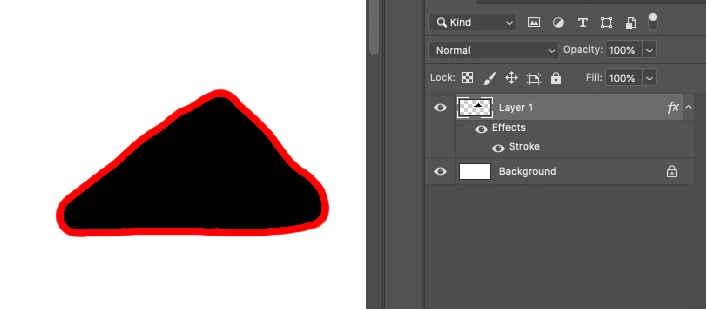
There is a super easy way to do this - but I'm not exactly sure of what you are trying to do. If you have a subject on a layer with no background, you can add a layer style of a stroke around it. Then for the layer, set the fill to 0. 
5 replies

Participant
February 3, 2025

Thank yopu, this is perfect, however I would need to slow the video down so I can follow the steps, or get the directions in text form . How can I do that?

c.pfaffenbichler
Community Expert
Community Expert
February 3, 2025

You can download the gif and open it in Photoshop. 

Nancy OShea
Community Expert
Community Expert
February 28, 2022

Create a new Layer above your image layer.

Trace or draw outline on a new layer. 

When done disable or delete bottom layer.  See screenshot.


Nancy O'Shea— Product User & Community Expert
Trevor.Dennis
Community Expert
Community Expert
March 1, 2022

Nancy, I was going to describe your images as very 'Andy Warhol' but I thought I'd better check, and his Marilyn Monroe images are not what I was remembering.  I actually like yours better than his horrible use of colour, but we are not allowed to question _anything_ labelled as art nowadays.


Nancy OShea
Community Expert
Community Expert
March 1, 2022

😁


Nancy O'Shea— Product User & Community Expert
melissapiccone
Community Expert
melissapicconeCommunity ExpertCorrect answer
Community Expert
February 28, 2022

There is a super easy way to do this - but I'm not exactly sure of what you are trying to do. If you have a subject on a layer with no background, you can add a layer style of a stroke around it. Then for the layer, set the fill to 0. 

Melissa Piccone | Adobe Trainer | Online Courses Author | Fine Artist
Conrad_C
Community Expert
Community Expert
March 1, 2022

If you want to use Melissa’s method but you need to cut out the subject first, start by choosing the Select > Subject command, so that you can avoid as much manual selection as possible. Does the demo below do what you want?


c.pfaffenbichler
Community Expert
Community Expert
February 28, 2022

Could you please post screenshots with the pertinent Panels (Toolbar, Layers, Options Bar, …) visible? 

Ares Hovhannesyan
Community Expert
Community Expert
February 28, 2022

You can use new Content Aware Pen Tool https://youtu.be/sFvo9-DMlR0 or you can make selection and then convert it to pats from the Paths pannel. That is more easy.