


Participant
November 18, 2020
해결됨

how to key out the background on many layers at once?

  • November 18, 2020
  • 2 답변들
  • 620 조회

I have 163 layers that are frames of an object spinning on a black background. I want to make a transparent animated gif with them but I need to remove the black background. Is there some way I can do this on all the frames at once and not one by one?
이 주제는 답변이 닫혔습니다.
최고의 답변: Theresa J

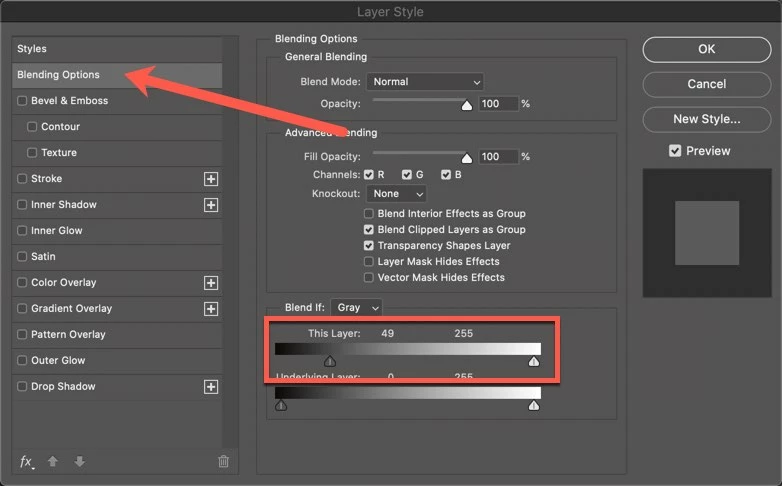
You can do it pretty quick with a layer blending option. Select the first layer and apply a layer blend option like shown in the screen capture. You may have to adjust the settings to work with your image. Then copy the layer style from this layer, select all the remaining layers and paste the layer style.

2 답변

Theresa J
Community Expert
Theresa JCommunity Expert답변
Community Expert
November 18, 2020

You can do it pretty quick with a layer blending option. Select the first layer and apply a layer blend option like shown in the screen capture. You may have to adjust the settings to work with your image. Then copy the layer style from this layer, select all the remaining layers and paste the layer style.

JJMack
Community Expert
Community Expert
November 18, 2020

If the sinning object has no black edge areas and no internal holes where the black background would show through and the Background is black or close to black   You should be able to record an action that uses the Magic wand on the top left corner to select the black background in continuous mode with some tolerance. Clear the selected background and the target the next layer. Assign a F key to play this action and tap that F key 162 times. Yes one layer are a time if we are not god.

JJMack
JJMack
Community Expert
Community Expert
November 18, 2020

If you can walk on water and turn water into wine that would be one black be gone.


You may be able to automate the black removal process with Photoshop tools it depends on how well you can use Photoshop.


Or if all 163 layer have exactly the same black background pixel by pixel group the layers and mask the groups black background. However it sounds like there is a spinning object so the backgroind is not constant.

JJMack