
Inspiring
April 6, 2024
Question

how to make part of a 3-color gradient transparent?

  • April 6, 2024
  • 3 replies
  • 8612 views

i'm trying to make a gradient where the color in the middle is transparent. however i cannot find a way do do that. i've tried using the color picker, using the gradient tab at the right side of the screen, to no avail. is it possible to do this?
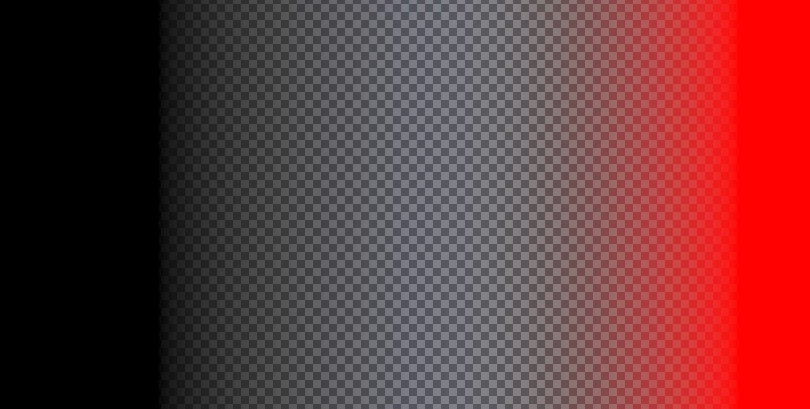
this is what i'm trying to make it look like. i just need to make it into one whole gradient to be efficient


This topic has been closed for replies.

3 replies

Conrad_C
Community Expert
Community Expert
April 6, 2024

If it’s a Gradient Fill layer, when that layer is selected it should be possible to adjust its properties using the Properties panel, as you see in the picture below. In this way you don’t have to open a stack of dialog boxes; that’s why they recently made this improvement to make the options of more layer types immediately accessible in the Properties panel. In the picture below, you can see that I added a middle opacity stop set to 0% opacity.


One thing that can confuse people is that the option they want, such as Opacity Controls, might be available in the Properties panel, but not visible. When this happens, make sure the options group you want is both scrolled into view (in case it’s hidden further down), and if necessary, also expanded (if it’s collapsed).


That’s the reason my screen shot is so tall. If it was shorter, Opacity Options would have been covered by the Layers panel unless I scrolled the Properties panel to bring the Opacity Options into view.


If the gradient was applied another way, it might be different. For example, you’d edit a Gradient Overlay effect in the Layer Style dialog box.

c.pfaffenbichler
Community Expert
Community Expert
April 6, 2024

Maybe it might be useful to set additional Color Stops to minimize the color gradient relative to the transparency gradient. 

Trevor.Dennis
Community Expert
Community Expert
April 6, 2024

Good idea.  That would stop any bleed past the center.

Trevor.Dennis
Community Expert
Community Expert
April 6, 2024

It's definitely a bit convoluted now, so unless I am not seeing an easier path, we have to, from left to right:


Select the new gadient tool, and run a gradient across the image.

Double click the gradient in the layers panel, which opens the Gradient Fill panel.

Double click the gradient in the Gradient Fill panel, which 'finally' opens the Gradient editor.

I started with a simple foreground to background colour gradient, because I wanted as close to a clean state to start with.

To adjust opacity, you need to add a new swatch 'above' the gradient, which is the white square I have highlighted in yellow.


Note that the transparent area is most of the image in the above screen shot. To make the transparent strip more narrow, add another black swatch on the left, and red on the right. The colour swatches go below the gradient, but to adjust opacity, place swatches above the gradient.


OK, that's the new way, but you can do it a lot more easily with the Classic Gradient.

Select the gradient tool, and Classic gradient in the Options bar.

Use the gradients drop down, and select Foreground to Transparent.

Make a new layer

With your first colour selected, drag the gradient from one side of the layer to the other.

Note you can hold the Shift key to force the gradient to be horiziontal.

Now select the other colour and sweep a gradient the other way.


Foreground to Transparent allows you to continuously add to the layer, where as foreground to background overwrites the previous gradient.


For instance:


The new gradient tool is powerful, but definitely clunky.


Semaphoric
Community Expert
Community Expert
April 6, 2024


The new gradient tool is powerful, but definitely clunky.


By @Trevor.Dennis


The new gradient tool  frustrates me no end. It's so powerful, but it really should be two separate tools. Editing gradients via the "classic gradient editor" and the Properties panel is different enough (for me at least) to require mental gear-shifting from one to the other. You can, at least, invoke the Classic editor by double clicking on the Gradient Fill thumbnail to bring up the Gradient Fill dialog, and clicking on the gradient preview.


And they still haven't fixed the Foreground to Transparent bug.