
Participating Frequently
April 23, 2025
Answered

How to recreate this glowing distorted letter effect in Photoshop?

  • April 23, 2025
  • 1 reply
  • 320 views

Hi everyone,

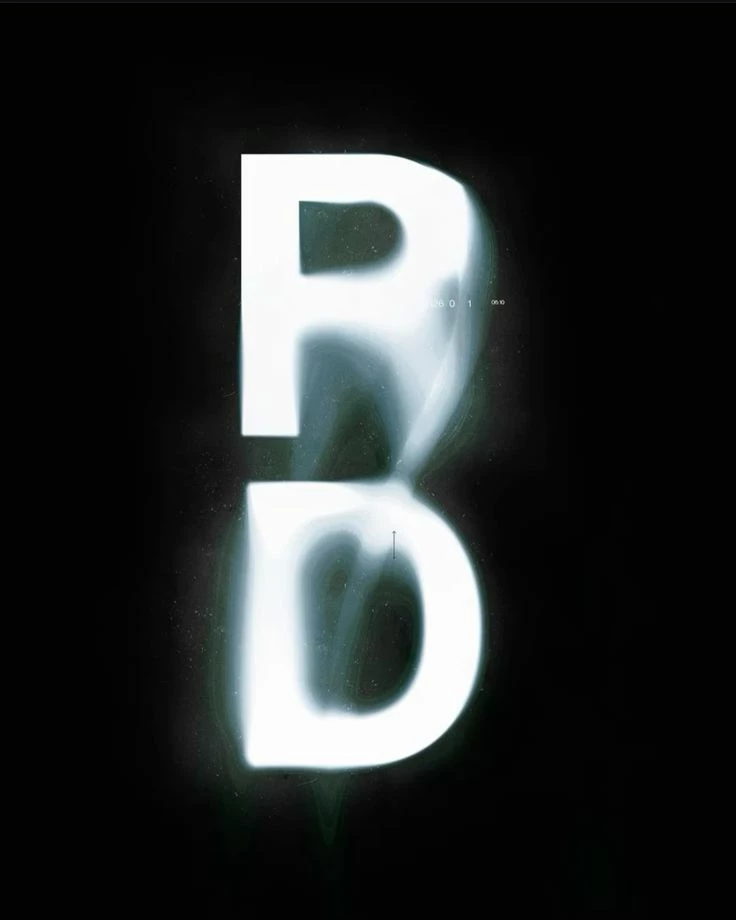
I came across this visual (attached) featuring a stacked “R” and “D” with a really striking glow and distortion effect — almost like the letters are lit from within, with a smoky or liquid-like blur in between. The glow seems soft yet intense, and there’s a smooth transition where the two letters almost merge through light and shadow.

I’d love to recreate this kind of effect in Adobe Photoshop (or After Effects if that’s better). Could anyone point me in the right direction? I’m especially curious about:

  • The glowing aura around the letters

  • The misty/smoky blending between characters

  • Any distortion or displacement techniques that could help achieve the “melting” transition

  • Thanks in advance for any advice or tutorials you can recommend!
Correct answer Srishti Bali

Hi @joe_1137,


Thanks for reaching out! It looks like this effect can be created using a combination of Motion Blur, Gaussian Blur, and some distortion with the Liquify tool. Here are a couple of quick tutorials that might help:


https://adobe.ly/3GnXGkd
https://adobe.ly/4jFXF9z


Let me know if this helps or if you need any further assistance!


Regards,

Srishti

1 reply

Srishti Bali
Community Manager
Srishti BaliCommunity ManagerCorrect answer
Community Manager
April 23, 2025

Hi @joe_1137,


Thanks for reaching out! It looks like this effect can be created using a combination of Motion Blur, Gaussian Blur, and some distortion with the Liquify tool. Here are a couple of quick tutorials that might help:


https://adobe.ly/3GnXGkd
https://adobe.ly/4jFXF9z


Let me know if this helps or if you need any further assistance!


Regards,

Srishti