Participant
August 15, 2011
Answered

How to remove yellow color from a photo?

  • August 15, 2011
  • 4 replies
  • 56590 views

I need to remove yellow color from a photo because it's too saturated. How should I do?

    Correct answer Conrad_C

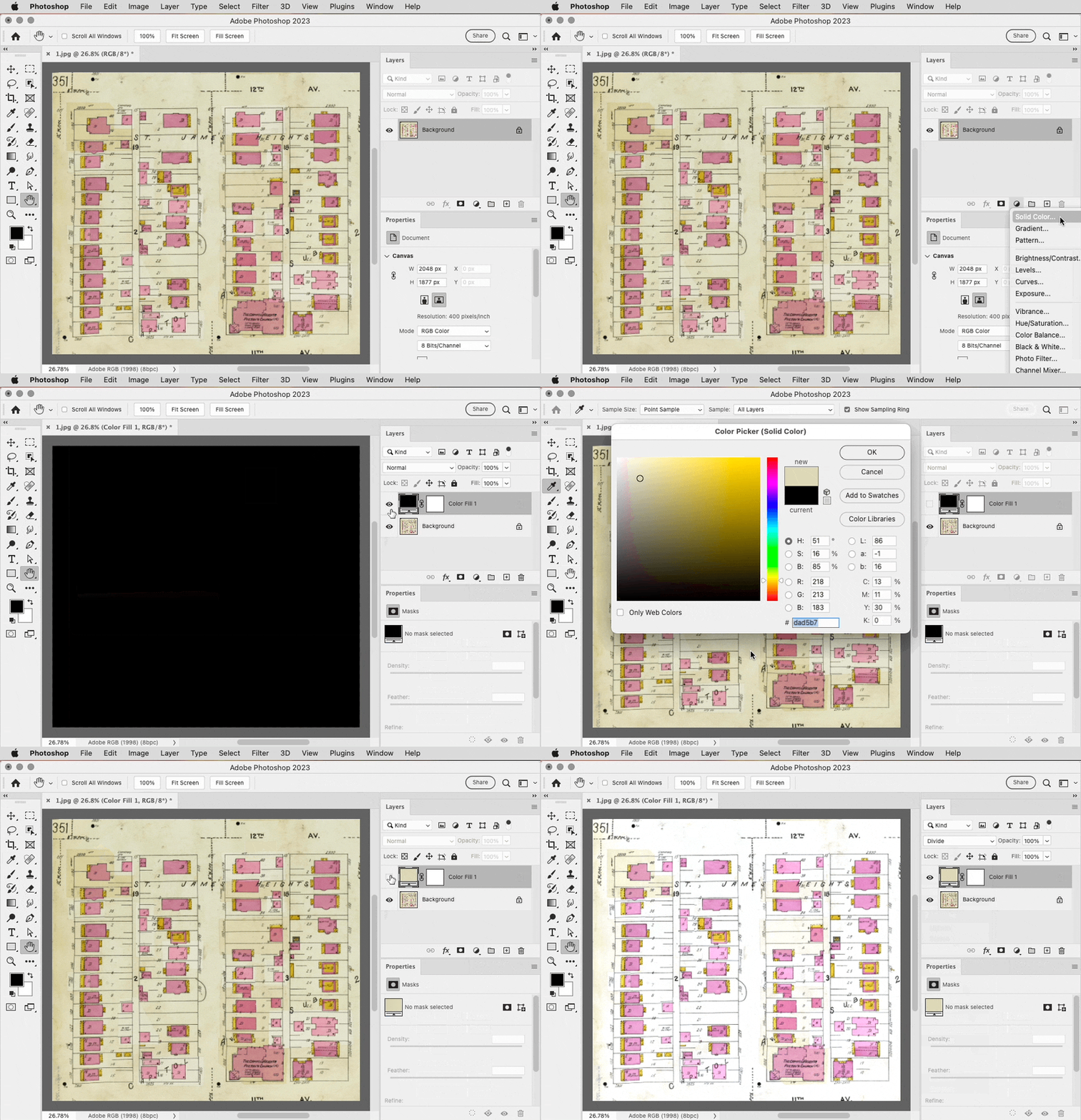
    Have you tried the interesting technique of adding a Solid Color fill layer, setting its color by sampling the yellow you want to remove, then setting the blending mode of the Solid Color fill layer to Divide? Demo below, using the file you posted.


    You can see there are still some areas that are yellow. They weren’t removed because that yellow is not similar enough to the sampled yellow color. You can remove those by adding another Solid Color fill layer that samples that variation of yellow, and set it to the Divide blending mode too.

    4 replies

    Jeff Arola
    Community Expert
    Community Expert
    February 2, 2023

    Something else you try is to use a Curves or Levels Adjustment Layer and use the White Point eyedropper to click on the darkest yellow color.


    Participating Frequently
    February 2, 2023
    Thanks.
    Conrad_C
    Community Expert
    Conrad_CCommunity ExpertCorrect answer
    Community Expert
    February 2, 2023

    Have you tried the interesting technique of adding a Solid Color fill layer, setting its color by sampling the yellow you want to remove, then setting the blending mode of the Solid Color fill layer to Divide? Demo below, using the file you posted.


    You can see there are still some areas that are yellow. They weren’t removed because that yellow is not similar enough to the sampled yellow color. You can remove those by adding another Solid Color fill layer that samples that variation of yellow, and set it to the Divide blending mode too.

    Participating Frequently
    February 2, 2023

    Thanks!!

    Simmer1
    Community Expert
    Community Expert
    February 1, 2023

    A colour balance Adjustment Layer increasing the blues usualy works:

    Participating Frequently
    February 2, 2023

    I didn't scan it . . . it was done by the Denver Public Library. They did a previous scan for me and also printed it and it was great. Unfortunately, they stop their printing services,

    Participating Frequently
    February 2, 2023

    My photo of the page was much less yellow.


    Noel Carboni
    Legend
    August 15, 2011

    What format is the photo in? If it's a raw file you may be able to achieve quite a good result with the dropper tool.

    If it's just an image that you have in Photoshop proper, there are several things you could try...

    1.  You could do Image - Adjust - Curves, then select the middle "gray point" dropper and click on something that's supposed to be neutral gray.

    2.  You could do Image - Adjust - Hue/Saturation then select Yellows and reduce the saturation.

    3.  You could convert it to CMYK, then do Image - Adjust - Curves and drop the Y curve a bit, then convert back to RGB.

    Post a representative part of the image here and you'll likely get even more direct advice.

    -Noel

    Participant
    August 15, 2011

    thank you very much for your help