


Inspiring
August 1, 2018
해결됨

How to set default paragaph layout to "Latin" rather than "Middle Eastern" in Photoshop ME version?

  • August 1, 2018
  • 1 답변
  • 2041 조회

I have Photoshop CC 2018 installed with ME features because I work with right-to-left languages from time to time and want to have that capability available when needed.

However, most of the time I work with left-to-right languages.

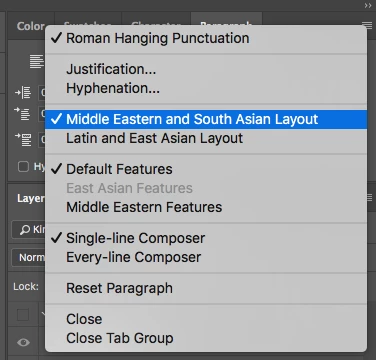
When ME version is installed, the paragraph layout (in Paragraph panel menu) is set to Middle Eastern and South Asian Layout

Is it possible to keep the ME version installed but set the default paragraph layout to Latin and East Asian Layout?
Thanks!
    이 주제는 답변이 닫혔습니다.
    최고의 답변: gener7

    If you checkmark "Latin and East Asian Layout", it should be a "sticky" choice and stay that way until you change it.

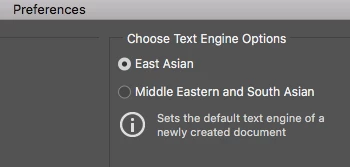
    If for some reason it does not, go into Edit > Preferences > Type and change the Type engine to East Asian and restart Photoshop.

    Then change to Middle Eastern when you need it.

    1 답변

    gener7
    Community Expert
    gener7Community Expert답변
    Community Expert
    August 2, 2018

    If you checkmark "Latin and East Asian Layout", it should be a "sticky" choice and stay that way until you change it.

    If for some reason it does not, go into Edit > Preferences > Type and change the Type engine to East Asian and restart Photoshop.

    Then change to Middle Eastern when you need it.

    aaddiiooss작성자
    Inspiring
    August 3, 2018

    That worked!

    Thanks

    gener7
    Community Expert
    Community Expert
    August 3, 2018

    Good. Glad that was resolved.

    Gene