


Participating Frequently
March 4, 2022
Answered

How to set the duration of individual GIF frames?

  • March 4, 2022
  • 1 reply
  • 2752 views

Using Photoshop 2020 v 21.2.2 (which I have Never used),
Is there a way to dictate the Duration of each frame in a GIF?
In a GIF of 20 frames, I want the 1st frame to show for 3 seconds,
then 18 frames of 0.1 seconds each, then the last frame at 3 seconds.
How to do this, please?
Thanks, people.
Mark
This topic has been closed for replies.
Correct answer Bojan Živković11378569

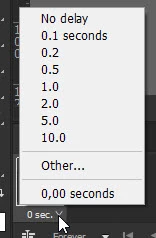
It is easy doable from Window > Timeline. Click at bottom right corner of frame in Timeline then choose. 

Select multiple frames then click the same spot on any frame and set duration for all selected frames.

1 reply

Bojan Živković11378569
Community Expert
Community Expert
March 4, 2022

It is easy doable from Window > Timeline. Click at bottom right corner of frame in Timeline then choose. 

Select multiple frames then click the same spot on any frame and set duration for all selected frames.

Participating Frequently
March 4, 2022

EXCELLENT !   Thanks very much for that simple solution, Bojan.