Thank you for sharing your feedback. We appreciate you taking the time to let us know your thoughts.
This is an older thread, and we're now tracking this request in a newer discussion. To keep all feedback in one place, we're closing this thread for further replies.
If you'd like to continue the conversation or add any additional feedback, please do so here:
That said, Photoshop doesn't currently have a global "AI Off" or "AI-Free" setting.
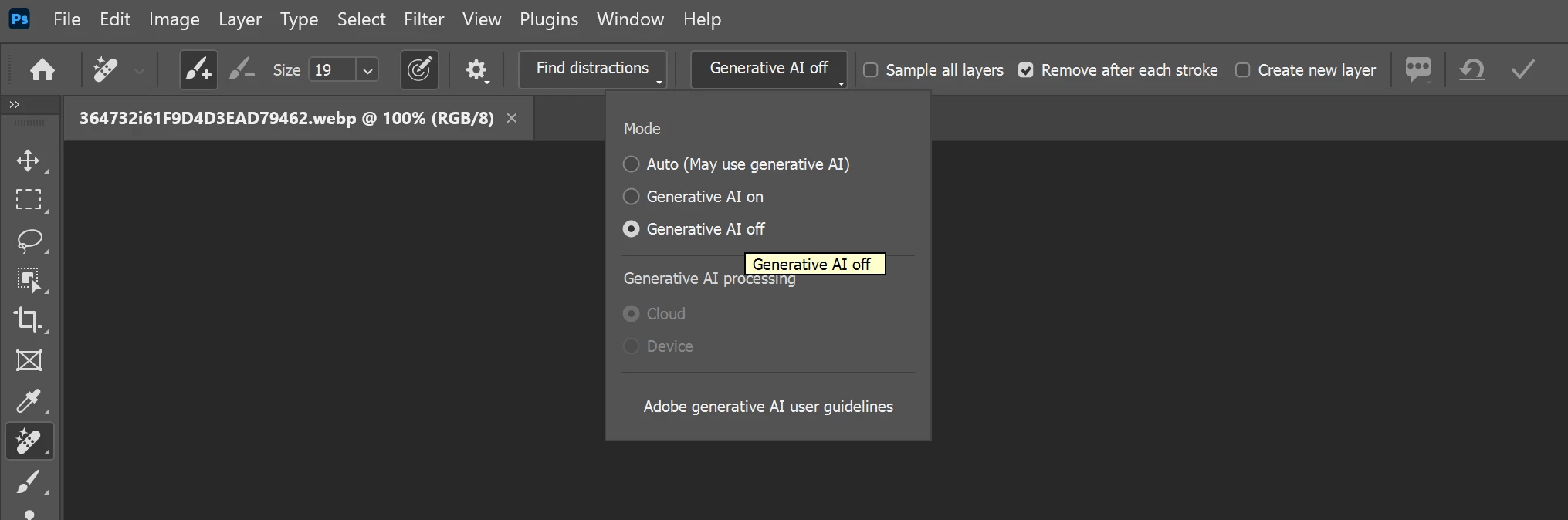
However, for certain tools that support both AI-assisted and traditional workflows, you can choose not to use Generative AI. For example, with the Remove Tool:
Select the Remove Tool.
In the Options bar at the top of the workspace, locate the Mode or Generative AI setting.
Set it to Generative AI Off to use the non-generative removal method instead.
Please note that this setting is tool-specific, not application-wide. Features such as Generative Fill, Generative Expand, and Generate Image are AI-based features, but they are optional and can simply be left unused if you prefer a non-AI workflow.
Thanks, Srishti Bali | Community & Engagement Strategist, Digital Imaging | Adobe
Thank you for sharing your feedback. We appreciate you taking the time to let us know your thoughts.
This is an older thread, and we're now tracking this request in a newer discussion. To keep all feedback in one place, we're closing this thread for further replies.
If you'd like to continue the conversation or add any additional feedback, please do so here:
That said, Photoshop doesn't currently have a global "AI Off" or "AI-Free" setting.
However, for certain tools that support both AI-assisted and traditional workflows, you can choose not to use Generative AI. For example, with the Remove Tool:
Select the Remove Tool.
In the Options bar at the top of the workspace, locate the Mode or Generative AI setting.
Set it to Generative AI Off to use the non-generative removal method instead.
Please note that this setting is tool-specific, not application-wide. Features such as Generative Fill, Generative Expand, and Generate Image are AI-based features, but they are optional and can simply be left unused if you prefer a non-AI workflow.
Translate
Thanks, Srishti Bali | Community & Engagement Strategist, Digital Imaging | Adobe
Just a bit of an 'update' to this thread. They have given the option to completely turn off AI in the Remove Tool. I'm not sure exactly when this was added, but it's like this in version 26.3.0. You can toggle it to Auto, AI On, or AI Off. The AI Off will always use Content Aware Fill (like it did originally) rather than Generative Fill.
A couple of replies have suggested “just don’t use those features.” But there is a flaw in that approach, in that there may actually be very few Photoshop users who can accurately list which specific features use generative AI.
Recently someone replied to this thread:
The Remove Tool is also AI? I didn't realize that. Guess that's one more tool I'm going to have to avoid going forward.
The newest Photoshop users will have zero ability to precisely list which features use generative AI, and intermediate Photoshop users have a fair chance of not accurately separating out which features are:
Content-Aware
AI / Machine learning / Neural
Generative AI
Not AI, just clever programming
But the third type of feature is the controversial one! It’s generative AI that is causing great concern in rights/legal/ethical/creative communities. It is that specific class of features that many want to avoid or disable and currently there is no effective way to, and also no simple way to know which exact list of features someone is supposed to “just avoid using.”
If someone does post a current list, that will be very helpful but…based on the rate of progress in just the last few months, the scope of generative AI features may change quickly as an application gets its continuous updates. There may be several more in a few months, but will they be a tool, an option in a tool, a menu command, the context bar? This is the dilemma for the users who may be required to not use generative AI:
How does one avoid unintentionally introducing generative AI, in an application where generative AI might be anywhere and is constantly being added in new ways?
It’s generative AI that is causing great concern in rights/legal/ethical/creative communities. It is that specific class of features that many want to avoid or disable and currently there is no effective way to, and also no simple way to know which exact list of features someone is supposed to “just avoid using.”
My own pragmatic approach is that if you pull out the internet cable and it doesn't work, then it's murky waters. Those I never use.
With one exception, as I've noted before: the Remove tool. It depends how you use it. If you use it for large areas, then it's ai-generated content. If you use it for small repairs, like blotches and tears in old photographs, then I think it's legitimate. You're not really having something made for you but passing it off as your own, which I think is the red dividing line. Just be aware that it will be tagged as ai.
You can turn off the Contextual Task Bar in the Windows menu, change the Crop Tool setting in the options bar above to "transparent (default)" and not use the Remove tool...
I too would like to remove or disable them from my devices. How can I opt out of this "feature"? Very excited for the helpful responses from community experts.
@Rem38119699ce9j you can't opt out of them, you can of course install version 22.2 which is available from the Creative Cloud app and doesn't have the AI features




 AdChoices