Exit
  • Global community
    • Language:
      • Deutsch
      • English
      • Español
      • Français
      • Português
  • 日本語コミュニティ
  • 한국 커뮤니티
0

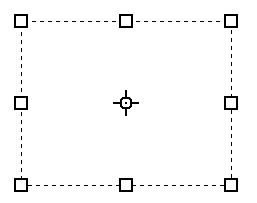
How to Turn off this center circle , cursor like thing ?

New Here ,
Oct 04, 2022 Oct 04, 2022

It's Suddenly showing on my Type Tool Box , i didn't encountered it before ..

TOPICS
Windows
501
Translate
Report
Community guidelines
Be kind and respectful, give credit to the original source of content, and search for duplicates before posting. Learn more
community guidelines

correct answers 1 Correct answer

Community Expert , Oct 04, 2022 Oct 04, 2022

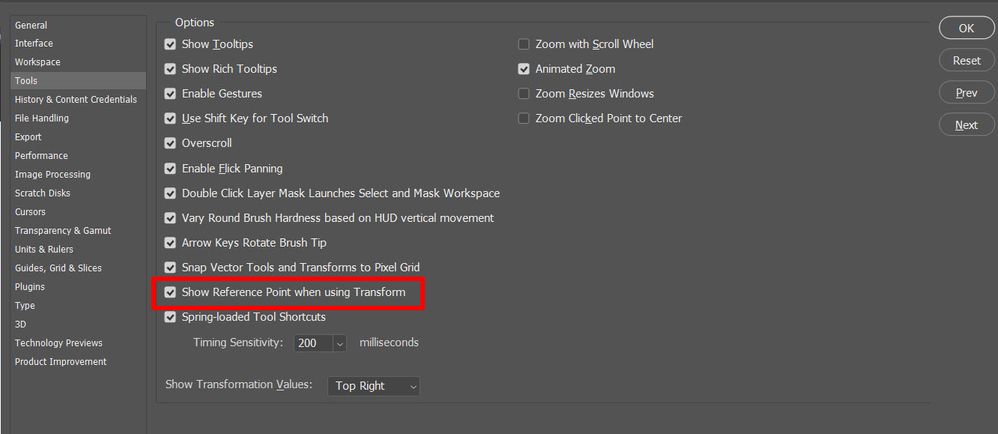
In the preferences, under tools, uncheck "Show reference point when transforming."

Just be away that if you turn this off, when you transform something, the center dot will not show up. I prefer to have it on.

type ref pt.jpg

Translate
Adobe
Community Expert ,
Oct 04, 2022 Oct 04, 2022
LATEST

In the preferences, under tools, uncheck "Show reference point when transforming."

Just be away that if you turn this off, when you transform something, the center dot will not show up. I prefer to have it on.

type ref pt.jpg

Translate
Report
Community guidelines
Be kind and respectful, give credit to the original source of content, and search for duplicates before posting. Learn more
community guidelines