Participant
September 4, 2023
Answered

How to use Base64 Image in Photoshop?

  • September 4, 2023
  • 3 replies
  • 2940 views

Hello. Due to my work, I receive a lot of Base64 images, which I always have to convert to PNG to use in Photoshop. With one or two files this is not a problem, but with a large amount it is tedious and repetitive work. Currently I use an online converter, but it takes a lot of time to upload, convert, download, import into Photoshop, so I would like to improve my workflow and speed it up.

Can you offer me a solution?


I almost forgot: I use Windows 10.

This topic has been closed for replies.
Correct answer Stephen Marsh
quote

They arrive in a database, from where I can export them to, for example, a .csv file.

Then I would need a batch file to split .csv and decode it one by one.

Thanks for the tip, I will try it.


By @Csaba32068154j718


Although JavaScript can decode Base64 into an image for display in a ScriptUI interface, I am not aware of a way to render and save actual image files.


This turns out to be surprisingly simple in Python!


https://stackoverflow.com/questions/67736290/how-to-convert-more-than-one-base64-format-to-pictures-from-csv-file-with-powers


https://superuser.com/questions/1498215/how-to-bulk-convert-base64-to-images-in-an-excel-file


https://ideone.com/dKPiVz


An example from the Mac... The process would be similar if you install Python3 in Windows.


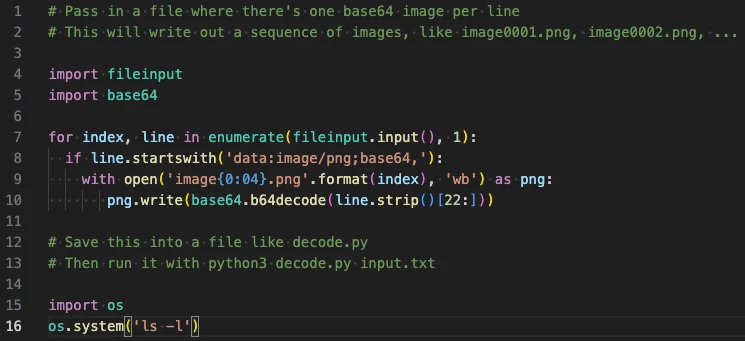
Here is the cross platform Python3 script code as linked previously. This is the decode.py file:


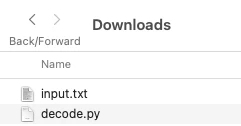
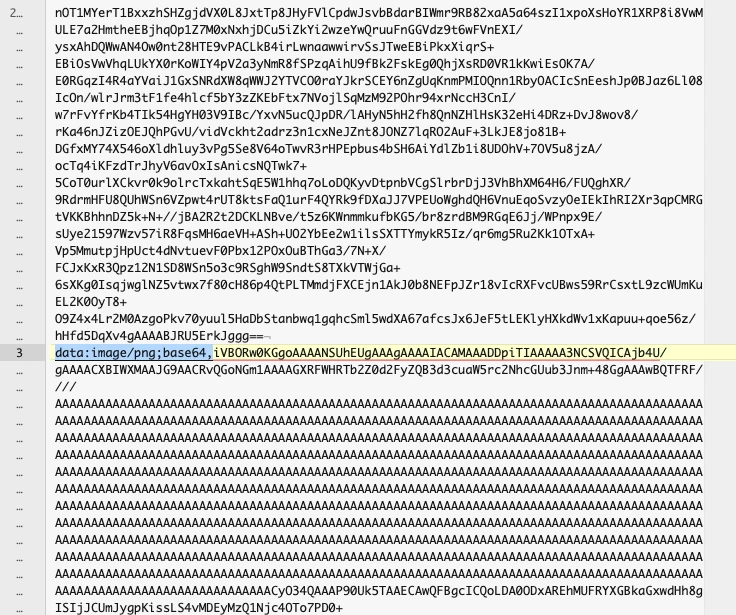
The input.txt file in the user's download folder has three base64 encoded strings, one per line for each image:


Working in the Downloads folder, here is the python3 command line code in Terminal.app:


The output images are written to the root/top-level user account "home" folder (not the Downloads folder):


image0001.png

image0002.png

image0003.png


Obviously a whole lot more can be done, however this is a simple way to batch convert locally.

3 replies

Stephen Marsh
Community Expert
Community Expert
September 8, 2023

@Csaba32068154j718 


Where did you end up on this project?

Participant
September 9, 2023

Along the lines of your Python idea, I created a JavaScript code using ChatGPT that basically does what you suggested. Thanks a lot for your help.

Stephen Marsh
Community Expert
Community Expert
September 9, 2023
quote

Along the lines of your Python idea, I created a JavaScript code using ChatGPT that basically does what you suggested. Thanks a lot for your help.


By @Csaba32068154j718


Please do share the JSX code! I would have offered it if I could, but once I found an existing Python script I stopped my research.

rayek.elfin
Legend
September 5, 2023

As an alternative to quickly convert Base64 images: the latest betas of PhotoLine support pasting Base64 directly and converts it to an image. Handy and quick if you have a smaller batch to convert.


CTRL-E will create a new image and paste the converted Base64 code with just one keyboard action. 🙂

The latest beta can be downloaded here:

https://www.pl32.com/forum3/viewtopic.php?f=1&t=6964


Stephen Marsh
Community Expert
Community Expert
September 5, 2023

These would be text files, wouldn't they? The binary image data is encoded into ASCII text.


I'd suggest that you search the web for:


windows batch decode base64 to image


Participant
September 5, 2023

They arrive in a database, from where I can export them to, for example, a .csv file.

Then I would need a batch file to split .csv and decode it one by one.

Thanks for the tip, I will try it.

Stephen Marsh
Community Expert
Community Expert
September 5, 2023
quote

They arrive in a database, from where I can export them to, for example, a .csv file.

Then I would need a batch file to split .csv and decode it one by one.

Thanks for the tip, I will try it.


By @Csaba32068154j718


Although JavaScript can decode Base64 into an image for display in a ScriptUI interface, I am not aware of a way to render and save actual image files.


This turns out to be surprisingly simple in Python!


https://stackoverflow.com/questions/67736290/how-to-convert-more-than-one-base64-format-to-pictures-from-csv-file-with-powers


https://superuser.com/questions/1498215/how-to-bulk-convert-base64-to-images-in-an-excel-file


https://ideone.com/dKPiVz