
mariab32311775
Participant
December 14, 2018
Answered

How to use Gradient Tool feather on two ends on layer mask cc2019

  • December 14, 2018
  • 3 replies
  • 3965 views

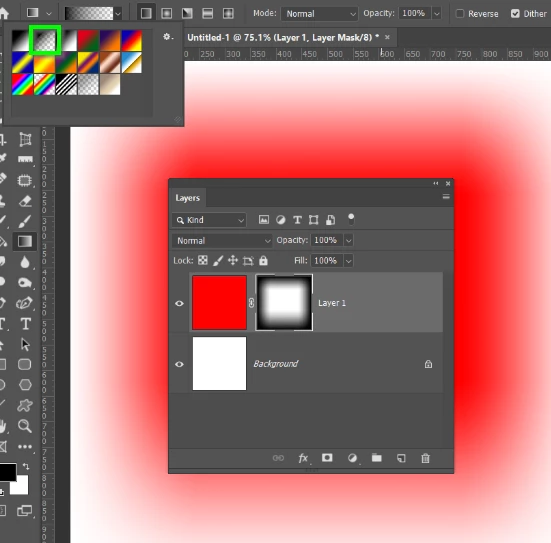
I just updated my Photoshop to CC 2019 and I don't know if I am missing something or if the gradient tool changed a bit. Before, I could add a layer mask to an image and feather out both ends. Now, I can only feather out one end, and when I try to do the other end, the gradient just goes to the opposite direction.

Seems like an easy fix but it's not working like it used to so what am I missing? A setting? So annoying!
This topic has been closed for replies.
Correct answer Trevor.Dennis

Foreground to Transparent.  It lets you make as many passes as you like, building the gradient with each pass.

3 replies

Chuck Uebele
Community Expert
Community Expert
December 15, 2018

You can also use the gradient tool on a straight gradient, but set the blend mode of the gradient to multiply so that you can apply multiple gradients, as either different distances or angles.

Trevor.Dennis
Community Expert
Community Expert
December 15, 2018

Cool tip Chuck, and a new one for me.

Trevor.Dennis
Community Expert
Trevor.DennisCommunity ExpertCorrect answer
Community Expert
December 15, 2018

Foreground to Transparent.  It lets you make as many passes as you like, building the gradient with each pass.

JJMack
Community Expert
Community Expert
December 15, 2018

Use a reflective gradient then adjust with a levels adjustment. The gradient tools seems broken on a reveal all layer mask in cc 2019 o start with a hide all layer mask.

Edit my problem was caued by my gradient tool being set to mode screen.... I forgot rule number one check all settings.  I turned 78 yesterday... memory going....

JJMack
mariab32311775
Participant
December 17, 2018

Thanks for your response! Yes, not checking the settings is my issue too. So it's not an age thing lol.

Happy Belated Birthday!