Exit
  • Global community
    • Language:
      • Deutsch
      • English
      • Español
      • Français
      • Português
  • 日本語コミュニティ
  • 한국 커뮤니티
0

How to use the brush tool over a logo without painting the transparent background

New Here ,
Sep 29, 2020 Sep 29, 2020

Hi everyone


I want to recreate this effect but can't figure out how I did it. it's a .png file  and I just want to use the brush over my white logo... the problem is that the brush  also paints the transparent background ... could anyone help please. 

thank you

1.1K
Translate
Report
Community guidelines
Be kind and respectful, give credit to the original source of content, and search for duplicates before posting. Learn more
community guidelines

correct answers 1 Correct answer

New Here , Sep 30, 2020 Sep 30, 2020

Thanx r-bin. 

I tried that but it won't paint if the background is locked.


I did however find the solution


open the .png as new project. use the quick selection tool. select the whole logo. grab the brush tool... brush over the selection... done

Translate
Adobe
People's Champ ,
Sep 29, 2020 Sep 29, 2020
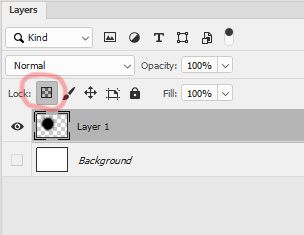
I think locking the transparency of the layer can save you.
 
bbb.jpg
Translate
Report
Community guidelines
Be kind and respectful, give credit to the original source of content, and search for duplicates before posting. Learn more
community guidelines
New Here ,
Sep 30, 2020 Sep 30, 2020
LATEST

Thanx r-bin. 

I tried that but it won't paint if the background is locked.


I did however find the solution


open the .png as new project. use the quick selection tool. select the whole logo. grab the brush tool... brush over the selection... done

Translate
Report
Community guidelines
Be kind and respectful, give credit to the original source of content, and search for duplicates before posting. Learn more
community guidelines