
scotwllm
Inspiring
August 15, 2021
Answered

I am so over the brushes...

  • August 15, 2021
  • 3 replies
  • 461 views

Ninety percent of the time, when I select a brush and start to paint, nothing happens. It literally ignores me. 

This topic has been closed for replies.
Correct answer Trevor.Dennis

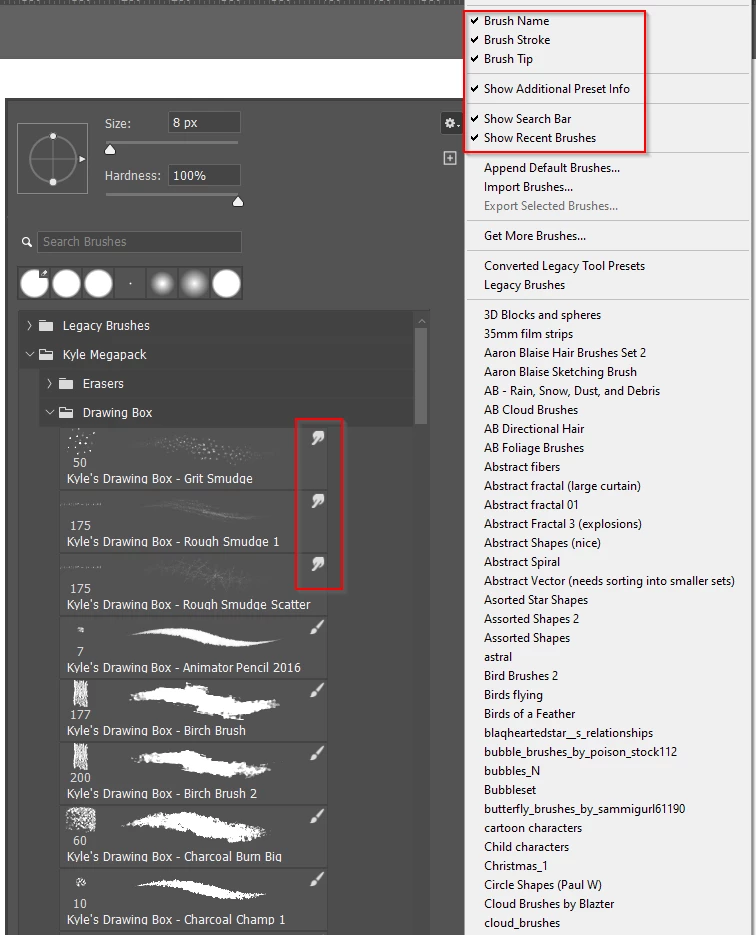
It's difficult to offer advice with so little information.  What I would suggest up front is to right click inside the document window with the brush tool selected, and click on the little cog icon.  Then turn on all of the options I have highlighted in red.  This will show you what you are selecting when you click on a preset. 


Note that the first three presets in my screen shot are for the Smudge tool, and selecting those will change whatever you are using to the smudge tool.  It is possible to prevent the tool change by holding down the Ctrl (Cmd) key when selecting a preset.
 

3 replies

August 15, 2021

And also, in addition to the above, check to make sure you aren't trying to paint while you have a selection and you're outside the selection area. Likely not the case, but I've done that a few times and of course, nothing will paint if you're outside the marching ants. Basic, but worth a check.

scotwllm
scotwllmAuthor
Inspiring
August 17, 2021

I can't count how many times I've done that. It's worse when you hide the marching ants (Ctrl-H), LOL.

c.pfaffenbichler
Community Expert
Community Expert
August 15, 2021

Please read this (in particular the section titled "Supply pertinent information for more timely and effective answers”):

https://community.adobe.com/t5/using-the-community/community-how-to-guide-tips-amp-best-practices/td-p/11601738?page=1


Could you please post screenshots with the pertinent Panels (Toolbar, Layers, Brush Settings, Channels, Options Bar, …) visible? 

What are the Blend Mode, Opacity and Flow settings? 

Are pressure sensitive settings involved? 

Trevor.Dennis
Community Expert
Trevor.DennisCommunity ExpertCorrect answer
Community Expert
August 15, 2021

It's difficult to offer advice with so little information.  What I would suggest up front is to right click inside the document window with the brush tool selected, and click on the little cog icon.  Then turn on all of the options I have highlighted in red.  This will show you what you are selecting when you click on a preset. 


Note that the first three presets in my screen shot are for the Smudge tool, and selecting those will change whatever you are using to the smudge tool.  It is possible to prevent the tool change by holding down the Ctrl (Cmd) key when selecting a preset.


scotwllm
scotwllmAuthor
Inspiring
August 17, 2021

This is perfect because it makes it way easier to diagnose and correct the problem. Thanks, Trevor!