


Participating Frequently
August 28, 2013
질문

I can not figure out how to flip my text?

  • August 28, 2013
  • 3 답변들
  • 123014 조회

Hi, I can not for the life of me figure out how to flip the text in my circle using PhotoShop CS6 (cloud version).

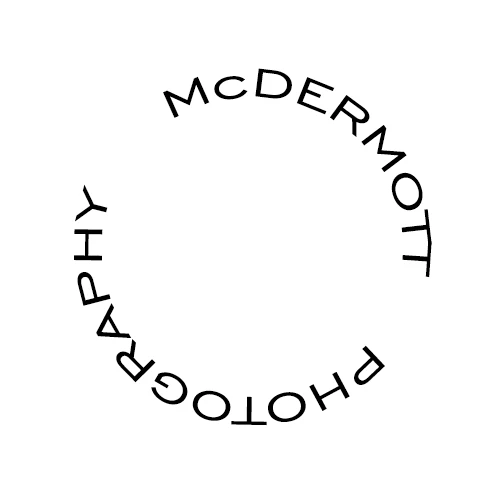
I made McDermott as one layer, then photography as another layer.  I want Photography to be right side up within the circle, it's upside down as it is now.  I saw a video someone posted on here about a similar question, but I tried that but my screen looked different than his?

Here is a logo I am trying to create for my photography.  Once I get the Photography font turned right side up, I will insert a large M in the cirlce - but 1st things 1st....
3 답변

Participant
October 18, 2020

I solved this problem really easily (and after a lot of wasted time). The simple, elegant solution is to use the Warp Text feature and NOT the Text to Path feature! (Using PC here) just right click your text layer, choose Warp Text, and adjust from the options on that window, which are pretty self-explanatory. In order to do the bottom half of your cirlce text, you'll probably want to use the 'arc lower' setting.  Good luck!


Inspiring
October 10, 2016

1. In the SHAPES toolbar, select the ELIPSE tool (not the marquee tool)

2. Make it the size you want and then type your text around the elipse

3. Highlight your TEXT and then ? Go to > EDIT > TRANSFORM** > FLIP HORIZONTALLY
4. Re-Adjust to suit your requirements

5. I use a WHITE BG color for the elipse and then select DARKEN in the LAYERS panel to make this invisible.

** Strangely sometimes TRANSFORM PATH comes up instead of TRANSFORM so pls note this.

Hope this helps someone.
I just did this logo up for a client Tikun Trace Minerals www.tikun.com so I am fairly sure that it works.

Participating Frequently
August 28, 2013

I'm a total novice - an infant really.  I know the shift key, but what is baseline shift mean?

Thx!

Participating Frequently
August 28, 2013

Forgot to mention, I'm working on a MacBook Pro.

Participating Frequently
August 29, 2013

One text layer or two?

Are you following the "baseline shift" tutorial or something else?

The "baseline shift" tutorial uses two text layers, one with baseline shift applied.


I am using 2 layers.