
Participant
June 12, 2019
Answered

I can't see the layer I'm applying effects to in the left-side edit window!

  • June 12, 2019
  • 1 reply
  • 1491 views

The layer I am working on does not appear in the bay window on the left side of the screen (after I apply Poster Edges from the Artistic Folder).

Does anyone know why the layer I'm working on is not appearing in the window, only the original photo? I'd appreciate any help on this, thanks!
    This topic has been closed for replies.
    Correct answer

    Hi

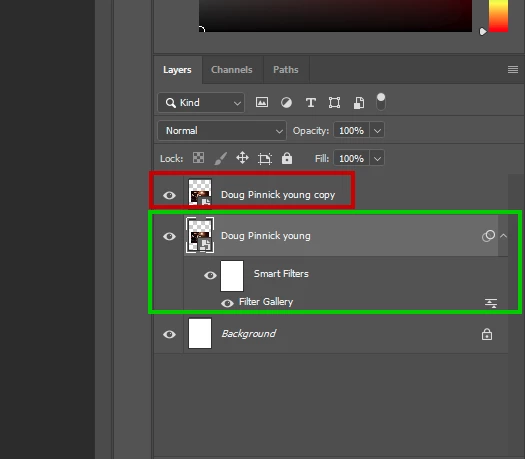
    The Filter Effect is applied to this layer mark in green, did you actually apply a Filter Effect to the copy layer mark in red

    1 reply

    Trevor.Dennis
    Community Expert
    Community Expert
    June 12, 2019

    Are you sure you are not showing off, telling us you live in a posh house with a bay window?

    Image result for bay window

    I'm not actually understanding your post.  Can you grab a screen shot of your workspace and paste it here?

    Are you using more than one screen?

    Do you perhaps mean the Navigator window?

    I'm just not getting it.

    Participant
    June 12, 2019

    Nice bay window! But no, I may have been referring to what you referred to as the Navigation Window, I'm not sure. I attached a screenshot. It's the main window where you can see whichever layer you're working on below on the left. When I apply the poster edge effect, then press ok, I should see the layer (Doug Pinnick young copy) with the poster edge effect, no? All I see is the original layer.

    Participant
    June 13, 2019

    Hi

    The Filter Effect is applied to this layer mark in green, did you actually apply a Filter Effect to the copy layer mark in red


    NO, I didn't > I was told that is the original layer and it is on top. How do I put the original layer on the bottom?