

Exit
  • Global community
    • Language:
      • Deutsch
      • English
      • Español
      • Français
      • Português
  • 日本語コミュニティ
  • 한국 커뮤니티
1

I do not want Photoshop to EVER ask me if I'd like to try a new feature, or anything else.

Explorer ,
May 30, 2023 May 30, 2023

How do I turn off these "helpful suggestions" that make me want to throw my computer through a plate-glass window every time they pop up? How I turn them off FOREVER? 

I already have "Rich Tooltips" turned off, FYI. 

Seriously, whoever thinks distracting users while they're trying to work is good marketing should be fired.
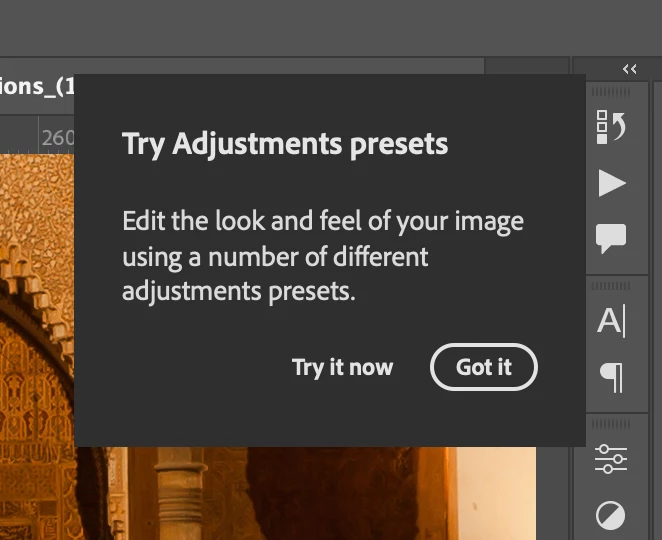
Screen Shot 2023-05-30 at 5.11.57 PM.png

TOPICS
macOS
562
Translate
Report
Community guidelines
Be kind and respectful, give credit to the original source of content, and search for duplicates before posting. Learn more
community guidelines
Adobe
Community Expert ,
May 30, 2023 May 30, 2023

It only happens after a new install. After a while, they go away on their own.


Nancy O'Shea— Product User, Community Expert & Moderator
Translate
Report
Community guidelines
Be kind and respectful, give credit to the original source of content, and search for duplicates before posting. Learn more
community guidelines
Community Expert ,
May 30, 2023 May 30, 2023

But yeah, the pop ups are really annoying 

Translate
Report
Community guidelines
Be kind and respectful, give credit to the original source of content, and search for duplicates before posting. Learn more
community guidelines
Explorer ,
May 30, 2023 May 30, 2023

Oh, is that so? Well, I still don't like it. And I want to be able to turn it OFF. FOREVER. Why can't I do that?

Translate
Report
Community guidelines
Be kind and respectful, give credit to the original source of content, and search for duplicates before posting. Learn more
community guidelines
Community Expert ,
May 31, 2023 May 31, 2023

<shrug> Don't know.</shrug>

We're just fellow product users like you.

Do you have any other questions?


Nancy O'Shea— Product User, Community Expert & Moderator
Translate
Report
Community guidelines
Be kind and respectful, give credit to the original source of content, and search for duplicates before posting. Learn more
community guidelines
Explorer ,
May 31, 2023 May 31, 2023

Is there someone at Adobe I can yell at? I would love to give them a piece of my mind. This is really an accessibility issue. I have been using Adobe products for thirty years, it's only really been annoying in the last few years. Did they learn nothing from Clippy? 

Translate
Report
Community guidelines
Be kind and respectful, give credit to the original source of content, and search for duplicates before posting. Learn more
community guidelines
Community Expert ,
May 31, 2023 May 31, 2023
quoteI have been using Adobe products for thirty years...
By @Siansonea

========

You & me both.  It's mildly annoying the first few times you use the app after which it's no issue at all. It doesn't prevent from me using Photoshop.  That would be a usability issue. 


IMO, nobody deserves to be yelled at. Not even on the Internet.


Nancy O'Shea— Product User, Community Expert & Moderator
Translate
Report
Community guidelines
Be kind and respectful, give credit to the original source of content, and search for duplicates before posting. Learn more
community guidelines
LEGEND ,
May 31, 2023 May 31, 2023
LATEST
quote

Is there someone at Adobe I can yell at? 


By @Siansonea


If you want Adobe to be viewing what you post, there are two ways based on what you are hoping to report:
If you wish to report what you believe is a bug, you do so by following these guidelines:
https://community.adobe.com/t5/photoshop-ecosystem-bugs/how-do-i-write-a-bug-report/idi-p/12373403

If you wish to provide a feature request, you do so by following these guidelines (then make a request in the product forum):
https://community.adobe.com/t5/lightroom-classic-ideas/how-do-i-write-a-feature-request/idi-p/123863...


Having been a beta (what is now called pre-release) tester since Photoshop 2.5, I can tell you yelling at the team will do you no good! 

Author “Color Management for Photographers" & "Photoshop CC Color Management/pluralsight"
Translate
Report
Community guidelines
Be kind and respectful, give credit to the original source of content, and search for duplicates before posting. Learn more
community guidelines
Community Expert ,
May 31, 2023 May 31, 2023

Try going to Photoshop Preferences/Tools and disabling "Rich Tool Tips" Edit: I see you already did.


Translate
Report
Community guidelines
Be kind and respectful, give credit to the original source of content, and search for duplicates before posting. Learn more
community guidelines