
Known Participant
June 1, 2023
Question

I need a script to create a new file with double the dimensions and 144dpi in photoshop 2023

  • June 1, 2023
  • 3 replies
  • 708 views

I tried to use AI to create a script to create a new 144 dpi file in Photoshop 2023 from the clipboard image, with twice the dimensions. It generated the following code.

// This is a Photoshop script that creates a new document from the clipboard with double the dimensions and 144 dpi resolution
// Save this file as a .jsx extension and place it in the Photoshop 2023/Presets/Scripts folder
// Restart Photoshop and run the script from File > Scripts > Create New File From Clipboard

// Check if there is something in the clipboard
if (app.clipboard.hasData()) {
  // Get the clipboard data as a bitmap
  var clipboardData = app.clipboard.getData("bitmap");
  // Get the width and height of the bitmap in pixels
  var width = clipboardData.width;
  var height = clipboardData.height;
  // Double the width and height
  width *= 2;
  height *= 2;
  // Create a new document with the doubled dimensions and 144 dpi resolution
  var newDoc = app.documents.add(width, height, 144);
  // Paste the clipboard data into the new document
  newDoc.paste();
  // Resize the pasted layer to fit the document
  newDoc.activeLayer.resize(200,200);
  // Rename the new document
  newDoc.name = "New File From Clipboard";
} else {
  // Alert the user that there is nothing in the clipboard to paste
  alert("There is nothing in the clipboard to paste.");
}


It fails, gives me the following error.
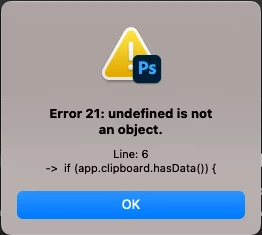
 

Any idea to make it work? Apparently app.clipboard.hasData() is not finding the clipboard's data.

This topic has been closed for replies.

3 replies

Legend
June 2, 2023

the scriptlistener will help you create the script code if that.

Stephen Marsh
Community Expert
Community Expert
June 2, 2023

@renatoj93608056 – Do you really need to use the clipboard, why not just dupe the active doc?


dupeDoc(activeDocument.name.replace(/\.[^\.]+$/, '') + "_x2", false);
imageSize(200, 200, 144);

function dupeDoc(docName, merged) {
	var s2t = function (s) {
		return app.stringIDToTypeID(s);
	};
	var descriptor = new ActionDescriptor();
	var reference = new ActionReference();
	reference.putEnumerated(s2t("document"), s2t("ordinal"), s2t("first"));
	descriptor.putReference(s2t("null"), reference);
	descriptor.putString(s2t("name"), docName);
	descriptor.putBoolean(s2t("merged"), merged);
	descriptor.putInteger(s2t("documentID"), 867);
	executeAction(s2t("duplicate"), descriptor, DialogModes.NO);
}

function imageSize(width, height, resolution) {
	var s2t = function (s) {
		return app.stringIDToTypeID(s);
	};
	var descriptor = new ActionDescriptor();
	descriptor.putUnitDouble(s2t("width"), s2t("percentUnit"), width);
	descriptor.putUnitDouble(s2t("height"), s2t("percentUnit"), height);
	descriptor.putUnitDouble(s2t("resolution"), s2t("densityUnit"), resolution);
	descriptor.putEnumerated(s2t("interfaceIconFrameDimmed"), s2t("interpolationType"), s2t("nearestNeighbor"));
	executeAction(s2t("imageSize"), descriptor, DialogModes.NO);
}


Known Participant
June 2, 2023

Maybe I should have mentioned that I was trying to get Photoshop 2023 to do with a script what Photoshop CS did by default: I would copy an image from InDesign or Sketch, start a new file in Photoshop CS, set it to 144 dpi and the interface would automatically double the dimensions of the image in the clipboard. Any time I would do that afterwards, it would retain the 144 dpi setting and I would just paste the image in the new file window. Now repeat that several times a day in the post-CS versions and you will see how much time and brain power was saved then. But now that you mentioned it, I tried to just change the default resolution after the new file is created and Outlook 2023 automatically doubles the dimensions, when I was expecting it to require me to double the dimensions manually as when creating a new file. So, that's good enough for me. Not yet, AI...

Stephen Marsh
Community Expert
Community Expert
June 2, 2023
quote

Maybe I should have mentioned that I was trying to get Photoshop 2023 to do


By @renatoj93608056


That is generally helpful...


Yes, it's possible to do this as suggested by @r-bin using actions or scripting listener recorded code if you can't script.


You can use the clipboard code from the following link to replace the dupeDoc function and call in my previous code:


Legend
June 1, 2023

Have your AI enumerate the properties and methods of the Application object in the Photoshop Object Model. And also let it give a link to the source of information. Then tell it to find the error in its code itself.

Stephen Marsh
Community Expert
Community Expert
June 2, 2023
quote

Have your AI enumerate the properties and methods of the Application object in the Photoshop Object Model. And also let it give a link to the source of information. Then tell it to find the error in its code itself.


By @r-bin


Thanks for the laugh, I needed that!