

PhotoBoy
Inspiring
May 31, 2022
Answered

I rearrange and regroup my AP Styles for quicker access, save it as one huge group, where saved?

  • May 31, 2022
  • 1 reply
  • 296 views

AP 23.3.2/19,1 iMac/Monterey 12.4:

I spend time arranging my Preset Styles menu for easier access. I made a new group of this rearranged Styles Preset menu. I named it 060122 Styles. Quit Adobe Photoshop. Opened Find File App to search my main drive where Photoshop installs this new menu arrangement. Find File found no such named file.

Does Photoshop SAVE this new Group of collected and arranged Styles. I need to do the same for SHAPES, but there isn't any use if Photoshop can not save the new arranged menu window. Does anyone know where Photoshop is saving new groups of Styles. It is not in the Styles Preset folders. I could not locate the new file at all.


Further: this new arranged menu will not show when Photoshop Updates. Why?
This topic has been closed for replies.
Correct answer Jeff Arola

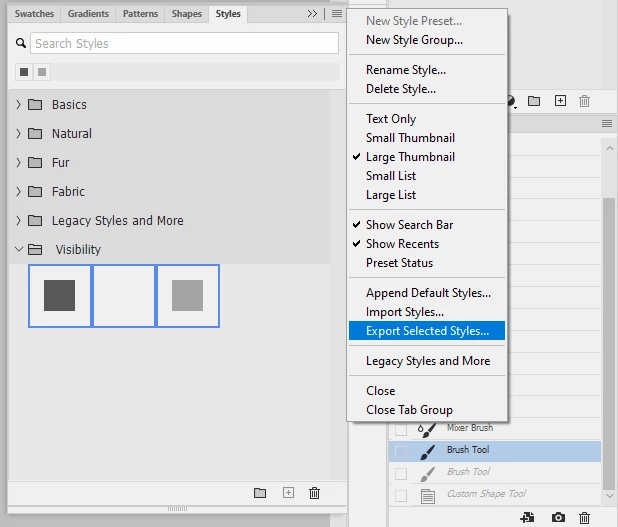
You need to save your styles by selecting the ones you want to save with a new name and then from the Styles panel flyout menu click Export Selected Styles.


The default location and most likely place where photoshop will want to save the styles to unless you manually change the destination is

/Users/User Name/Library/Application Support/Adobe/Adobe Photoshop 2022/Presets/Styles


From the same Flyout menu if click Import Styles that same folder should open one selects a different folder.


1 reply

Jeff Arola
Community Expert
Jeff ArolaCommunity ExpertCorrect answer
Community Expert
June 1, 2022

You need to save your styles by selecting the ones you want to save with a new name and then from the Styles panel flyout menu click Export Selected Styles.


The default location and most likely place where photoshop will want to save the styles to unless you manually change the destination is

/Users/User Name/Library/Application Support/Adobe/Adobe Photoshop 2022/Presets/Styles


From the same Flyout menu if click Import Styles that same folder should open one selects a different folder.


PhotoBoy
PhotoBoyAuthor
Inspiring
June 1, 2022

You are exactly right, Jeff. Thank you so very much. I failed to export the new styles and shapes last year. Looked in the Preset folder Styles and the exported group were there, this time. Thanks again.

Trying to Live Simply