


Inspiring
December 7, 2018
해결됨

I still cannot find the shape tool I need. I want to insert an arrow. I tried resetting the shape tools to no avail.

  • December 7, 2018
  • 5 답변들
  • 15312 조회

I have PS CC 2019. I want to insert an arrow onto a photograph. I cannot get it done. I tried resetting the shape tools menu to no avail. Where the hell is an arrow and what do I click to get there?. You need to stop moving things around. It becomes a nightmare. Fortunately I have other photo editing software programs that are much easier to use and have easy to insert symbols. I am going to cancel my Adobe subscription if the continuing changes to each version are too difficult to navigate.
    이 주제는 답변이 닫혔습니다.
    최고의 답변: JJMack

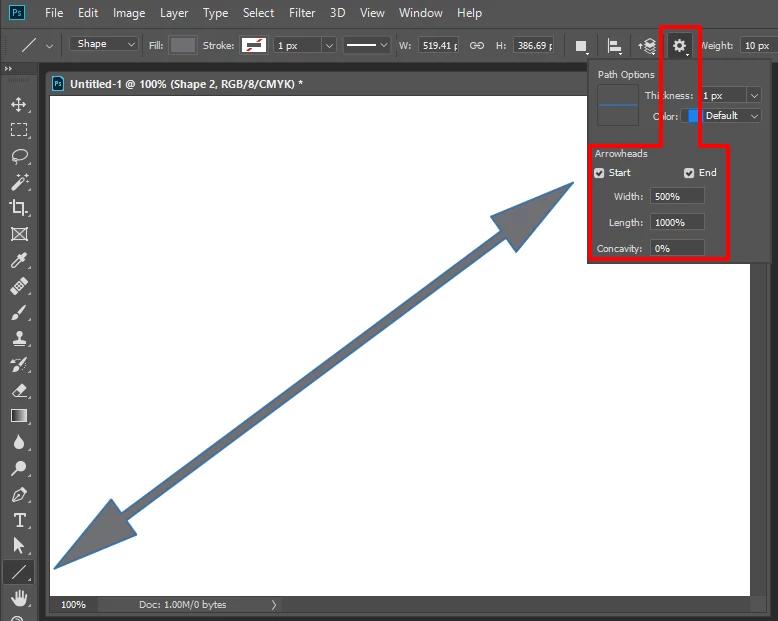
    Ite the Line shape tool with  option set fron the tool option bar.

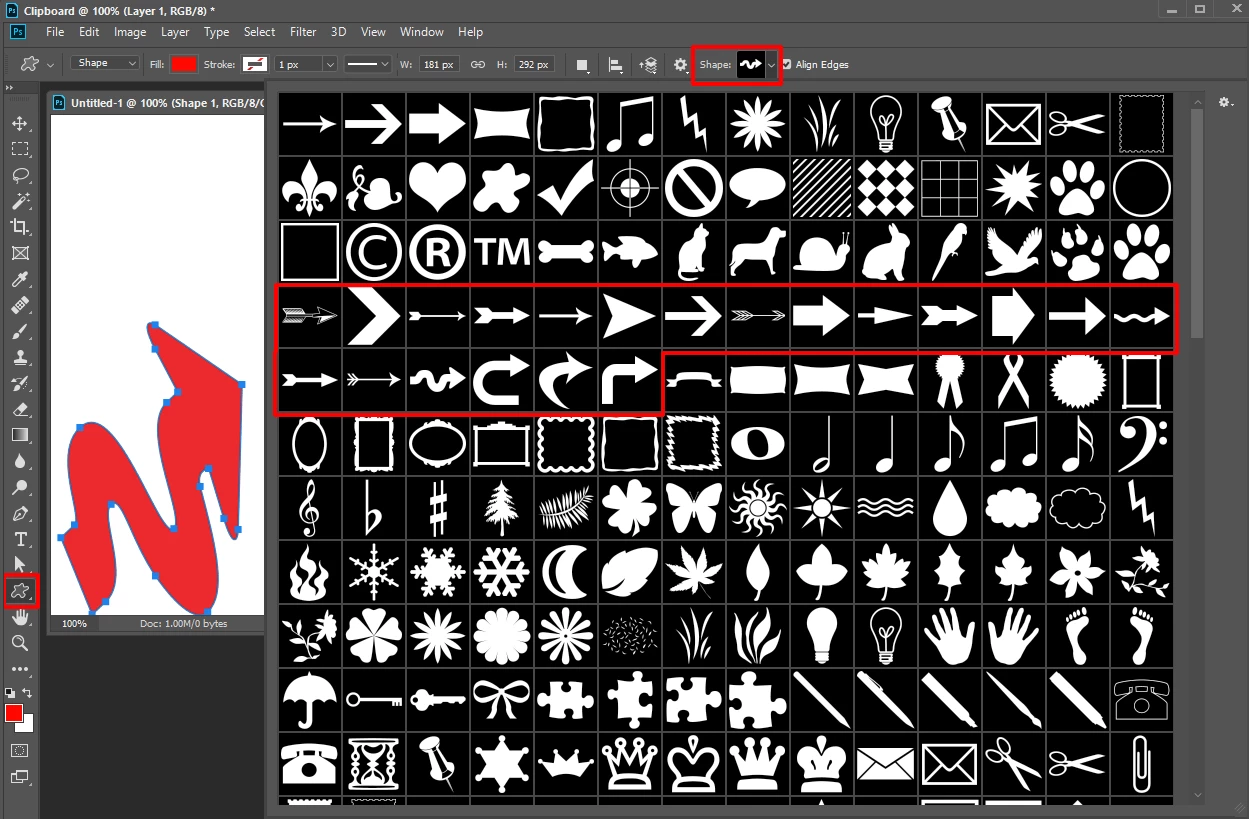
    Or a custom shape

    5 답변

    Inspiring
    June 3, 2023

    We have AI integration now, but drawing an arrow in Photoshop is still a nightmare. Why nobody in the dev team ever had the idea just to have the basic shapes ready available in the UI without having to search the internet and forum everytime for tutorials is beyond me. I am using Photoshop since 23 years now and still struggle to draw a simple arrow. Its quirky, hidden and hard to do. I gave up and now use Snagit to draw arrows. Just a lot quicker than to try to find presets in Photoshop.

    thereallara
    Participant
    January 15, 2020

    These shapes are not included in my shapes menu after recent updates. It's super frustrating and even following your advice does not find where they may be stored or accessed. They seem to have dissapeared, and been replaced with a ridiculous selection of ''trees'', ''boats'', ''emoticons'', and other probably useless items. I now have to DRAW an arrow when I had a menu of them previously.

    UPDATE: ''Restore Default Shapes" SEEMED to do nothing for several tries, but if you go digging, Arrows are there. FOUR folders into ''Legacy Shapes and More''. Find; Legacy Shapes and More>2019 Shapes>All legacy default shapes>Arrows. This is beyond frustrating and pointless as an update to the program features. Hopefully this comment will help someone simply find what they are looking for without being told they are not following directions properly!

    Participant
    February 16, 2020

    Thank you so much for this reply it helped me i had the same issue all you get in custom shape dropdown is useless trees and boats.  i followed your advice and i am happy after wasting an hour on this simple thing.

    Can your reply be pushed to the top? instead of the ones telling people they are stupid.

    thanks again you saved me so much frustration.

    Ghost_16
    Known Participant
    December 7, 2018

    try right clicking the shape icon then silecting the arrow shape.

    Chuck Uebele
    Community Expert
    Community Expert
    December 7, 2018

    Did you try either click and hold or right clicking on the icon where the shape tools are in the tool bar to get the line tool? The gear just shows up if the line tool is selected. This really hasn't changed in PS.

    Inspiring
    December 7, 2018

    I can't get any shapes tool to show up in the top menu bar. The tools that are there do not highlight when clicked. We need to start with "Boot PS", then step - by - step. Click this, click that, click this, click that. It is just impossible without detailed, detailed instructions.

    JJMack
    Community Expert
    Community Expert
    December 7, 2018

    It not in the menu bar or the tool bar it is in the tool Option bar are you displaying that bar?

    JJMack
    JJMack
    Community Expert
    JJMackCommunity Expert답변
    Community Expert
    December 7, 2018

    Ite the Line shape tool with  option set fron the tool option bar.

    Or a custom shape

    JJMack
    Inspiring
    December 7, 2018

    I cannot get the gear icon to show up so that I can click on it and see the arrowheads menu. I can see the line and shape tool listed but cannot get them to show up in the menu bar either on the left or the top. PS has just become too non-intuitive to use anymore. I am going to some other software. PS has just become horrid.

    JEJ

    Inspiring
    December 7, 2018

    I ended up going to MS Excel and getting the arrows there and copying them to an old photo software program (not PS), and creating my arrowed image there.