


AssembledVS
Known Participant
October 19, 2017
해결됨

Image different outside of Photoshop if "proof colors" is unchecked

  • October 19, 2017
  • 1 답변
  • 5855 조회

Photoshop CC 2017

When working with a particularly dark image, I noticed something that I have not noticed before - my images are a bit different in the Photoshop environment than anywhere else, including in Windows Photos, in my browser, and most importantly, in my game development engine, Unity.

Getting my image in Photoshop to look exactly the same as it does in any other environment requires me to do two things:

1. View -> Proof Setup -> Monitor RGB

2. Checking View -> Proof Colors to ON

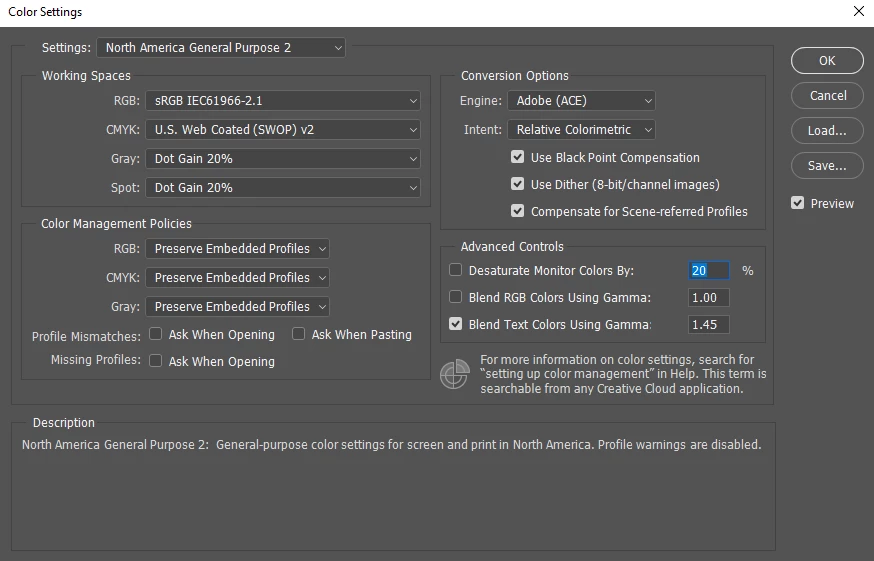
My color settings are already North America General Purpose 2, sRGB IEC61966-2.1. I don't think I've ever touched this default setting. I also noticed that my Proof Setup setting was set to Working CMYK, but because Proof Colors was always unchecked, it did not seem to make a difference. Is this the default setting?

From what I've read, it seems like I should NOT be working with Proof Colors on. But this setting is what gets my Photoshop image in Photoshop to look like its target environment, which is in Unity, online, just within Windows, etc.

What am I doing wrong?

Here are my settings below:
이 주제는 답변이 닫혔습니다.
최고의 답변: D Fosse

AssembledVS  wrote

if most of my users will not be viewing from a color managed environment (online, in-game, etc.), does it make sense to NOT work in a color managed environment?

You're assuming that "no color management" means one single thing. It doesn't! No color management looks like one thing on your laptop, like something else entirely on the desktop system in your study, and you might no even recognize it on your tablet or phone. No color management is entirely unpredictable!

This is the problem that color management solves. But the application has to support it, and few do.

As far as I can tell, pretty much all games are not color managed regardless of the engine and use the color profile set in the OS.

No, they don't. An application without color management doesn't know what a profile is. It takes the original RGB numbers in the file, and throws them directly at the screen. No questions asked. The rest is up to how close that particular display's native color space is to the document color space.

A color managed application converts from document color space to monitor color space - on the fly, as you work. This preserves color appearance by recalculating the numbers in the file before they hit the screen. This is a standard profile conversion just like any other profile conversion.


Summed up: the only reference you have is how the file is supposed to look. A color managed application will show you this, assuming you have a valid monitor profile.

Outside a color managed environment it's a lottery. You're assuming you can predict that, but you can't. How it looks on your monitor is no indication whatsoever of how it will look elsewhere.

1 답변

D Fosse
Community Expert
Community Expert
October 19, 2017

This is the difference between color managed and not. Photoshop uses the monitor profile to correct for your monitor - the others do not and just pass the numbers straight through. Photoshop displays the file correctly, the others incorrectly.

Proofing to Monitor RGB disables display color management.

You just have to decide whether correct or consistent is more important.

AssembledVS
AssembledVS작성자
Known Participant
October 19, 2017

Thank you for the explanation.

I want to work in Photoshop in the same color environment that everyone else will see. My game screenshots, the game itself - those assets, within the browser or within Unity, should look the same in Photoshop as they do everywhere else.

What do I have to do to make my Photoshop color environment be the same as all the other environments?

Is it checking Proof Colors to ON? Though I've heard that you should not be working that way. Furthermore, there is no way to make it the default setting; every document that is opened will have it off by default. Another suggestion that Adobe themselves believe that this is not the right way of working in Photoshop.

EDIT: It seems like changing RGB in Edit -> Color Settings -> Settings to Monitor RGB makes this color environment work program-wide. My images now look in Photoshop the way they do everywhere else. Is it recommended to work in this mode? What are the downsides?

mglush
Community Expert
Community Expert
October 20, 2017

Perhaps I'm missing something here so please help me understand:

"Color management was invented to solve this exact problem: to see exactly what others see."

The entire issue is that I'm not seeing what other people see when I'm working with my image in Photoshop. On two different monitors and on my phone, my image outside of Photoshop looks different than the image in Photoshop. I understand that Photoshop displays the image "correctly," but what good is that when I'm the only one seeing it?


I have a quick question for you. Does Unity -- the program you are working in -- give you any guidance as to what color space you should be working in?

And just one other bit of information -- proof colors deals specifically for proofing for PRINT. You are correct--you should not be working in Proof Colors. Since you are working with output directly for monitors or electronic devices, you want to stay in sRGB and not CMYK.

Michelle