
Inspiring
May 2, 2019
Answered

Image Processor

  • May 2, 2019
  • 5 replies
  • 1426 views

I have been attempting to use the Image Processor for re-sizing a batch of images..Something I have never done before.

I have gone through the procedure...File/Scripts/image processor/select folder/re-size to fit...RUN. The processor then starts to run but after the first image I receive a message saying  'The Command Feather is not currently available.Continue or stop'...If i press Continue the process carries on to the next image and again I get the same message. This carries on until the batch is complete. This obviously makes a mockery of the batch process. Does anyone know where this feather command comes from and how I can rid myself of it?   Thanks
This topic has been closed for replies.
Correct answer Bojan Živković11378569

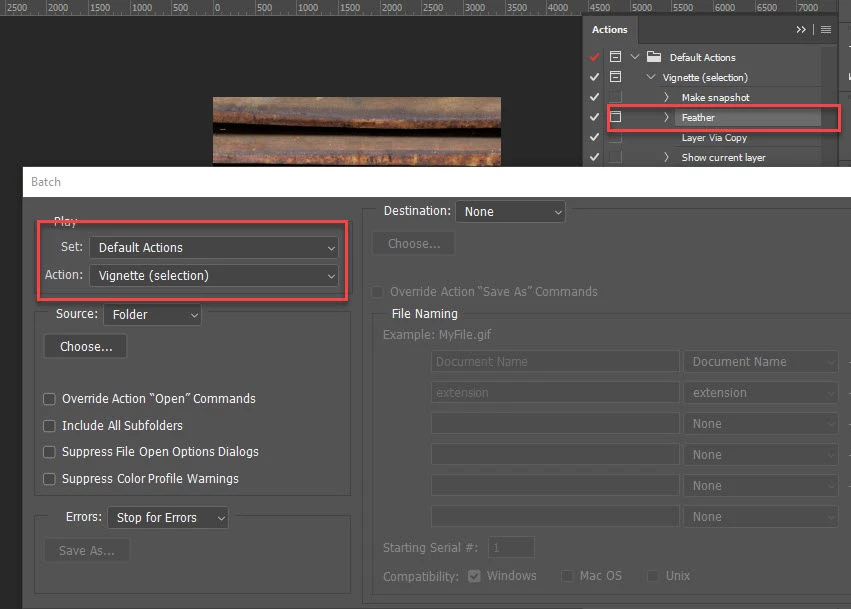
Feather is a second step in Vignette action which is the first action in the default action set, that is probably the problem. Please post screenshot with Batch window.

5 replies

Bojan Živković11378569
Community Expert
Community Expert
May 3, 2019

Feather is a second step in Vignette action which is the first action in the default action set, that is probably the problem. Please post screenshot with Batch window.

michael dAuthor
Inspiring
May 3, 2019

Spot On..Thanks, answer was so obvious in retrospect but not so obvious when I was experimenting with the Processor. 

JJMack
Community Expert
Community Expert
May 2, 2019

Feather would be something an included action would do.  There is nothing I can think of that the images processor or image processor Pro scripts would need to use feather for.  These scripts process images not layers or selections.

JJMack
c.pfaffenbichler
Community Expert
Community Expert
May 3, 2019
Feather would be something an included action would do.

I wonder if a Feather setting of a Layer Mask or Vector Mask might be involved.

michael dAuthor
Inspiring
May 3, 2019

Thanks  now sorted

c.pfaffenbichler
Community Expert
Community Expert
May 2, 2019

Please read this (in particular the section titled "Supply pertinent information for quicker answers"):

https://forums.adobe.com/docs/DOC-7044

Derek Cross
Community Expert
Community Expert
May 2, 2019

Try some simple ones to start to learn the facility, then build up from there to more complex ones.

c.pfaffenbichler
Community Expert
Community Expert
May 2, 2019

Have you included an Action in the Process?

Please post screenshots including all pertinent Panels and dialogs.