
Participant
June 21, 2019
Answered

Image Size Not Working

  • June 21, 2019
  • 5 replies
  • 3577 views

UGH!!! Someone smarter than me please help!!

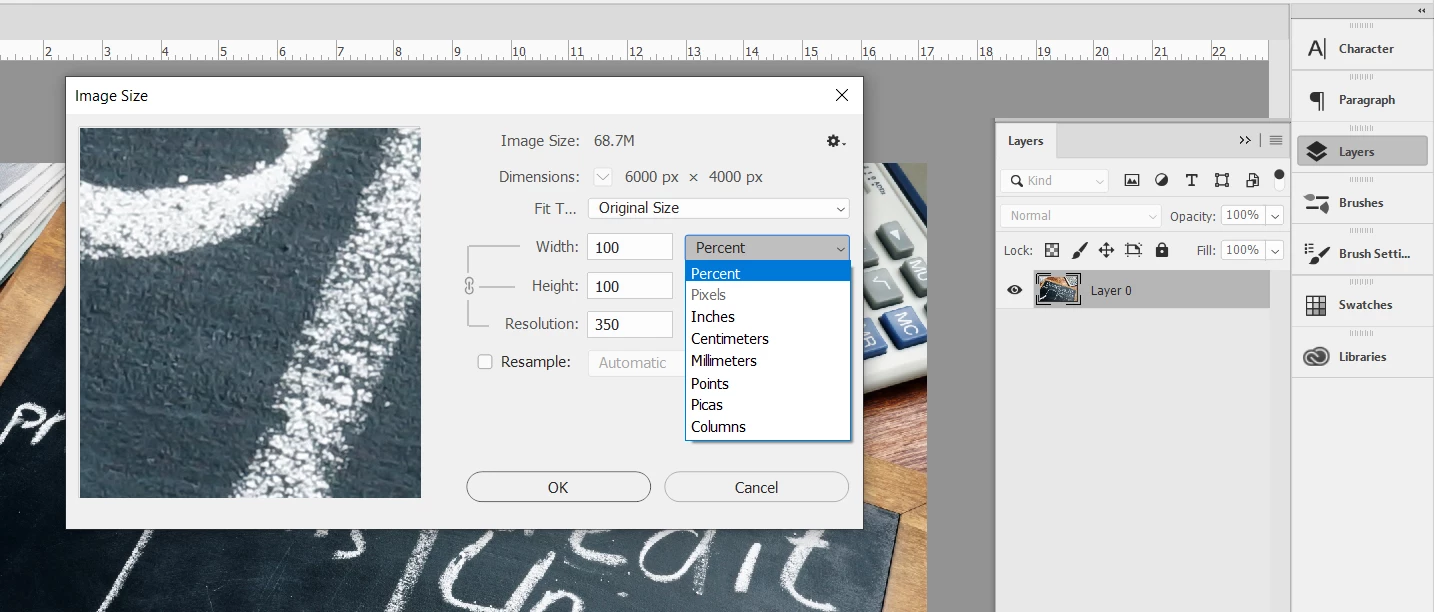
I'm trying to resize an image to 2000 pixels wide, and when I go to the Image Size options box, Pixels is grayed out (see below). What the heck am I missing??? I've tried choosing all different options under the Fit To menu, and the Dimensions drop-down is also grayed out.

I seriously hate this new Photoshop! So many things I used to do without thinking have required me to Google solutions and waste a bunch of time.

Thank you in advance!
    Correct answer c.pfaffenbichler

    »Resample« seems to be unchecked.

    5 replies

    gener7
    Community Expert
    Community Expert
    June 21, 2019

    Well you did provide a screenshot which goes a long way in helping us resolving the problem.

    c.pfaffenbichler
    Community Expert
    Community Expert
    June 22, 2019

    True that.

    A screenshot (or several) often provides a good way of assessing an issue.

    Legend
    June 21, 2019

    Yes, it is a royal pain that all the settings are reset. There may be important settings we got right by trial and error years ago, and kind of hope they will stay put.

    c.pfaffenbichler
    Community Expert
    Community Expert
    June 21, 2019
    There may be important settings we got right by trial and error years ago

    A lot of the settings transfer just fine when installing a new version properly anyway, but in this case I assume someone with access to your computer turned »Resample« off.

    To test you can restore the preferences and see if »Resample« ice checked by default.

    And in a professional context »we figured it out by trial and error years ago but in the meantime we forgot it again« seems like a problematic approach.

    D Fosse
    Community Expert
    Community Expert
    June 22, 2019

    c.pfaffenbichler  wrote

    in this case I assume someone with access to your computer turned »Resample« off.

    Resample should always be off, unless you specifically need it, in which case you need to be very conscious of the fact so that you don't accidentally save over the original.

    I don't know what the actual out-of-the-box default is, but it should be "off".

    Legend
    June 21, 2019

    I think you've had to check the Resample box to change the number of pixels, always, in all versions.

    c.pfaffenbichler
    Community Expert
    Community Expert
    June 21, 2019
    I seriously hate this new Photoshop! So many things I used to do without thinking have required me to Google solutions and waste a bunch of time.

    Have you read the »What’s New«-section of the Help?

    And in this case the problem does not seem to be with the new version anyway.

    c.pfaffenbichler
    Community Expert
    c.pfaffenbichlerCommunity ExpertCorrect answer
    Community Expert
    June 21, 2019

    »Resample« seems to be unchecked.

    eravellaAuthor
    Participant
    June 21, 2019

    Thank you!! I knew it would be something simple like that, but I'm not a PS pro, so most likely would not have realized that.

    It's really the fact that all prior settings get wiped out when there's an upgrade, and I don't necessarily know how to fix them without Googling for 10 minutes. I appreciate you helping a noob!