
Participating Frequently
April 21, 2023
Answered

impossible d'appliquer un mode de fusion en cmjn

  • April 21, 2023
  • 13 replies
  • 712 views

Bonjour 


Je viens demander de l'aide sur photoshop. 

J'ai l'abitude d'utiliser les masques d'écretage et d'y appliquer des mode de fusions.

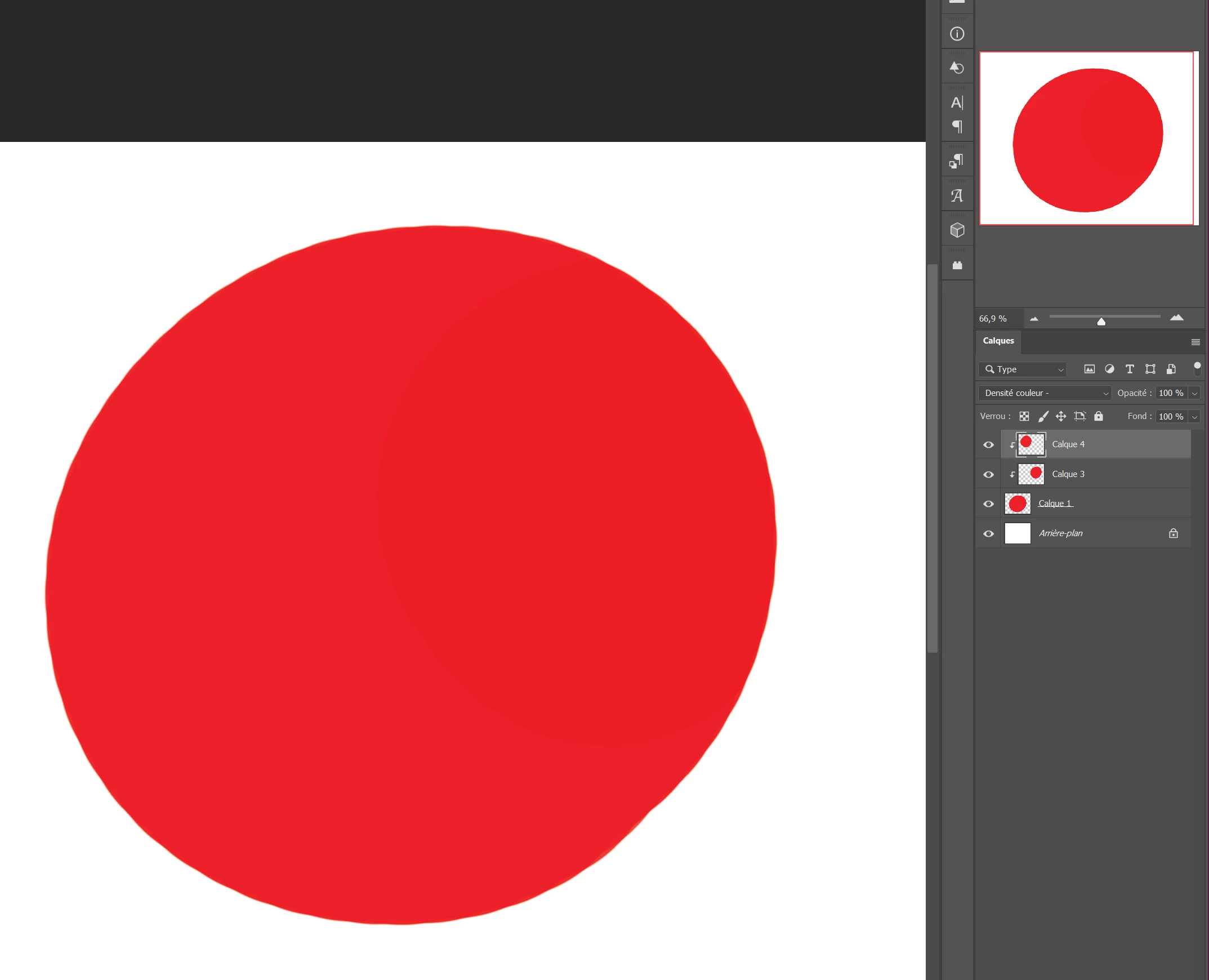
Mais aujourd'hui mon masque d'écretage n'est quasiment pas visible lorsque je lui applique le mode produit, ou le mode densité couleur -. Sur la photo le calque 3 et en produit et il ne ce vois pas sur le calque .

Je sui en cmjn, et lorsque je passe en mode rvb, cela fonctionne. Mais j'ai besoin de travailler en cmjn. 

Ca marché avant, je ne comprend pas s'y c'est un bug, ou si j'ai fais une mauvaise manipulation.


J'ai un pc windows 11 -version 22H2

Photoshop 24.4.1


merci pour votre aide.
This topic has been closed for replies.
Correct answer CShubert

pas problème mon ami @Celia23047459dq3q so, let's try this and see if you can get the functionality back.


Let's make sure we're in a default state and there are no stale settings somewhere: 

Restore your preferences using this manual method:  

https://helpx.adobe.com/photoshop/using/preferences.html#Manually 

Does it work correctly? 

If that doesn't solve it, you can quit Photoshop and put the Settings folder back. 


It may help if we could see your Photoshop System Info. Launch Photoshop, and select Help >System Info...and copy/paste the text in a reply.  


13 replies

Participating Frequently
April 21, 2023

@CShubert It's okay.

J'ai appliqué votre conseil et restauré les préférences. Ca fonctionne maintenant sur mes documents de bases. Thank you very much.

Participating Frequently
April 21, 2023

Ok je pense avoir trouvé la base du probleme. 

Ca fonctionne sur un nouveau document, mais sur mes documents déjà existant ( des dessins au croquis sans couleurs )ca ne fonctionne pas . ( des documents que j'ai du passé en mode rvb a cmjn en cours de de création ). J'ai donc copier-coller mon croquis sur un nouveau document psd, et la ca a marché. Ca viens donc des paramètres de mes premiers documents. 

Participating Frequently
April 21, 2023

@CShubert @Kevin Stohlmeyer @Derek Cross  merci pour votre aide. J'ai laissé photoshop sans le fermé et sans le réinstallé. Je viens de refaire la manipulation et ca marche maintenant. J'en conclu que c'étais peut etre un bug ou une mauvaise manipulation. Voici ce que je souhaitais faire depuis le début, et qui ne marché pas avant.  thanks for your help me

CShubert
Community Manager
CShubertCommunity ManagerCorrect answer
Community Manager
April 21, 2023

pas problème mon ami @Celia23047459dq3q so, let's try this and see if you can get the functionality back.


Let's make sure we're in a default state and there are no stale settings somewhere: 

Restore your preferences using this manual method:  

https://helpx.adobe.com/photoshop/using/preferences.html#Manually 

Does it work correctly? 

If that doesn't solve it, you can quit Photoshop and put the Settings folder back. 


It may help if we could see your Photoshop System Info. Launch Photoshop, and select Help >System Info...and copy/paste the text in a reply.  


Participating Frequently
April 21, 2023

@CShubert oui, je l'ai déjà utilisé, ça marché avant, et ça ne marche plus maintenant comme montré sur la photo .Exusez-moi, c'est difficile à expliquer surtout sans parler la même langue. 

Kevin Stohlmeyer
Community Expert
Community Expert
April 21, 2023

Hi @Celia23047459dq3q can you show examples where you are seeing a difference in CMYK mode? My first example was in RGB - which shows no difference in color. The example below is in CMYK again, with Color Burn it will not produce a change with the same color applied. 


CShubert
Community Manager
Community Manager
April 21, 2023

@Celia23047459dq3q to be sure we understand, are you saying you have used this workflow, the blending you mention, in the past? Is this something new you are seeing or is this used to work and does not anymore?


Participating Frequently
April 21, 2023

Bonjour @CShubert  merci pour ce lien . Non, je ne connaissais pas . Je n'ai malheureusement pas accès à la partie impression. Mais je me pencherai sur l'epreuvage à écran de plus près. 

Participating Frequently
April 21, 2023

hello @Kevin Stohlmeyer 


merci pour votre réponse. Pourtant sur d'autre travaux ça m'ai arrivé d'utiliser la même couleur en mode produit sur un calque de même couleur et ça marcher.

Kevin Stohlmeyer
Community Expert
Community Expert
April 21, 2023

Hi @Celia23047459dq3q Color Burn (Densité Colour) will not producce any result when you are using the same color, clipped layer or not, RGB or CMYK.