
aidamilja
Inspiring
July 21, 2018
Answered

Impossible to Disable "Save as Copy" in Photoshop [locked]

  • July 21, 2018
  • 3 replies
  • 10447 views

[This thread is now locked as it is from 2018 and is now drawing comments from the changes three years later in 22.4.1 and 22.4.2, which are unrelated to this thread. Please start a new thread or join one related to the current issue.]


Hello,


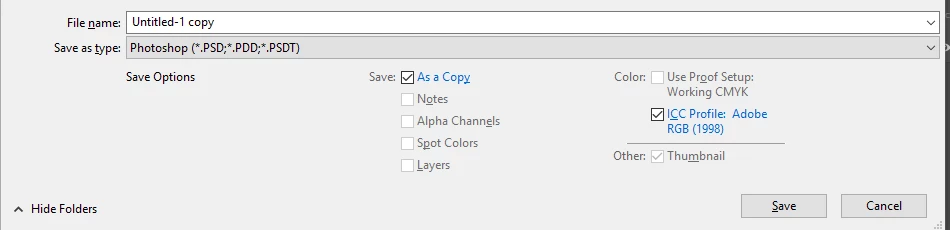
I am unable to uncheck "save as copy" in the save as box for good. Every time I do the save as command it is constantly checked. I haven't found any ways to disable this from the preferences. I am using the latest updates in Windows 10 and Photoshop CC. Looking forward to your help, thank you in advance.
 

This topic has been closed for replies.
Correct answer aidamilja


I just resolved the problem myself.

When I did the save as command via the panel menu"File / Save as", there was no problem.

Then I checked the shortcuts that have been created for "save as" and there are two of them :

SHIFT+CTRL+S (this is made for the "normal save as")

ALT+CTRL+S (this is made for the "save as copy")

So by deleting or just by not using ALT+CTRL+S command the problem is solved.

This command cannot be changed to anything else.

3 replies

IWOS
Participant
May 25, 2021

The changes made to the saving behaviour are so strange. I switched the shortcuts, so "save as copy" is now accessible with CTRL + Shift + S, but is it possible to remove the word copy after the save? I just want so save my psd-project as a jpg file and don't want to always delete the word "copy" at the end. It's hillarious that this bothers only a few people so far. I'm raging everytime I use Photoshop since the last update.

Participating Frequently
May 25, 2021

I did the same thing that you did and I'm right there with you, IWOS.

Participating Frequently
November 5, 2020

Same [removed]! It always worked with Save As (Ctrl+Shift+S), now it's making a copy every time. Why fix something that works good already? 

Participant
February 28, 2021

Yes - same thing here - our entire workflow is impacted and broken... So just how does one update an AE and PR source file which is the integrated flow? ... When you go to update a base .PNG file, and it always wants to make a "copy" .. Therefore, all the real time linking / updating are BROKEN.

$80 / month = ci.

ADOBE = UNUSABLE.

Participating Frequently
March 1, 2021

Still happening here - affecting all users of Photoshop in our office. I'm sure Adobe will fix this immediately and issue a refund of some sort for the workflow interruption and headaches. Then they will lower the subscription price to something reasonable. I mean, that's something a company that cares about its clients would do, right?

davescm
Community Expert
Community Expert
July 21, 2018

If you open a file that does not support layers then you add layers and try to save in the same format Save as Copy will be checked. The only way round it is to use Layer>Flatten Image first.

Dave

aidamilja
aidamiljaAuthor
Inspiring
July 22, 2018

Thanks ...

But this sounds pretty unsatisfying and appalling for the workflow !

I used to work with Mac for a decade and I never had this kind of issue !

Why such a simple thing cannot be fixed for Windows 10 ?

aidamilja
aidamiljaAuthor
Inspiring
July 22, 2018

Also I am ONLY using PSD files that should support layers !

Also I have a friend that is also using Photosho CC 2018 with Windows 10 and he doesn't have this problem !

When I want to save a PSD file with the "save as command" I can see two other file formats "PDD" and "PSDT" in the same row, please see the preview attached.

Are these file formats those that do not support layers ? Can I disable them from the "save as command" ?