Exit
  • Global community
    • Language:
      • Deutsch
      • English
      • Español
      • Français
      • Português
  • 日本語コミュニティ
  • 한국 커뮤니티
0

In Photoshop, how do I change units from metric to imperial (inches)?

New Here ,
Sep 23, 2015 Sep 23, 2015

Does some one have an answer for me?

25.4K
Translate
Report
Community guidelines
Be kind and respectful, give credit to the original source of content, and search for duplicates before posting. Learn more
community guidelines

correct answers 2 Correct answers

Adobe Employee , Sep 23, 2015 Sep 23, 2015

Hi Michelineh,

Please follow the below steps to change the units in Photoshop.

> Launch Photoshop

> Click Photoshop > Preferences > Units & Rulers (In Mac)

               Edit > Preferences > Units & Rulers (In Windows)

> Change Rulers to Inches

Rulers.PNG

> Click on Ok.

> Relaunch Photoshop and check for the issue.

Hope this helps.

~Mrinmay

Translate
Community Expert , Sep 23, 2015 Sep 23, 2015

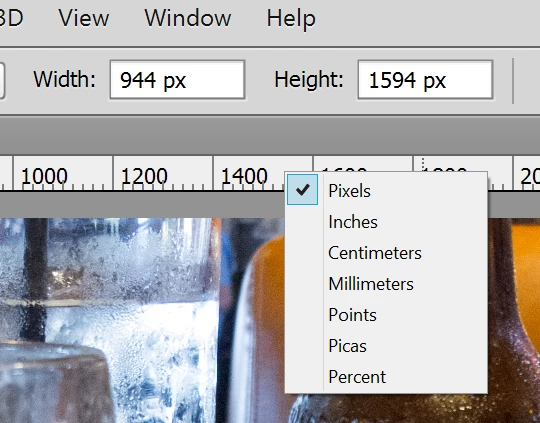
If you have rulers enabled, you can also right click on the rulers to change this:
Translate
Adobe
Adobe Employee ,
Sep 23, 2015 Sep 23, 2015

Hi Michelineh,

Please follow the below steps to change the units in Photoshop.

> Launch Photoshop

> Click Photoshop > Preferences > Units & Rulers (In Mac)

               Edit > Preferences > Units & Rulers (In Windows)

> Change Rulers to Inches

Rulers.PNG

> Click on Ok.

> Relaunch Photoshop and check for the issue.

Hope this helps.

~Mrinmay

Translate
Report
Community guidelines
Be kind and respectful, give credit to the original source of content, and search for duplicates before posting. Learn more
community guidelines
Community Expert ,
Sep 23, 2015 Sep 23, 2015

If you have rulers enabled, you can also right click on the rulers to change this:

Translate
Report
Community guidelines
Be kind and respectful, give credit to the original source of content, and search for duplicates before posting. Learn more
community guidelines
Community Expert ,
Sep 23, 2015 Sep 23, 2015
LATEST

I'll add my 2 cents worth.  Chuck's suggestion is the usual way.  It is quick, easy, and can be done on the fly.  If you have an image that was created with a metric size, open up the image size dialog, and uncheck Resample.  Then use the size drop down and chose your unit.

Before

After

Note that you won't normally get a nice rounded result like above, depending on the number of pixels.   In this instance 1 Inch = 25.4mm so it worked out nicely.

Translate
Report
Community guidelines
Be kind and respectful, give credit to the original source of content, and search for duplicates before posting. Learn more
community guidelines
