Participant
October 30, 2023
Answered

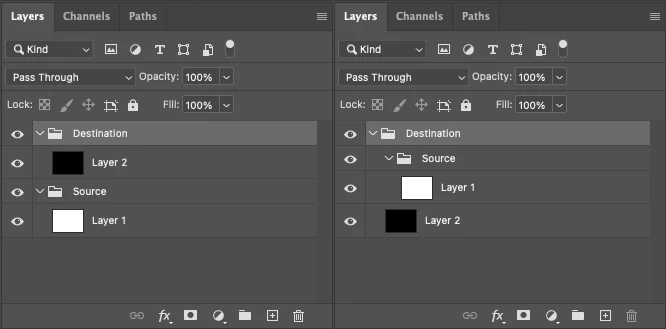
Is it possible to use Javascript to select groups by name and nest them within other groups?

  • October 30, 2023
  • 1 reply
  • 418 views

I've been trying to write a javascript to organize groups that runs on a PS file containing dozens of groups.


It needs to scan through to see wether the specific named groups exist and if so select these groups and nest them into another specific named parent group. If the groups don't exist the script should simply move on. I have been able to make bits and peices of this work but I've completely hit a wall.

I can write code to select the groups by name and even sort them to the top of the layers pallette but haven't figured out the method for how to then move and nest these groups into another already existing named group. To make things more complicated these groups all contain layer masks so it's not enough to use javascript to simply generate the groups and their parent children relationships.


Ideally the script will be able to be run once the parent children relationships have been defined otherwise the group nesting all has to be done manually. 

This topic has been closed for replies.
Correct answer Stephen Marsh
quote

I can write code to select the groups by name and even sort them to the top of the layers pallette but haven't figured out the method for how to then move and nest these groups into another already existing named group.


By @Wrendering


You should be able to use either DOM or AM code. Here is the DOM:


https://theiviaxx.github.io/photoshop-docs/Photoshop/Layer/move.html

https://theiviaxx.github.io/photoshop-docs/Photoshop/ElementPlacement.html


EDIT:


You can try the following – I wasted a lot of time not knowing of this bug!


https://stackoverflow.com/questions/38307871/photoshop-scripting-move-one-group-inside-of-other


https://community.adobe.com/t5/photoshop-ecosystem-discussions/how-to-place-layersets-into-layersets/m-p/8853221


var actLayer = activeDocument.activeLayer;
var sourceGroup = activeDocument.activeLayer = activeDocument.layerSets.getByName('Source');
var targetGroup = activeDocument.activeLayer = activeDocument.layerSets.getByName('Destination');
var tempGroup = targetGroup.layerSets.add();
sourceGroup.move(tempGroup, ElementPlacement.PLACEBEFORE);
tempGroup.remove();
activeDocument.activeLayer = actLayer;


It works correctly when moving a layer into a layer group:


activeDocument.layers.getByName("Layer 1").move(activeDocument.layerSets.getByName("Group 1"), ElementPlacement.INSIDE);


Keep in mind that "getByName" ideally relies on having unique layer names to work as expected.

1 reply

Stephen Marsh
Community Expert
Stephen MarshCommunity ExpertCorrect answer
Community Expert
October 30, 2023
quote

I can write code to select the groups by name and even sort them to the top of the layers pallette but haven't figured out the method for how to then move and nest these groups into another already existing named group.


By @Wrendering


You should be able to use either DOM or AM code. Here is the DOM:


https://theiviaxx.github.io/photoshop-docs/Photoshop/Layer/move.html

https://theiviaxx.github.io/photoshop-docs/Photoshop/ElementPlacement.html


EDIT:


You can try the following – I wasted a lot of time not knowing of this bug!


https://stackoverflow.com/questions/38307871/photoshop-scripting-move-one-group-inside-of-other


https://community.adobe.com/t5/photoshop-ecosystem-discussions/how-to-place-layersets-into-layersets/m-p/8853221


var actLayer = activeDocument.activeLayer;
var sourceGroup = activeDocument.activeLayer = activeDocument.layerSets.getByName('Source');
var targetGroup = activeDocument.activeLayer = activeDocument.layerSets.getByName('Destination');
var tempGroup = targetGroup.layerSets.add();
sourceGroup.move(tempGroup, ElementPlacement.PLACEBEFORE);
tempGroup.remove();
activeDocument.activeLayer = actLayer;


It works correctly when moving a layer into a layer group:


activeDocument.layers.getByName("Layer 1").move(activeDocument.layerSets.getByName("Group 1"), ElementPlacement.INSIDE);


Keep in mind that "getByName" ideally relies on having unique layer names to work as expected.

Participant
November 1, 2023

Thank you so much for posting this!

I was able to get the script fully functional using this workaround. I would have replied yesteray but I was so busy trying to get it implemented. You are a hero!

Cheers!

Stephen Marsh
Community Expert
Community Expert
November 1, 2023

You're welcome, full credit to those who found the original work-around to the bug, which is still here to this day!