
Known Participant
November 21, 2010
Answered

Is there a trick for evenly spacing things out?

  • November 21, 2010
  • 6 replies
  • 30391 views

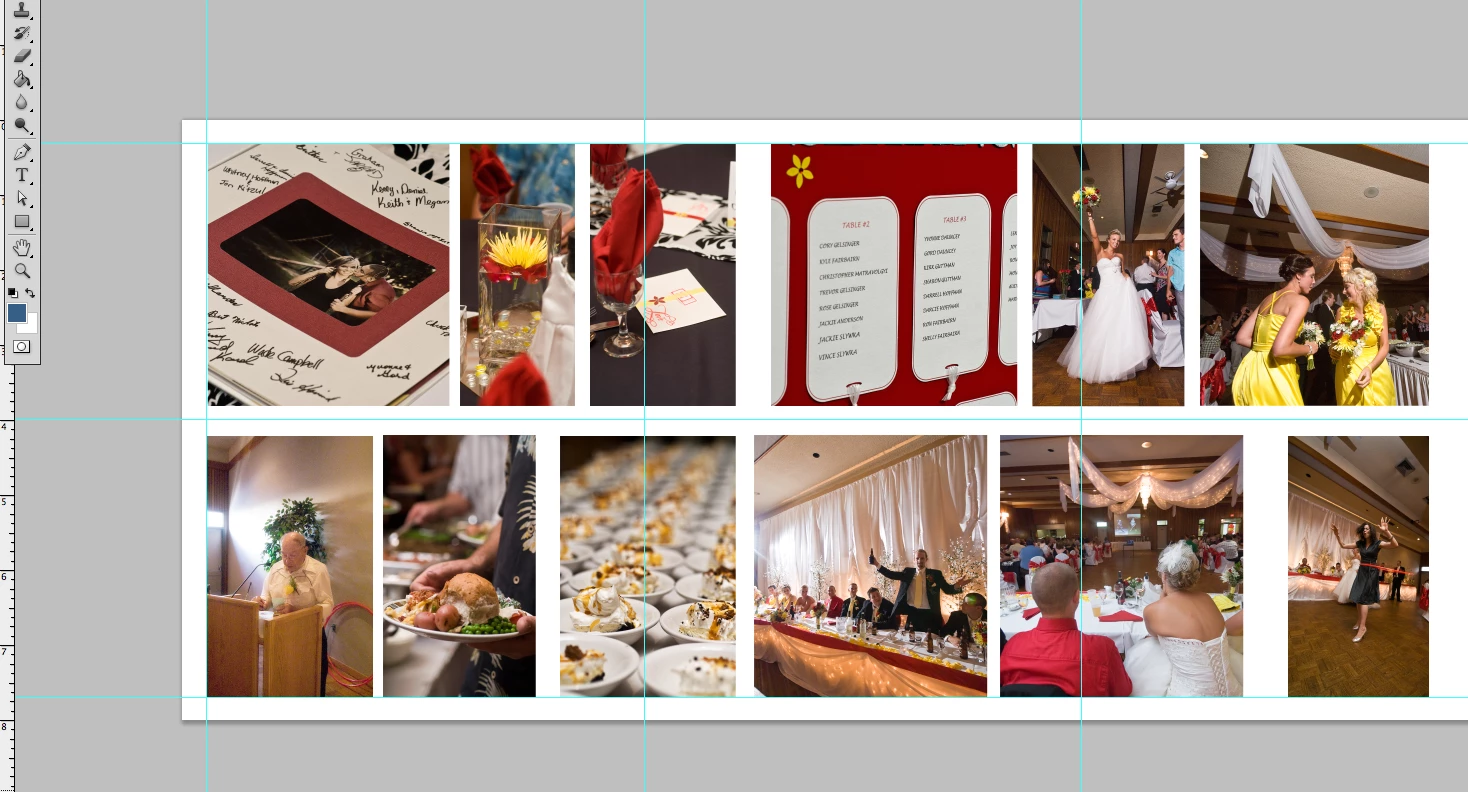
Hi, I'm designing a wedding book where I have to line things up nicely.  I use smart guides and snap to...  and those are great for lining things up in a row (for example the tops and bottoms of the shots here)  But the vertical lines are where I'm having trouble . I'm good at eyeballing how far I want things apart,  but there has to be a more exact way to space out the images quickly and evenly.  (in this shot I have not lined them up yet... My eye is better than this   )  It's just one of those things that I finally remembered to ask
Thanks in advance,

Cortney

    This topic has been closed for replies.
    Correct answer c.pfaffenbichler

    Paul Riggott offered a pretty nifty Script in this thread that may help:

    http://forums.adobe.com/message/2929207#2929207

    And lining layers up in rows or columns is pretty easy from the options bar or Layer > Align.

    6 replies

    Participating Frequently
    March 31, 2011

    hi paul your script doesnt work in CS5???

    do you haev a other solution

    i get an error in line 10, no such element

    Known Participant
    November 24, 2010

    Well I'm glad I'm not the only one with this beef   I'll give the script another try, and if all else fails I can just go back to eye balling.

    I didn't know what InDesign did, so I just bought Photoshop  instead of the suite :S

    7 out of 12 books to go !

    C

    Inspiring
    November 24, 2010

    Cortney,

    You might consider downloading the 30 day trial of InDesign to finish your project.

    November 28, 2010

    I'm glad I stumbled upon this thread! I tried the script, and it works for one row, but it doesn't seem to work for multiple rows.

    I am putting together a poster with children's artwork that I scanned and reduced, so some objects are horizontal and some are vertical.

    -Holly

    November 23, 2010

    Aside from the better alignment tools available in InDesign, this kind of project is much more efficiently done in InDesign. You're needlessly building up layers in a raster image file and duplicating bytes for images already saved elsewhere on your computer. A page layout program like InDesign makes references to the original image files without duplicating data.

    dianer_macperson
    Inspiring
    November 23, 2010

    When in the "move" tool, making sure all your images are on separate layers, and the layers are selected, use the align funtions in the menu bar.

    _scott__
    Legend
    November 24, 2010

    dianer_macperson wrote:

    When in the "move" tool, making sure all your images are on separate layers, and the layers are selected, use the align funtions in the menu bar.

    Important to note.. you are A) working with three layers of identical dimensions and B) you are aligning the layers via their dimensions, not the space between the layer artwork. There's a wold of difference.

    dianer_macperson
    Inspiring
    November 24, 2010

    It doesn't matter what size the images are, you can select all the layers and choose "distribute horizontal centers" and it makes the space between the images the same. Isn't that what "evenly spacing things out" means?

    c.pfaffenbichler
    Community Expert
    c.pfaffenbichlerCommunity ExpertCorrect answer
    Community Expert
    November 21, 2010

    Paul Riggott offered a pretty nifty Script in this thread that may help:

    http://forums.adobe.com/message/2929207#2929207

    And lining layers up in rows or columns is pretty easy from the options bar or Layer > Align.

    _scott__
    Legend
    November 21, 2010

    Thanks C

    Inspiring
    November 21, 2010

    Photoshop does not have "Distribute Spacing", which is what you are looking for.

    Illustrator or InDesign would have that type of distribution for your layout. It would be a handy feature for Photoshop to have too.

    _scott__
    Legend
    November 21, 2010

    It's damn annoying that Photoshop at version 12 doesn't have a feature to distribute spacing evenly.

    Inspiring
    November 23, 2010

    Charles, could you please try this script, just select the layers and run the script, there is no UI it just tries to do the distribute.


    @JSXBIN@ES@1.0@MyBbyBnADMAbyBn0AhJJBnASzPjTjUjBjSjUiSjVjMjFjSiVjOjJjUjTBAXzKjSjV
    jMjFjSiVjOjJjUjTCXzLjQjSjFjGjFjSjFjOjDjFjTDjzDjBjQjQEnftJCnABXCXDjEXzGiQiJiYiFi
    MiTFjzFiVjOjJjUjTGnfJDnASzGjSjFjTjVjMjUHBEjzTjHjSjPjVjQiTjFjMjFjDjUjFjEiMjBjZjF
    jSjTInfnftOyEZEnAnAhzBhBJVHBnJFnASzLjHjSjPjVjQiMjBjZjFjSjTKCXzGjMjBjZjFjSjTLXzL
    jBjDjUjJjWjFiMjBjZjFjSMjzOjBjDjUjJjWjFiEjPjDjVjNjFjOjUNnftJGnASzOjTjFjMjFjDjUjF
    jEiMjBjZjFjSjTODEjzFiBjSjSjBjZPntnftaHbyIn0ABJInAEXzEjQjVjTjIQVODRBQzARVKCVzBjJ
    SEffAVSEAXzGjMjFjOjHjUjITVKCByBzBhcUJKnAEjzNjFjYjFjDjVjUjFiBjDjUjJjPjOVRDEjzOjD
    jIjBjSiJiEiUjPiUjZjQjFiJiEWRBFeEjVjOjEjPffjzJjVjOjEjFjGjJjOjFjEXXzCiOiPYjzLiEjJ
    jBjMjPjHiNjPjEjFjTZffOyLZLnAnACUXTVODnndCnJMnASzKjCjPjVjOjEjTiMjJjTjUgaFAnnftJy
    MnASzIjUjFjNjQjCjOjEjTgbGAnnftJNnASzEjSjPjXhRgcHAnnftJyNnASzEjSjPjXhSgdIAnnftJy
    NnASzEjSjPjXhTgeJAnnftJyNnASzEjSjPjXhUgfKAnnftJyNnASzEjSjPjXhVhALAnnftJOnASzEjS
    jPjXhWhBMAnnftJyOnASzEjSjPjXhXhCNAnnftJyOnASzEjSjPjXhYhDOAnnftJyOnASzEjSjPjXhZh
    EPAnnftJyOnASzFjSjPjXhRhQhFQAnnftJPnASzFjSjPjXhRhRhGRAnnftJyPnASzFjSjPjXhRhShHS
    AnnftJyPnASzFjSjPjXhRhThITAnnftJyPnASzFjSjPjXhRhUhJUAnnftJyPnASzFjSjPjXhRhVhKVA
    nnftJQnASzFjSjPjXhRhWhLWAnnftJyQnASzFjSjPjXhRhXhMXAnnftJyQnASzFjSjPjXhRhYhNYAnn
    ftJyQnASzFjSjPjXhRhZhOZAnnftJyQnASzFjSjPjXhShQhPgaAnnftJRnAEjzGjIjJjEjFiGiYhQRB
    FcfffaSbTn0AJJTnABXMjNEXzJjHjFjUiCjZiOjBjNjFhRXzJjBjSjUiMjBjZjFjSjThSjNRBXzEjOj
    BjNjFhTQRVODVzBjBhUgbffnfJUnASzCiMiChVgcXzGjCjPjVjOjEjThWXMjNnftJVnABXzBhQhXVgb
    GXhTXMjNnfJWnABXzBhRhYVgbGXzFjWjBjMjVjFhZXhXVhVgcnfJyWnABXzBhShaVgbGXhZXhYVhVgc
    nfJXnABXzBhThbVgbGXhZXhaVhVgcnfJyXnABXzBhUhcVgbGXhZXhbVhVgcnfJYnAEXQVgaFRBVgbGf
    fJZnASgbGAnnffAVhUgbAXTVODByBUJygbnAEXzEjTjPjSjUhdVgaFRBNyBnAMgbbyBn0ABZgbnACzB
    hNheXhaVhUAXhaVzBjChfBnnAChU40BhAhf4B0AhAC0ARCgbffJgcnASzLjBjSjSjBjZiOjVjNjCjFj
    SiAgdndBftJgdnAEXQVgcHRBXhXVgaFffagebygfn0ABOgfbyhAn0ABJhAnAEXQEjzEjFjWjBjMiBRB
    CzBhLiCnViAgdeDjSjPjXnffRBQRVgaFVzBjGiDgeffAUzChGhGiECzBheiFXhaQRVgaFViDgeCheXh
    aQRVgaFCheViDgenndBnndhSnnCUXhaQRVgaFViDgeCiCXhaQRVgaFCheViDgenndBnndhSnnnnbhCn
    0ACJhCnATiAgdBtJhDnAEXQEjiBRBCiCnViAgdeDjSjPjXnffRBQRVgaFViDgeffAViDgeBXTVgaFBy
    BUahGbyhHn0ABJyhHnAEXhdEjiBRBCiCnCiCVzBjEiGgfnndBeDjSjPjXnffRBNyBnAMhHbyBn0ABZh
    HnACheXhYVhUAXhYVhfBnnAChU40BhAhf4B0AhAC0ARChHffAViGgfAViAgdByBUahJbhKn0AFJhKnA
    SzKjMjFjGjUiBjOjDjIjPjSiHhBEjzGiOjVjNjCjFjSiIRBXhbXhXEjiBRBCiCnCiCVzBjMiJhAnndB
    eDjSjPjXnffffnftJhLnASzIjTjQjBjDjJjOjHiBiKhCCheEjiIRBXhYQREjiBRBCiCnCiCViJhAnnd
    BeDjSjPjXnffCheXTEjiBRBCiCnCiCViJhAnndBeDjSjPjXnffnndBffEjiIRBXhbXhXEjiBRBCiCnC
    iCViJhAnndBeDjSjPjXnffffnnnftahMbhNn0ACJhNnASzKjMjBjZjFjSiXjJjEjUjIiLhDCheEjiIR
    BXhbQREjiBRBCiCnCiCViJhAnndBeDjSjPjXnffVhUgbffEjiIRBXhYQREjiBRBCiCnCiCViJhAnndB
    eDjSjPjXnffVhUgbffnnnftJhOnASiKhCCheViKhCViLhDnnnffAVhUgbBCheXTEjiBRBCiCnCiCViJ
    hAnndBeDjSjPjXnffnndBByBUJhQnASiKhCCzBhPiMViKhCCheXTEjiBRBCiCnCiCViJhAnndBeDjSj
    PjXnffnndBnnnffahSbhTn0AFJhTnABXMjNEXhRXhSjNRBXhXQREjiBRBCiCnCiCViJhAnndBeDjSjP
    jXnffVhUgbffnfJhUnASzFiXjJjEjUjIiNhECheEjiIRBXhbQREjiBRBCiCnCiCViJhAnndBeDjSjPj
    XnffVhUgbffEjiIRBXhYQREjiBRBCiCnCiCViJhAnndBeDjSjPjXnffVhUgbffnnnftJhVnASzLjTjI
    jJjGjUiQjJjYjFjMjTiOhFCheCiCViHhBViKhCnnEjiIRBXhYQREjiBRBCiCnCiCViJhAnndBeDjSjP
    jXnffVhUgbffnnnftJhWnAEXzJjUjSjBjOjTjMjBjUjFiPXMjNRCViOhFFdAffJhXnASiHhBCiCnCiC
    ViNhEViKhCnnnnntfAVhUgbBXTEjiBRBCiCnCiCViJhAnndBeDjSjPjXnffByBUAViJhAAViAgdByBU
    JhanAEjhQRBFctffJhbnABXCXDjEVBAnfAhGS4E0AiAhU4gb0AiAiD4ge0AiAB40BiAK4C0AiAO4D0A
    iAga4F0AiAgb4G0AiAgc4H0AiAgd4I0AiAge4J0AiAgf4K0AiAhA4L0AiAhB4M0AiAhC4N0AiAhD4O0
    AiAhE4P0AiAhF4Q0AiAhG4R0AiAhH4S0AiAhI4T0AiAhJ4U0AiAhK4V0AiAhL4W0AiAhM4X0AiAH4B0
    AiAhN4Y0AiAhO4Z0AiAhP4ga0AiAhV4gc0AiAiG4gf0AiAiA4gd0AiAiJ4hA0AiAiH4hB0AiAiK4hC0
    AiAiL4hD0AiAiN4hE0AiAiO4hF0AiAAhGAzQjEjJjTjUjSjJjCjVjUjFiMjBjZjFjSjTiQAhcMhebyB
    n0AIJhfnASzEjEjFjTjDiRAEjzQiBjDjUjJjPjOiEjFjTjDjSjJjQjUjPjSiSntnftJiAnASzDjSjFj
    GiTBEjzPiBjDjUjJjPjOiSjFjGjFjSjFjOjDjFiUntnftJiBnAEXzIjQjVjUiDjMjBjTjTiVViTBRBE
    jzQjTjUjSjJjOjHiJiEiUjPiUjZjQjFiJiEiWRBFeMjMjBjZjFjSiTjFjDjUjJjPjOffffJiCnAEXzM
    jQjVjUiSjFjGjFjSjFjOjDjFiXViRARCEjWRBFeEjOjVjMjMffViTBffJiDnASzEjSjFjGhSiYCEjiU
    ntnftJiEnAEXzNjQjVjUiFjOjVjNjFjSjBjUjFjEiZViYCRDEjWRBFeEiMjZjShAffEjWRBFeEiPjSj
    EjOffEjWRBFeEiUjSjHjUffffJiFnAEXiXViRARCEjWRBFeEiGjSjPjNffViYCffgiGbyBn0ACJiHnA
    EjVRDEjWRBFeEiNjLhAhAffViRAXYjZffZiInAFctABnzBjFianbyBn0ABZiJnAFcfADiY4C0AiAiR4
    0BiAiT4B0AiAADAIAiKMiLbyBn0AJJiNnASzHjEjFjTjDhRhXhSibAEjiSntnftJiOnASzFjSjFjGhZ
    hXicBEjiUntnftJiPnAEXzLjQjVjUiQjSjPjQjFjSjUjZidVicBRCEjWRBFeEiQjSjQjSffEjWRBFeE
    jMjGjYjWffffJiQnAEXiZVicBRDEjWRBFeEiEjDjNjOffEjWRBFeEiPjSjEjOffEjWRBFeEiUjSjHjU
    ffffJiRnAEXiXVibARCEjWRBFeEjOjVjMjMffVicBffJiSnASzHjEjFjTjDhRhXhTieCEjiSntnftJi
    TnAEXzKjQjVjUiCjPjPjMjFjBjOifVieCRCEjWRBFeEjMjGjYjWffVzHiWjJjTjJjCjMjFjADffJiUn
    AEXzJjQjVjUiPjCjKjFjDjUjBVibARDEjWRBFeEiUhAhAhAffEjWRBFeEjMjGjYjWffVieCffgiVbyB
    n0ABJiWnAEjVRDEjWRBFeEjTjFjUjEffVibAXYjZffABniannAEjA40BhAib40BiAic4B0AiAie4C0A
    iABDAhQAiYBJhdnAEjiQnf0DRByB


    Paul, works like a charm. Here is the new script run on my previous example:

    CB